Website Security Archives | Page 5 of 7 | Spectrum Net Designs

SEO Secrets Google Doesn’t Want You To Know…..So We Are Spilling the Beans!

SEO Secrets

metatags

  1. Meta tags and keywords are garbage to Google, but can still help

Back in the 2000s, meta tags (keywords and descriptions) were search engine gold. They were supposed to tell Google what the website was about, therefore help the rank of the website. But instead of using those tools for that purpose, they became a use to insert misleading information. Terrible websites were able to get high rankings.

Google then was informed of this issue and announced it would no longer use meta tags for ranking items. So, now, nothing you put in these areas will have any effect on your ranking.

They, however, are not completely useless. When customers/visitors search for you, their eyes skim over the meta-description and whatever is in there can be the factor that will tell them to click on the website or not.

links

  1. Powerful links are crucial

Having a link building is important part of any SEO, but the real trick is inserting powerful links. What’s the difference? Well, let’s compare. One person inserts 100 links on their site to a bunch of unimportant, not popular bloggers. The second person has just one link, but it’s to a powerful site: The Huffington Post. The second person has the better SEO. It’s all about quality, not quantity.

google

  1. Google+

Google wants to take away power from other social media sites, like Facebook. To do this, they have multiple strategies. One way is to use Google+ to influence search results.

Google+ affects your personalized search results by showing you if any of your friends have +1’d any of the results that show up. Also, Google will sometimes promote certain content based on who’s in your Google+ circles and what they’ve searched for.

Google+ also is shaking things up with Google Authorship. This is a way to link the content you write online with your Google+ account. This makes it easier for people to find content written by you, and it makes your link much more customer-friendly by adding your Google+ picture.

secret

4. There is no ultimate secret to SEO

The real SEO “secret” to obtaining the best search results is to create good, quality content that people want to read and share. Google is ultimately powered by people, and people are insatiable to content. Instead of focusing all your energy into mastering SEO secrets and the tricks, focus on writing what people want to read and see.

Mastering these “seo secrets” and “tricks” can make you a professional in Google’s ballpark. But remember, even if you have the best SEO in the world, it is the content that people read, and content the people see. If you have content that people don’t want to read, it will have little to no traffic.  But these tips can help you understand what Google wants to see and what will help you receive the best traffic.

October 2017 Newsletter | Spectrum Net Designs

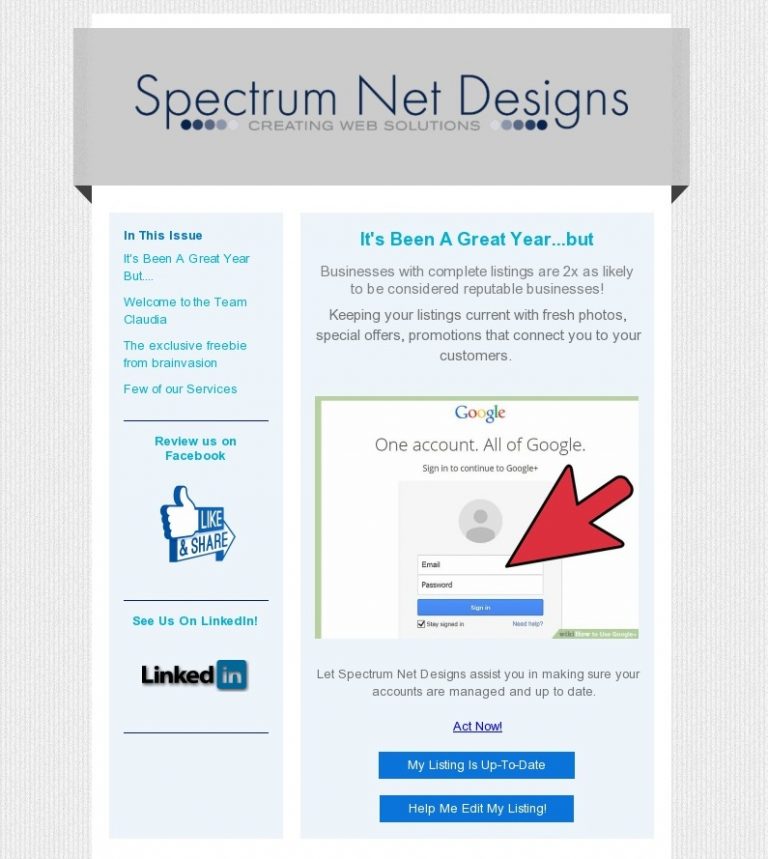
Welcome to our newsletter.  Click the image below to view our full PDF with links.

It’s been a great year..but it could get even better!  Businesses with complete Google listings such as MyBusiness, Google+, Webmaster tools, and more are two times as likely to be considered a verified and reputable business.  Keeping your listings current with fresh photos, company contact information such as phone, address, other locations, special offers, and promotions will connect you to your customers!

Would you like Spectrum to assist you in making sure all of your information is up to date and all of your accounts are created and maintained?  Contact us today!  Email laura@spectrumnetdesigns.com or go to our contact page and fill out our simple form to have someone contact you.

October 2017 Newsletter
CLICK TO OPEN FULL PDF

SSL Site Security & Need to Know Facts

SSL Security

SSL Site Security Facts

SSL can be confusing to most people, especially with all the certificates and intricate details that come with it.

Here are some facts and details about SSL.

1.

If you’re not always on the SSL site, you are vulnerable to threats such as side-jacking, compromise of sensitive data, and malware attacks.  This URL will look like HTTPS://, and might have a lock symbol in the URL as well.  This is the secured version of HTTP://

2.

The cost of losing sensitive data is higher than purchasing the SSL certificate. Which, for a basic one, will run you between $50-$100 a year

ssl solutions

3.

Secure sites (HTTPS) will help ranking on Google, because Google loves security, as it ensures the browser’s security and fewer changes for hacks.

4.

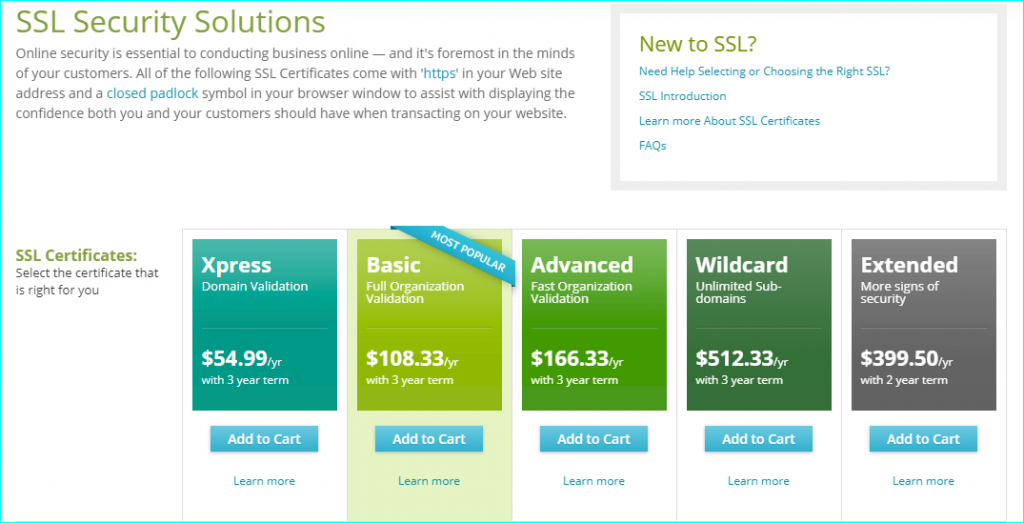
There are different types of SSL certificates available.  You can view some options for SSL certificates here.

High Assurance Certificate Two things must be verified before you can have a high assurance certificate: ownership of the domain name and valid business registration. Both must be verified so visitors can be sure that you are who you say you are. This certificate can take a couple of hours to a few days to be issued.

Low Assurance/Domain Validated Certificate- This is a certificate that only includes your domain name, not your business or organization name. Authorities can automatically verify that you own the domain name by sending an email to the email address on the domain’s WHOIS record. They are instant and cheaper, but they provide less security and assurance to your customers.

EV (Extended Validation) Certificate This is a new type of certificate that is designed to prevent phishing attacks. Phishing attacks are attacks that specifically target credit card information, usernames, and passwords. This certificate can take a few days to a few weeks to receive, but it gives an even greater assurance to customers than the high assurance certificate by making the address bar green.

Wildcard Certificate This certificate can secure an unlimited number of first-level subdomains on a single domain name.

Chain Certificate, Intermediate Certificate, Root Certificate Certificate authorities issue certificates in the form of a tree structure. The root certificate is the top-most certificate in the tree. All certificates after the root certificate gain the trustworthiness of the root certificate. Any certificate between your certificate and the root certificate is the chain or intermediate certificate. These must be installed on the web server along with the primary certificate for you web site so the browsers can link the certificate to a trusted authority.

Warranty A warranty is what you get when you purchase an SSL Certificate. But beware, it can be misleading. It is not a warranty to the purchaser but rather to the end users who use the site. If the purchaser turned out to be a fraud and a customer loses money because the certificate authority didn’t properly validate you, the certificate authority would compensate the customer. This rarely happens, though. Therefore, it is not very important how big the warranty is when you buy the certificate.

Scalable SSL Certificate Every certificate authority now issues a scalable certificate. These can be used at low, normal, or high encryption rates.

Understanding SSL can be a huge help to your business’s website. Being secure is a golden ticket in today’s age for traffic to come to your website, and therefore bring more customers and clients to you. Paying for a secure website (SSL Certificate) is cheaper than if you were hacked and sensitive information had been stolen, etc. Knowledge of these certificates and the basics of SSL can help your website grow and prosper.

WordPress or Not? What’s My Best Option?

WordPress: Best Option?

WordPress is a CMS website platform that lets a developer create websites online, whether for personal use or a business. It is used for over 50 million websites, and it has many pros and maybe an equal number of cons, but what is the right option for you?  Let’s discuss!

One is able to create a powerful, modern, polished website by using WordPress without knowing the details of coding. WordPress provides a multitude of tools for building and managing amazing websites. Some of the best uses of this CMS system are blogs, brochures, portfolios, e-commerce sites, job boards, social networks, and other custom sites. WordPress is also easy and free to use! The plugins in this system can handle features like blogs, basic sites, slideshows, contact forms, and more no problem!

So why not use WordPress? Many are against it… why? Well, those people created their website or blog by themselves, and not through a company, such as Spectrum Net Designs or other professionals. People who use WordPress by themselves are subject to bugs and security problems. They complain about the daily, constant updates, lack of custom themes, and the constant fear of being hacked.

wordpress

But don’t run away yet!  There is a solution.

Spectrum Net Designs is able to fix these problems!

We have the knowledge and experience to fix bugs and security problems. We can create custom themes to resolve your personal needs and wants. No more unoriginal websites that look the same as everyone else’s! We update our website daily and also have a backup handy for that rare occasion that things don’t update properly. We have fine control over the website that you wouldn’t receive by using WordPress yourself. With this fine control, having a full search engine optimization is possible. We give your website the personal attention that it needs so that your website is the best that it can be. You will want to utilize a professional company that can manage your website and keep it up-to-date!

By using WordPress through Spectrum Net Designs, there are no cons!

need a website?

Providing All The Services You Will Ever Need

Marketing Services

We Are Your All-In-One Service Provider in All Things Digital

Full-service, graphic identity and marketing collateral shop!

Spectrum Net Designs is your one-stop website development and creative firm that can start with your website design and development, then move
 on to provide all your printed graphics, from business cards, large yard signs, letterhead, brochures, and anything else you might need. Spectrum
can help you take the stress and time constraints out of website design with WordPress development and hundreds of plug-ins that can be customized for your business needs.

The Top Ten Questions to Ask When Searching for a Reputable SEO Company

The Top Ten Questions to Ask When Searching for a Reputable SEO Company

You now have an awesome website designed and launched on the Internet. You search for your company or organization’s name…and there it is! Waiting to be clicked on! But…how are potential customers or users supposed to find you unless they use your company, organization, or website’s name? There are currently over one billion websites on the World Wide Web…and counting.

SEO strategy

So…how is your phenomenal, one-of-a-kind website ever going to be found?

The answer is Search Engine Optimization (SEO), a term and strategy that has been in use for more than twenty years – even before Google came into being. For the first ten years or so, getting your website listed high in the rankings on the search engines was “easy”, that is, if you “cheated” and followed the black hat techniques of keyword stuffing and collecting, trading, or buying links.

However, as technology has progressed, so has Google’s.  They were and are now able to increase their algorithms’ capabilities of targeting sites and penalizing them by either pushing them way down in the rankings or removing them from their index altogether.

And that is NOT good since NO ONE will ever be able to discover your website.

As Google continues to refine its algorithms, ranking your website’s SERP (Search Engine Ranking Position) organically, that is, without paying for an ad, has become increasingly more difficult. But the good news is that it is not impossible if you understand SEO and how to implement a strategy that will result in your website being found for your keywords on page one of the results.

Can I do this on my own? 

If you are confident that you know the complexities of search engine optimization and have the time to take away from your business to spend hours and hours each month to implement them, then, yes, you can. But if you don’t…your best option is to search for an SEO company who can.

What is the best way for you to go about finding a reputable SEO company that can successfully increase your SERP?

The best answer is to know what questions to ask when you are searching for an SEO company to hire.

The Top Ten Questions to Ask Are:

  1. Do you have a strategy or process for approaching SEO in place that will deliver results?
  2. Are you able to adapt that strategy to our specific niche of business, industry, or brand?
  3. Do you conduct keyword research?
  4. Does your strategy include on-site, off-site, and technical SEO?
  5. Does your strategy include content marketing and onsite blogging?
  6. Do you observe the search engine’s webmaster guidelines?
  7. Do you use various tools to help guide your SEO strategy?
  8. Do you adapt your strategy or add new throughout the campaign?
  9. How do you stay up-to-date on industry changes and Google updates?
  10. How often do you report on progress and what does it look like?

If a company cannot readily give you well laid out answers to these questions or demonstrate what and how effective they’ve been for current and previous clients, it’s probably a good indicator that you may want to continue your search.

Two other very popular questions are also asked even before those listed above. They are:

  1. Can you guarantee immediate results?
  2. Can you guarantee my website will achieve a number-one ranking on Google, Bing, and Yahoo?

These are “reasonable” questions. However, the answers you are given may indicate immediately whether or not you should consider that company.

If the answer is, “Yes”, end your discussion immediately.

If a company is “guaranteeing” such results – and may even be able to demonstrate from current client results that this is indeed true – they are using black hat techniques as mentioned earlier. The initial results may be fantastic. Your website may zoom to the top position of Page 1 on Google. But…it can be guaranteed that it won’t stay there. Eventually, Google will catch on – and when they do – your site will receive penalties or even be taken out of the listings altogether. Depending on the type of penalty that’s been given, it could take days, weeks, months, or in some severe cases…years for your website to be put back in their index.

Meeting Your Goals

How long will it be until we can expect to see results?

This is a very legitimate question. The answer we usually give is: At least six months, though in most cases we see improvement sooner.

We measure the success of our SEO campaign for your site by whether or not we are meeting the goals that we have discussed and determined with you.

Some of the answers to the “Top Ten Questions” are answered on the “Search Engine Optimization” page of our website.

However, we will be more than happy to help answer all the questions listed above as well as any others you may have if you contact us.

We want to do everything we can to help you make an informed decision concerning your SEO.

Colonial Builders Named Winner of 2017 Cosmopolitan Home of the Year

Building Character: The 2017 Cosmopolitan Home of the Year by Colonial Builders

Here’s to Colonial Builders for winning the 2017 Cosmopolitan Home of the Year.  Truly a job well done featuring inspiring and state-of-the-art JELD-WIN windows and doors.

When it comes to building and remodeling, Standale Lumber’s knowledgeable and friendly team has the experience to help make your project a success.  Explore the fine selection of products in person at your neighborhood stores.

What “a  job well done” looks like!

Cosmopolitan Home of the Year

Source: Home Grand Rapids Magazine

Be Prepared & Claim Your Business Before Someone Else Does!

Be Prepared & Claim Your Business Before Someone Else Does!

Shannan Dushane | Spectrum Net Designs, Inc | May 24, 2017

Part 1: Balancing Act

In a perfect digital world of electronic data and internet that is accessible anytime, anywhere, where everyone is honest and there are no identity issues of profiles and online businesses, you wouldn’t have to worry. But in our reality, hundreds of thousands of individuals impersonate people and businesses just because they can, those fraudulent actions will continue to conquer business pages every day until you do something. If your company is not responsive and claims its online listings and profiles, it could happen to them. Plus, directory sites help your rankings on the search engines, and who doesn’t love that?

The first step in this process is to develop your strategy by assigning a team or individual the daunting task. Depending on how large your company is, will determine the number of individuals it will take to do the task correctly.  This is not a dream job, but it is one of the most important and necessary ones for a company not to overlook. This is a multiple-step process, so create your team accordingly.  This will set your starting line, make sure this person is a motivated individual and can be a bloodhound on the internet, be intuitive to know where and how to look, and someone who won’t give up easily.  They will need organization skills as well as great follow-up skills in the case of reclaiming a listing someone has already.

Secondly, you will want to develop a timeline of goals and what you want to accomplish, and update this regularly with sites you’ve found, claimed, unclaimed, new accounts created and whatever else you find out on the world wide web.

Next, your team will start by completing a search of the business’s name, always including misspellings, different variations of the business name such as Inc, LLC, shortened name, abbreviations, subsidiary, DBAs, and look for location differences as well.  Just remember to never end your search with one search engine; you will want to look at all options, such as the big dogs of search engines, Bing, MSN, Google, Yahoo, and Ask, to obtain the most comprehensive list of possible online profiles you can find and claim.

So now what, your company has found and claimed and/or created all of these online presences, what do you do with them now? The most important thing your business can do is monthly management; keep all of your online accounts up-to-date with correct business information, hours, address, and phone for your customers. If your hours change or you move, don’t forget about your online presence; this needs to keep up with you. You don’t need upset customers showing up to your old place of business, or coming when you are closed – you will probably lose their business.

If you do find your business profile online but it has already been claimed, you will need to contact the customer service for that platform (Facebook, google+, etc.) to start the claiming process for that listing. Sometimes it is as simple as having proof of tax id and sending it to them on company letterhead from the president of the company or with your LLC or INC paperwork. It solely depends on the platform the online presence is.

You might be on the other side of the fence and cannot find any online listings for you to claim, that’s great, but you still are not out of the woods. Without proper online presence your chance of being found is limited. You will want to strategize on what accounts to create according to your business locations, geography and demographics of your audience.

The last thought today is to make sure to keep track of all business usernames, custom URLs, passwords, emails associated with the account, when account was created and who is managing the account.  I’ve been using KeePass Password Safe database (keepass.info) for 10 years and it’s free so bonus for your business. You can install on desktop or a flash drive for convenience.

Happy Marketing!

Google Says, “You Need Online Reviews!”

Customer Reviews

Do I Really Need Online Reviews?

Google says, "Yes!" ~ Why?

Years ago (before the age of the Internet and Google – yes, there actually was such a time) when you finally decided to buy a new car, what did you do to help make your decision as to what type and model? You had several options.

  • Buy the same make as your parents.
  • Buy according to the ads you saw on TV.
  • Go around to all the dealers, then buy the one you liked the best, or who had the fastest-talking salesman, or gave the best deal.
  • Read all the information available. (Remember! No Internet or Google!)
  • Talk to your family, friends, and colleagues and ask about their experiences with the different makes and models. In other words – by word-of-mouth.

More than likely, you used a combination of all of the above. But which had the greatest impact? The most probable? The experiences and opinions of the people you talked to face-to-face – by word-of-mouth – are what influenced you the most.

But, the reality today is…90% of people use online reviews to decide what type, brand, or model they’re going to buy or who they’re going to do business with. This is now the new word-of-mouth. Do they need a new phone? They go online and read reviews. Do they need a new washing machine? Go online and read reviews. A new car seat? Go online. Questions about a toy they’re considering buying? Go online first and read reviews. You get the idea. The new, virtual word-of-mouth.

So…again the question:

Do I really need online reviews?

The answer is, “Yes!”, unless, of course, it doesn’t affect your bottom line if your website doesn’t appear in the Google Local 3 Pack…or in the local rankings on page 1 at all.

Why does Google care if you have online reviews or not?

Because Google’s main concern is USER EXPERIENCE!

And their users are looking for reviews before contacting or buying from a local business or online. And…Google knows.

In BrightLocal’s latest findings in their Local Consumer Review Survey 2016, their first key ‘takeaway’ was:

“84% of people trust online review as much as a personal recommendation.”

In other words, online reviews are the new “word-of-mouth”…at least for these 84%.

In July 2014 BrightLocal reported that 88% of the respondents to their annual Local Consumer Review Survey read “reviews to determine the quality of a local business.” This had increased by 3% from 2013. This past November, Tom Dupuis of Online Media Masters confirmed that “about 90% of people use reviews to decide who they’re doing business with.”

9 out of 10 use reviews to make decisions.

More statistics?

Humayun Khan in How Online Reviews Impact Local SEO and Why They matter to Your Bottom Line refers to a survey conducted by Dimensional Research:

“90% of their respondents claimed that positive online reviews influenced their buying decisions.” 

and

“86% had responded saying that negative reviews impacted their decisions.” 

So, as far as Google is concerned, if you have online reviews, then their users’ experiences must find you to be reputable, dependable, and reliable, and worthy of being listed in the Local 3 Pack. And…maybe…even in the Knowledge Panel which would include your address, hours, and photos in addition to the website and directions buttons. And…it also includes your reviews. And the only way you can be featured in a Knowledge Panel is if you have reviews.

Another statistic:

In How Positive Reviews Improve Local SEO for Businesses, Tom Dupuis states in his opening paragraph:

“There’s no doubt reviews are a huge part of local SEO. They show up in Google Maps, when people search your businessreputation-management name, and they’re 8.9% of Google’s local search ranking factors.”   

However, Google does not just publish Google+ reviews. (Although they list these first.) They publish reviews from other sources as well:

  • Yelp
  • Facebook
  • Foursquare
  • Citysearch
  • YP.com
  • TripAdvisor

If you’ve not been convinced that you need online reviews, you can stop here. If you have been convinced that you need them to grow your business, you also need to know where 90% of your consumers are going to find their most “trusted” online reviews. Are you a restaurant? They’ll probably go to Yelp. Are you a hotel? They’ll probably check TripAdvisor and so on.

The next logical question is:

“How do I get reviews?”

Following is a quick list of ways various experts such as Bruce Clay have given to get reviews.

  • Find out which review sites Google pulls from your industry.”
  • Invite happy customers to write and submit a review. (Do not pay for or offer rewards!)
  • Ask for feedback.
  • Add notices or signs in your stores asking for reviews on various sites.
  • Set up a reviews landing page.
  • Make sure the reviews are genuine. Don’t fake it.

As Mike Blumenthal says:

The goal should be happy customers.

And Google’s goal is:

Great user experience.


Statistics in Review:

  • 90% – use online reviews.
  • 84% – trust online reviews.
  • 88% – read reviews to determine a local business’ quality.
  • 90% – claim positive online reviews influence their decisions to buy.
  • 86% – say negative reviews impact their decisions.

Sources:

https://www.brightlocal.com/learn/local-consumer-review-survey/

http://searchengineland.com/online-reviews-reputation-become-super-credible-220562

https://www.shopify.com/retail/119916611-how-online-reviews-impact-local-seo-and-why-they-matter-to-your-bottom-line

https://searchenginewatch.com/sew/how-to/2436136/the-importance-of-user-reviews-for-local-seo

https://moz.com/local-search-ranking-factors

http://www.bruceclay.com/blog/local-businesses-need-reviews-12-seo-approved-ways-get/

Google Says, “We Don’t Sell Listings!”

Google Sell Listings

Have you ever received these robocalls…from Google!?!


  • Buy your Google Listing on My Business NOW!
  • Buy your Google Search page NOW!
  • Buy your chance to get included in  Google Maps NOW!
  • Update your front page listing NOW!
  • Claim your free website NOW!
  • Guarantee your top placement in Google search results NOW!
phone call

Google says,

“NO! We don’t sell listings…or anything else!”

At least by robocalls, that is. They never, ever place robocalls.  And, all emails from Google will be from from an email address ending in “@google.com”.

We, ourselves, have received dozens of these calls, and as a business owner, you probably have, too. Whether it’s a robocall or a live person, they are illegal. However, there are many unscrupulous, dishonest individuals and businesses who use these tactics to give business owners such as you the impression that all the resources and treasures Google has to offer can be had by just buying one of services that they (the callers) are selling. Not true!

So what should you or your employees do if they receive one of the these robocalls or emails?

Google says:

  • Never, ever respond to one of these calls or emails.
  • Delete the emails without opening any of the attachments that may have been sent with them.

So when might you actually receive a real call from Google?

  • To verify your business for Google Maps or Google My Business.
  • To confirm your business details for Google Maps or Google My Business.
  • To provide information about Google AdWords, Google Play, or other Google products.

All calls will be from a real person.

So what are some of the many Google scams to beware of via phone or emails?

  • Selling My Business Google listings. (A Google My Business listing is free!)
  • Selling Google Search pages.
  • Guaranteeing placement of business places on top of search page results.
  • Offering to “claim your free website”.
  • Charging for being included in Google Search, Places, or Maps.
  • Offering a business the opportunity to “update their front page listing”.
  • Claiming that a business will be deleted from Google Plus local listings or Google Places.

Other scams include:

  • Google Lotteries, Contests, or Lotto
  • Google Wallet claims or invoices
  • Google Account Recovery via SMS Messages
  • Gmail Update Phishing
  • Google Zagat Job Scam
  • Google AdSense Scam
  • Tax Payment
  • Blackmail and extortion
accounting

More information about these individual scams, what they entail, and what to do can be found on the Google Help’s FAQ page on how to avoid and report Google scams. This page also includes specific examples, such as the “official” notification for the “Google Lotto”, more resources, and much more information concerning particular scams.

Google also asks for your help in reporting scams and other types of fraud in addition to giving you specific information as to what to do.

In short:

What do you do if you receive a robocall?

Hang up.

How do you prevent unwanted calls?

Go to the Federal Trade Commission’s (FTC) Robocalls resources website.

How can you protect yourself from these types of calls in the future?

Check the FTC’s tips on how to handle these calls, as well as register your personal number with the National Do Not Call Registry.

What do you do if you continue to receive suspicious calls?

File a formal complaint with the Federal Communications Commission.

What can you do to help Google track down the robocallers?

Contact Google directly via their web form.

Many businesses have lost money to these deceitful, unprincipled telemarketing schemes and unscrupulous scams. Being aware of their tactics is the first means of defense against them. Make sure your employees know what the various strategies are that are used. What to do…or better yet…what not to do is the next major feat. Do your employees know what to do? And finally, Google wants to know when their name is being used illegally and encourages anyone who receives these types of calls and emails, and especially if they’ve been victimized, to please contact them. Although there will always be new ways of attempting to defraud, reporting these types of abuses is the only way to limit the damage they can cause..

As Holiday Season and Online Shopping Surges

Security Features to Be On Lookout For This Season with Online Shopping

Shannan DuShane | November 14, 2016 | Spectrum Net Designs, Inc.

Millions of people use e-commerce sites daily to purchase everything online from aspirin to vehicles, and yet many consumers really do not care about the personal experience anymore. It is all about being convenient and working around busy lives, but what we don’t see when shopping online is there are two types of sites to be on the lookout for; you have the safe e-commerce sites and the unsafe websites all over the web and around the world. Here are a few things to watch out for while you are browsing.

People lead busy lives, much more than 10 years ago, and we dread the job of dodging salespeople or driving to the store to shop; humans seek the convenience of online shopping. Some of the benefits are ye,s you guessed it #1 Convenience of shopping; when you want, where you want, and how you want. Yes, that means if you want to buy a cake at 2 am in your pajamas, then you go right ahead! And the biggest benefit everyone enjoys is the instant download access and streaming features we can utilize now with e-books, videos, and more.

Online shopping has many other benefits, too. From sending gifts, no crowds to fight off, and more variety with price comparisons on nearly every website, we have it easy these days, plus bonus rewards, we save money and earn points on gas, so we can spend more online, and most places will have free shipping with minimum orders.

The disadvantages of online shopping do not outweigh the benefits, but there are a few details to be aware of while shopping. Keep your guard up about trustworthy sites is #1. The waiting for the product to arrive is a disadvantage, but not a huge one, when you think about how secure the transaction is and if you are protected from identity theft. What you are looking for is the security certificate or SSL (secure socket layer), a small lock icon or badge in the website address, and the possible changing of color of the address bar with the web address switching from http://www.yoursite.com to the secure site that you are protected on https://www.yoursecure.com. This is when you can trust the site you are purchasing from; if you don’t see these features, leave the site immediately.

The same precautions go with online banking, filling out credit card offers online and any site that you have to input your social security number or billing information into, be cautious, don’t assume that every site is trustworthy or secure. The 2 minutes it takes to look for these items might save your bank account information from being in jeopardy one day.

Here are three examples of security features that you can make sure your transaction is secure and your browsing is also secure.

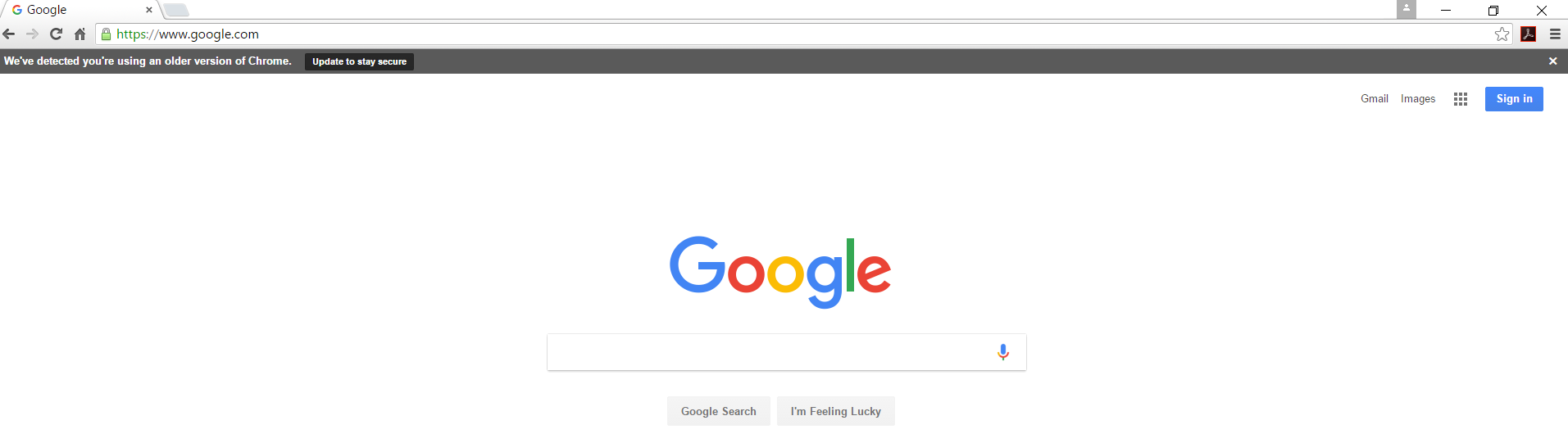
Google. You can see below in the url address bar the https:// is green, this is telling you that you are on a secure site and you are protected. Not all sites and search engines do this but those who do take your business seriously.

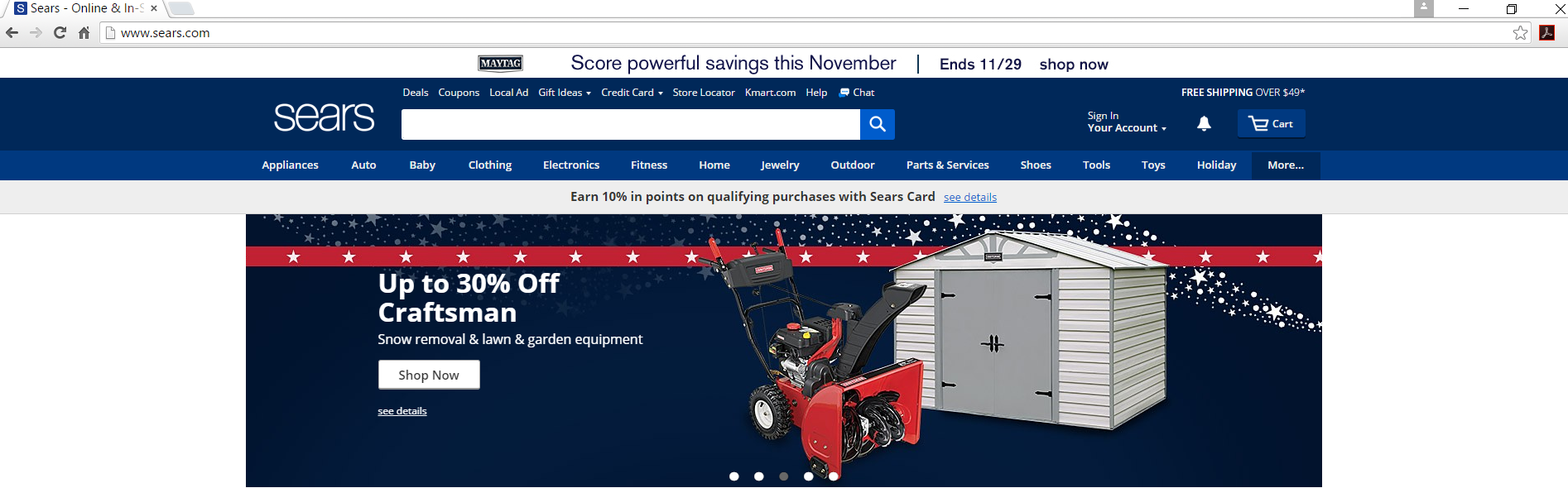
Sears. You can see from this website’s domain that there is no security here for browsing on the site. But when you look below, you will see a change.

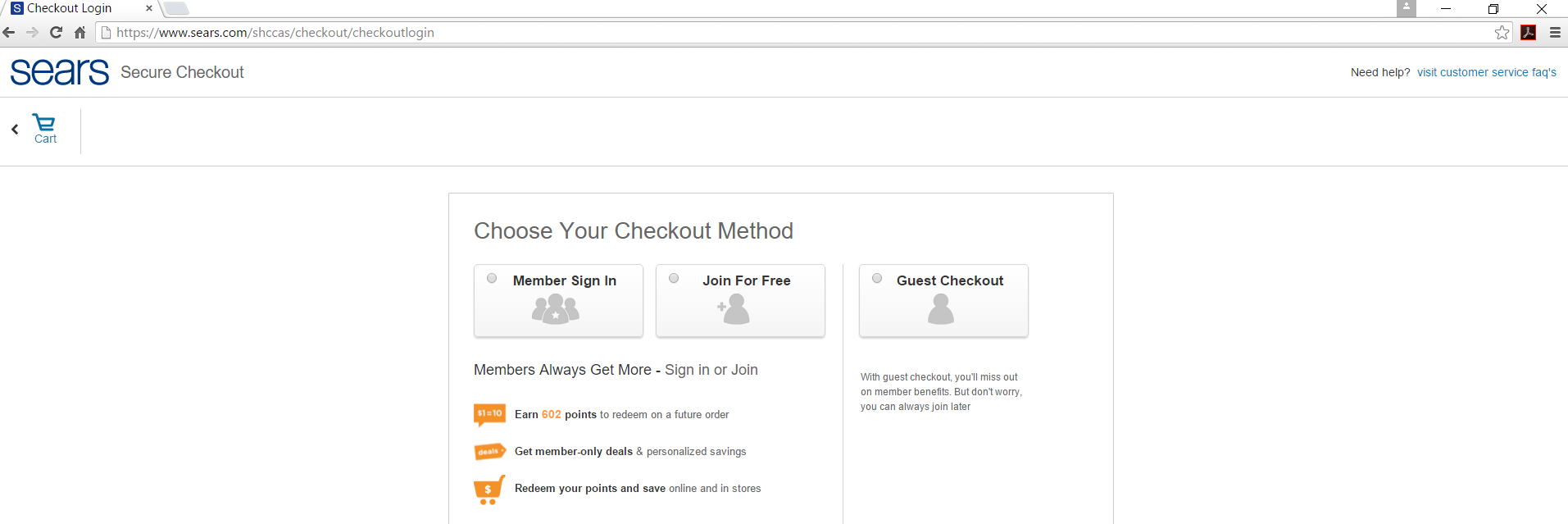
As I enter into the cart checkout of my order it goes to https:// from http:// and it tells you that are you on a secure site for your transaction. This is the protection that you want!

So, as consumers become more dependent on online shopping here are a few things to watch out for.

  1. Be perceptive when giving out your personal information, social security number or credit card information.
  2. Keep your password private and secure by making it hard to guess, use symbols, capitals and numbers to help in this.
  3. Change your passwords every 3-6 months
  4. Observe signs of security such as https:// (secure gateways)
  5. Email is never secure unless it is encrypted on both the sender and receivers side

Happy Shopping!

Yahoo Newsroom branded its app similar to Facebook

Yahoo is re-branding its main app as Yahoo Newsroom

Company discussion

The new app referred to as Yahoo Newsroom will have a heavier focus on – you guessed it – news, with a bit of community-building twist.

The change is a follow up on a redesign to Yahoo’s homepage and app back in January. There’s an ‘Explore’ tab where you can select to follow topics they are now calling “Vibes.” Like pretty much everything else these days, the app uses machine learning to help determine the best stories to show you, and the more you read, the better your recommendations will be.

Perhaps the most interesting bit is that you can actually post your own article recommendations to individual Vibes. The Vibes essentially become their own communities where you can read, discuss, and debate topics with people who might share common interests (These vibes are like mini chat rooms for different topics).

That makes the Newsroom a bit more akin to the Facebook News Feed than your standard News aggregate, allowing users to shape the conversation around topics they care about, but hopefully with less of the haphazard and low quality content so prevalent on social media.

The update is rolling out today on iOS and Android. I wonder what users will be saying about Yahoo spying on you.

www.TheNextWeb.com | Napier Lopez

Are Emoticons Bad for Business or Do They Say It All?

emoticons

From Emjoi's to Emoticons- What's the Difference

We all communicate in different manners, and it is an ever changing with all of the new technology out there, and with the break out of the emoticons and emoji’s it is now advancing to a new level.  With the idea that an image is worth a thousand words, we can now transition from toneless messages and avoid mis-interpretation when emailing co-workers and clients.

Young adults and teenagers might not ever know how it was without the emoticons because they have been with them all along, so it is a normal thing for them to use emojis in messages. But for the older generation, we had to endure years of not knowing what the sender was trying to say or the tone they were depicting.  But what transpires when they are in the position of a professional career and have to adhere to business communication rules?  Do they have to leave their emotions behind? What is acceptable and what is too much?

Emoji

Business communication is different than messaging a friend, your clients expect a level of professionalism with communication.  Expectations such as grammar, and accurate punctuation are just a given when in communication via email, inter-office memo or internal messaging systems, there are certain levels of competence expected.

Here is a full list of emoji’s you can use just copy and paste no app needed or copy paste this address in your web browser. http://getemoji.com

“The biggest problem with all electronic communication is that it’s toneless. In the absence of tone, people read negative tone into it.”   The Atlantic

Language barriers are everywhere, but emoji seem to break that barrier with an emotion attached to the message when normal email or messaging communication can fail because no one can predict the tone of the message, now with a smiley face at the end of the message you have a complete understanding of the message that is portrayed.

Now we can eliminate the guessing game “name the tone” of the message, unlike when you are face to face, you can effectively read body language.  So what is acceptable, there are different levels that you can use your head about when sending a message.  There aren’t any straightforward rules, but here are a few guidelines if you aren’t sure.

  1. If it is a close friend you work with or someone you hang out with after work, then yes emoji are fine – just keep it between the two of you, don’t make it an inter-office message.
  2. Your communication with your boss depends on your relationship, and if you two are lax together or strictly talk to each other only at work only when you have to.
  3. Your other co-workers, just depends on their attitude and your relationship with each of them, but it’s for you to determine. If they aren’t in your circle, then probably not a great idea to start with until they get more comfortable with your personality.
  4. Your customers I would say depends on if they are a new prospect or client then keep it professional until you get to know their personality, but current customers that you have a business relationship with would be fine. I have customers that we hang out outside of work and we use emoji’s all the time.
  5. Formal communications I stay formal and keep the J out of the conversation they is always a time and place for them and this isn’t one.

Not all emoticons have an appropriate place in business; you don’t want to use most of them, but a thumbs up or smiley face occasionally doesn’t hurt if the mood calls for it. In my field of work in marketing and social media, I use them more than let’s say lawyers, can you imagine a message from a lawyer that looks like this, “great job today? (happy smiley) way to go? (clap hands). Let me know what you are doing with your other cases. (ok) bye? (thumbs up), That just doesn’t fit the expertise of the professions they are in, so it is up to you to make a smart projection on when the occasion calls to use emoticons or leave them for another day.

Emoji 1

Happy Marketing!

What Did the Penguin Say? Google Release of Penguin Real Time Update 2016!

Release of the Google Penguin Real Time Update

Whether you are new or a veteran of search engine optimization, everyone has some sort of knowledge of the internet and search engines. One of the largest search engines, Google, is solely responsible for many different algorithm updates.  In the past,t Google updates could determine if and how your website shows up on the World Wide Web.

A few popular ones include:

  • Google Pirate Update (dealing with copyright infringement),
  • Google Hummingbird Update (the new search platform)
  • Pigeon Update (provide more useful, relevant, and accurate local search results)
  • Panda Update (that targets spammy websites and penalizes them)
  • Google’s Mobile Friendly Update in 2015 to boost mobile friendly sites to higher search results.  A pat on the back for getting your site mobile friendly before anyone else.
  • Google’s Top Heavy Update of 2012. That was a means to prevent sites that had too many advertisements, who wouldn’t love that?

According to Google, the primary aim of Penguin and its updates is to curb the practice of using unnatural back-links to improve search engine results page rankings.

Other black hat SEO tactics include:

  • Link buying
  • Comment spam links
  • Un-Natural links
  • Disappearing text
Google penguin

According to Google, the primary aim of Penguin and its updates is to curb the practice of using

unnatural backlinks to improve search engine results page rankings.

Other black hat SEO tactics include:

  • Link buying
  • Comment spam links
  • Un-Natural links
  • Disappearing text

Google just released another update, another round of the Penguin algorithm. The first Penguin update was launched in 2012.  The last overhaul from Penguin was a little over 2 years ago, in 2014.  This time, Google made this release more of a learning update, a real-time ranking algorithm. So, no more waiting two years or more for another face-lift. The disadvantage is that your development company will need to be on its game to keep up with it. There will be no more slacking on effort or excuses for why Penguin is penalizing you.  This update will allow quicker ranking efforts when a website has been fixed from previous bad rankings and penalties from the search engine.

I express to all of my customers that it’s better to get familiar with Google and their updates. Updates seem to be coming more frequently these days.  I suggest this empowerment to business owners especially. You do not have to be an expert or do anything with the information, but it is always good to gain knowledge.  Also, communicate with your development company about your search engine optimization strategy and recent updates in Google.

Discover the entire history of Google Updates! Be prepared to sit awhile!

Happy Optimizing!

Google’s Easter Eggs: “All Work and No Play…”

Googles Easter Eggs Work No Play

“All work and no play makes Jack a dull boy.”

Sandy Kooiman | September 2016 | Spectrum Net Designs, Inc


Google’s Easter Eggs proves that this huge corporation definitely believes in this adage and so includes fun and humor in their “googol” amount of search results.

What are Google Easter Eggs?      

According to Wikipedia, “An Easter egg is an intentional inside joke, hidden message, or feature in an interactive work such as a google's easter eggscomputer program, video game, or DVD menu screen.” Google is known for adding Easter eggs to almost all of its products and services to amuse its users as they hunt through its search engine.



From the sources listed below, we’ve picked out several of our favorites.

Fun Facts

If you’re interested in “Fun Facts”, search “fun facts” or “I’m feeling curious”, and you’re on your way to a googol of information such as, “Can you predict an earthquake?” Not interested? Then go ahead and click the “ASK ANOTHER QUESTION” until you find something that does intrigue you.

Games

  1. Do you love Solitaire? Just search “solitaire”, and there you go!
  2. Do you prefer Tic Tac Toe? Search, and you got it, “tic tac toe”.

Also, try:

  1. Atari Breakout
  2. Google Pacman
  3. Play Dreidel

Word Play

Google has numerous Easter Eggs dealing with various types of plays on words.

Try:

  1. Anagram
  2. Recursion
  3. Askew
  4. Blink HTML

Numbers

  1. The answer to life, the universe, and everything
  2. Once in a blue moon
  3. The number of horns on a unicorn
  4. The loneliest number
  5. sqrt(cos(x))*cos(300x)+sqrt(abs(x))-0.7)*(4-x*x)^0.01, sqrt(6-x^2), -sqrt(6-x^2) from -4.5 to 4.5 (See The Big List of Google Easter Eggs)
  6. 2+(sqrt(1-(sqrt(x^2+y^2))^2) + 1 – x^2-y^2) * (sin (10000 * (x*3+y/5+7))+1/4) from -1.6 to 1.6 (See The Big List of Google Easter Eggs)
  7. Mortgage calculator
  8. Tip calculator
  9. Unit converter
  10. Or, just a plain calculator

And More

  1. Need to roll a die?
  2. Need to flip a coin?
  3. Need a metronome?
  4. Try zerg rush.
  5. Try Bletchley Park.
  6. Teaching your child animal sounds? Just google whatever animal you want by what sound does a ________ make?


Google’s Anniversary

Google Birthday

September is considered a notable month in tech history because it’s Google’s anniversary. Born out of a doctrinal thesis by Larry Page with help from Sergey Brin, Google was officially incorporated on September 4, 1998, at a garage in Menlo Park*, California.

Why “Google”?

“Google” is a play on the word “googol”. 

If you don’t remember what “googol” is from your knowledge of math, it’s the name for the number that is equal to 1 followed by 100 zeros. In other words, it is a huge number that is almost infinite. And, according to Google’s history page, that is exactly what Page and Brin hoped to do through their project: “organize a seemingly infinite amount of information on the web.”

“Google” was voted to be the “most useful word of 2002” by the American Dialect Society and was made an “official” verb in 2006. “Googling” has become significantly important to students from grade school to grad school looking for information needed for assignments and dissertations, for moms looking for home remedies for sick children to dads looking for the “how to’s,” from company CEOs searching out the competition to journalists searching for more material for their articles. Google has become a household word since its inauspicious beginning eighteen years ago.

But Google is about more than just an avenue for the search for information. It’s also about “fun”. From Google Easter Eggs to Google Doodles, Google has created a world within a world. For more Easter Eggs, you can look up the sources listed below.

On September 27, Google also traditionally creates an anniversary Google Doodle. Wikipedia defines a Google Doodle as “a temporary alteration of the log on Google’s homepage that is intended to celebrate holidays, events, achievements, and people.” Be sure to check what they come up with next or what they’ve done in the past! All Google Doodles have been archived for viewing, including the 2016 Doodle Fruit Games in celebration of the 2016 Summer Olympics.

Indeed, Google is more than just a Google of information; they are about fun and games as well.


*Yes, if the name “Menlo Park” seems familiar for another reason, it is. It’s the address of another famous inventor. You’ll have to click to find out who!

Easter Eggs Sources

List of Google Easter Eggs – Wikipedia

19 Easter Eggs Hidden within Your Google Search Bar 

Google’s Best Hidden Games and “Easter Eggs”  

Updated: The Big List of Google Easter Eggs

Other Sources:

This Month in Tech History

Google Doodles Archive

10 Top Mobile Responsive Tools for Business’

Mobile Responsive Tools

Shannan DuShane | September 2016 | Spectrum Net Designs, Inc

Have you ever wondered how your website looks on your customers’ mobile phones, tablets, iPad, etc., well there is an abundance of free tools out there to help you analyze and visualize what your website looks like on mobile devices , it’s called mobile responsive website design and without it your clients are probably not staying on your site. If you’ve noticed a drop of visitors to your site, this might be the cause.

But that takes time…time you don’t have because you have a business and a life.

So we did it for you! We hope you enjoy!

Click on Image Below to View the Slideshow

Branding Tips in an Automatic Need It Now Digital World

Branding Tips

Branding Tips In A Digital World

Shannan DuShane | September 2016 | Spectrum Net Designs, Inc

You wake up one day and get the idea of rebranding the company that hasn’t been updated in 75 years, and the look is stale; you probably have no idea where to start.  So what do you do? The last thing you will do is sit on your computer and try and design a logo yourself!

People often have a misconception about differentiating branding and marketing; they think they can just tweak their logo and throw it out there for the world to see and slap it on everything from their website to letterhead.  While that might work a small percentage of the time with a smaller mom and pop shop, that is 100% wrong direction and thinking for most companies that have a more noticeable reputation or corporate image to uphold.  Rebranding is changing the face of the company, sometimes including a name change, mission, vision, website, advertising, logo modification, graphical elements, marketing material, and much more.

Start the process by meeting with the managers, owner, and anyone else who will have a say in the project itself, and ask these crucial questions before anything else, especially contacting and interviewing marketing and ad firms.  The art of branding a company is not just a process, it is a lot of work and needs people who are motivated with initiative! Which piece will you play in the process?

  1. What’s the reason for our rebrand or need for change in the logo?
  2. What are our objectives and goals with the rebrand or revamp of the logo?
  3. What is the company’s mission and vision statement? Is that still correct, or does it need to be changed completely or just modified?
  4. What is our geographic target audience? What locations are we trying to reach?
  5. What is our demographic target audience? Who are we trying to reach?
  6. Evaluate the current logo, as well as all of the compilations of the logo, company name, website, gauge if it reflects your brand or is a change needed?
  7. Where will the new logo/brand go and how will it impact all of the business mediums including company vehicles, website, letterhead, business cards, advertising, etc.
  8. Create a feasible and reasonable timeline of what you were thinking. Once you talk to the ad firm you will have a better idea, but it gives you a start. Make sure they know about any product launches or other events taking place so they don’t coincide with each other.   You want the launch to be its own event and nothing crowding it.
  9. Fill out a design brief that asks questions that you might not think of now, but will impact it later.

Do your research into similar industry-related companies, inside and outside your geographic location, and look at what you are up against to get an idea of where your brand is heading.  The last thing you want is a similar logo to your competitor, or a bad logo that resembles a pile of crap – literally if you don’t believe me check out what happened to Hershey’s new logo back in 2014. It resembled the Emoji Poop – you know they didn’t do their homework.  Hershey’s new logo looks a lot like the Emoji Poop?!

Keep in mind you have other avenues you don’t want to forget about, including social media and advertising needs that will impact your brand and how your ads are perceived; you might have to change up your marketing strategy to support the company more effectively.

After you’ve figured all of the above out and sorted through the company, the next thing is to interview marketing firms that specialize in the task of rebranding businesses, because even the big dogs can crash and burn after spending thousands of dollars on their rebrand. Check out The 15 Worst Corporate Logo Fails. It is an interesting read and gives you a different perspective to think about when going through the process yourself. Some are not as obvious as others, but look closely and you will see some surprising stuff.

Hershey Logo

The one piece of the puzzle I see companies overlooking is neglect of the white and negative spaces within and just outside their logo, and the secret objects that aren’t caught right away, but too late to catch before the public attack begins.

It’s true that some companies do not need to go through a whole re-brand process if it’s a small logo change, color or object, by keeping the same company name and philosophies you can probably trust a graphic designer to do the deed and save the money of a costly ad marketing agency.

Just remember that this is not an overnight project that will be done in a couple weeks, you will want to take your time.  This process requires a dedicated team, weekly meetings, an experienced agency and patience to get done properly.

Did you like this article? Check out more below.

Evolution of 12 Classic Logos

Check out the 10 Best Corporate Logo Changes of 2013

Mike Noorman Builders: Website Design

Mike Noorman Builders New Website

Shannan DuShane | September 2016 | Spectrum Net Designs, Inc

A company to us is defined as a group of individuals that come together like a family to form a business that is trustworthy, and can provide a team of strong employees with powerful talents to form a union of services that makes Spectrum Net Designs, Inc more than just your one stop shop.

We can provide your organization, business or group, services from graphic design, print design, promotional materials, customized websites for both profit and non-profit, hosting, search optimization, online and traditional marketing, social media management, Google services, and more. If you need a service we didn’t list just give us a call or email us to find out more.

Our focus is on your success, and your success is determined by our commitment. Just let us know your objectives and goals and we will develop an effective campaign tailored to your business.

Here is one of our clients below.

Lee Highway Nursery

Interactive Color Wheel to Find Your Complementary Colors

Let's Talk about Complementary Colors in Websites & Marketing

Originally Published: Shannan DuShane | September 2016 | Spectrum Net Designs, Inc

Updated and Revisited Content Posted: Nicole Vranich | August 2025 | Spectrum Net Designs, Inc

Complementary colors create high contrast and vibrant looks that allow elements to stand out and grab the user’s attention. Creating a proper color palette for your brand helps with brand recognition. If you ever have a hard time finding complementary colors for your website or marketing material, this is the tool for you! Try the Adobe Color Wheel!  This is an interactive color tool that goes over and beyond what you can expect. Don’t forget to write down your color combinations or print them off for later.

How To Use The Adobe Color Wheel:

  • Go to the Adobe Color Wheel 
  • Choose a base color (can also upload and extract a color from an image or logo to get started) 
  • Experiment with color harmony options (complementary, monochromatic, analogous, etc.) 
  • Play around with different shades and colors 
  • Save the palette you created!

Where and How to Apply Your Colors

  • Website Design
    • Background 
    • Logo
    • Text 
    • Accent Colors
  • Marketing and Advertising  
    • Brochures
    • Ads
    • Posters
  • Social Media 
    • Consistent and cohesive branding through posts
  • Logo Design
    • Creating Brand Identity

Keep In Mind...

  • Readable, keep your colors and palette easy to read and see so that the user experience doesn’t get negatively affected by the theme.
  • Before you decide on colors, test them on different screens and devices! Contrast Checkers can help out with that and make sure that your design is looking good!
  • Keep it consistent across platforms – this will allow consumers the ability to develop brand recognition.
  • Try out different pairings, see what you like, what works, and what kind of messages you feel from the designs you make. There may be an unexpected pairing that works perfectly. Not sure if it will convey your brand the proper way? Create mock-ups of ads or social media posts and see what works best.

Colors are not just for creating an aesthetic, but to form an identity around your brand. This will influence how consumers perceive your business, and with the right colors, you can send the right message. Even if you aren’t in the market to find your colors because you have them already, then that’s great, but you can still try it for fun; you never know when you might need complementary colors for your business, new material, or website. Attract attention and build connections with consumers. 

RA Dudley Nurseries Website Design Is Set to Launch

RA Dudley Nurseries in Georgia

RA Dudley

About RA Dudley Nurseries

From the Dudley’s: ” We at R.A. Dudley Nurseries, Inc want to thank you for your continued patronage. Since the 1940’s, when the Dudley family entered into the nursery business, our biggest concern and our greatest satisfaction has come from satisfying the needs of our dedicated and loyal customers. With our many years in this business we have established quite a tradition and we believe that tradition plus experience equals quality and value in everything that we do.

Quality runs deep in the way we do business. It runs deep in the way we work to give you what you want, when you want it, and how you want it. When you add the tradition of the Dudley family along with each and ever experienced employee at the nursery, you get quality plants that will increase the value of your customers’ buying experience. We at R.A. Dudley Nurseries, Inc hope that you will continue to enjoy the tradition, experience, quality and value in the years to come.

We hope that if you are ever in the area you will stop by and let us show you the nursery. Thanks again for your patronage and best wishes to you in the future.”  Visit their website here.

Website Re-design Features:

  • Custom Website Re-design
  • Mobile Website Development / Responsive Design
  • Online Availability
  • Guestbook Signup
  • Website Counter