Search Engine Optimization Archives | Page 2 of 3 | Spectrum Net Designs

6 Things To Consider While Updating Your Website

6 THINGS TO CONSIDER WHILE UPDATING YOUR WEBSITE

It’s time for an updated website…have you been noticing that your current site just isn’t keeping up with your competition; it’s outdated, clunky, too busy, or too plain. There’s no option for buying your products online, and your site just doesn’t reflect your business the way you want it to. Does this sound familiar? Keeping up with your online presence can be challenging, and now that you’ve realized your need for a change, you must begin the daunting task of beginning the updating process…
So, here are a few things to keep in mind as you begin searching for the right way to update your website so that you can make a statement as you jump into the 2019 world wide web with your new online presence for your company.

updating your website

First, take some time to check out your competition…they say imitation is the best form of flattery, but we are telling you, DON’T IMITATE YOUR COMPETITION! Take a look at your competition, check out what they are doing, then take the time to get a game plan going of how you can do it better. This will be the most beneficial thing in the long run. Secondly, think about your website layout & don’t be afraid to change it! Where do your current website viewers go? Where do they want to go? What are your hot products or pages? Use Google Analytics to help you investigate each of these things so that you can plan out & revamp your website in a way that is user friendly & specifically created for YOUR desired & current users. Third, more content is not always better content – keep your site clean & simple, modern & to the point. Too much text where it is not needed can ultimately hurt your user experience. Most of the time, people want a quick experience; they don’t want to sit on your site for 4 hours trying to sort through the information they need from the unnecessary fluff that happens to be in there. Keep your content as simple as possible. Fourth tip is to use the opportunity to re-evaluate your URL’s. If your websites been around for awhile, chances are you didn’t give much thought to your current web addresses & url’s on your site. Now is a great opportunity to change that. A page URL can affect various things, from user experience to search engine ranking. It’s helpful to get a plan together of what you want your URLs to portray as a website. The fifth thing to keep in mind is to secure your website(if it isn’t already). Making sure that your site is secure is important, not only to your users, but now, its even important to Google. Lastly, consider Search Engine Optimization – SEO is an increasingly important part of websites everywhere, and it’s no easy feat…seo has many moving parts that can make it tough to grasp. More power to the businesses, free lancers, bloggers, & other website owners who do SEO for themselves, but we also would advise that you consider hiring a Digital Marketing Agency that knows SEO well to assist you with the ins & outs of Search Engine Optimization.

These are our 6 quick topics to keep in the back of your mind as you consider a website update. Most importantly don’t be afraid to change up your website & take risks to make sure that you are providing something fresh for your audience.

Do You Need Help Getting Your New Website Up & Running? We Can Help

we also handle hosting & domain registration

Like this article?

Share on Facebook
Share on Twitter
Share on Linkdin
Share on Pinterest

Is Your Site Mobile Responsive for 2019 Web Traffic?

Why This Should Be A Priority....

Do you have a phone? How about a tablet? Nearly everyone in today’s day and age carry around a smart phone and have some sort of tablet. The mobile device is always near them throughout the whole day. This kind of lifestyle is predicted not to change. People use their mobile device for everything: communication, searches, social media, etc.  Maybe too much reliance on mobile devices will have irreversible affects, but for now website owners are recognizing this direction of technology, and are frantically trying to catch up. The new year is upon us and coming quickly, and we want you prepared for the new 2019 web traffic that will be coming your way.

So I just have one question, is your site mobile responsive?

What is a Mobile Responsive Site?

Today, phones, tablets, and desktops are all made in different sizes. Website designs need to change and adapt fluidly to whatever screen it is appearing on. A responsive website is one that changes based on the needs of the users and the device they are viewing the site on. For example, a website with a three-column layout would change to a single column display on a phone.

Some key features for a mobile responsive site include:

  1. Dynamic content that changes
  2. Navigation is condensed
  3. Optimized images
  4. Correct padding and spacing
  5. Relies on mobile operating systems to function
site mobile responsive

What is the difference between a Mobile Responsive Site and Mobile Friendly Site?

mobile friendly devices

A mobile friendly site is one that is designed to work the same exact way across all devices. It has no changes. Features are limited, and can be very difficult to use on mobile devices. A Mobile Responsive Site is a bit different, a mobile responsive site automatically adjusts sizing, layouts, and features based on the device it is being used on. This design provides a better user experience by providing easy-to-read text and easy-to-use features.

So, why should having a Mobile Responsive Site be a priority?

It has been proven over and over again by several different independent organizations through extensive testing that Google has updated their algorithm, but that is nothing new, but now Google favors websites that provide mobile users with a responsive and favorable experience.  This is huge to ranking factors and what business owners are currently implementing.  This should be a concern to businesses that thrive on selling products online. Mobile traffic in 2017 was 52.64%, meaning, more internet usage is through mobile devices than a desktop. By the end of 2018, it is predicted that mobile devices will reach 79% of internet usage over desktop. This is why it is so necessary for having a mobile responsive site.

If you do not have a mobile responsive site, you are losing website traffic, and therefore, potential customers and clients. 

site mobile responsive

5 Quick Tips About Search Engines

5 Quick Search Engine Tips

Search Engines can be confusing to understand & for many business owners, SEO is perplexing and over complicated.

We want to help you understand search engines a little better so that in turn you can be more successful with more understanding in your business and SEO endeavor. So, here are 5 quick and simple tips that will help you and your understanding of search engines.

1. Search Engines do 2 things: Crawl & Index

So, what does that mean? First, Moz.com compares a search engine crawling your site to a subway; everything is connected. They will investigate your content, going from page to page, checking links, images, paths, load times, and everything else. Second, indexing is simply the rank that Google or other search engines give your website based on relevance and popularity for any given phrase or keyword that is searched for by a user.

2. Algorithms are constantly changing

Although never confirmed, Google is said to change and tweak their algorithms DAILY! That’s right, daily! Many people get worried because they don’t know when Google is making these changes, as they don’t inform us when algorithms are changing. But, not to worry, unless you are practicing some shady SEO, you will not be affected much by these small tweaks and changes. (most of the time)

search engine tips

3. Search Engines are not senseless

…and they’re only getting smarter. Things like keyword stuffing and duplicate content, bad SEO tactics like that get noticed by search engines. Not only do they take note of these bad SEO tactics, but many times and most times, you will get penalized and keep note of your track record going forward. These things are not easily forgotten and can really affect your website and companies rank going forward.

4. Quality over quantity is noted

Search Engines as they crawl your page, check on things like readability, content value, etc. This is all to make sure that the content will be applicable for consumers. It’s important to realize and note that the content on your website is not taken lightly. As a business owner making sure that your content is useful, and provides something valuable to society is one of the most beneficial things you can do for your website today!

SEO tips & tricks
people marketing

5. Speed is Critical

Don’t ever sacrifice speed. Page speed is a crucial part of your rank with search engines. Just a second delay in load time can change your bounce rate drastically, and make it much harder to keep consumers on your site. That higher bounce rate can affect your search engine ranks pretty significantly. Long story short, pay attention to speed, you won’t regret it.

We hope these search engine tips have been helpful for your company’s SEO and other marketing endeavors. Contact us for help getting started with SEO!

Need Help Getting A Handle On Your SEO?

Blog Management is More Than Content Writing

blog management

Blog Management Content Writing

We all know that blogs are important for a website. Blogs should be one of the first priorities of your company’s marketing strategy.  They help your site gain more traffic, increase your site’s search engine rankings, help communicate to potential and existing customers, and more! (Check out our past blog to learn what that more is!) Bottom line, blogs help you get found online. Blog management is essential for sites that want to rank high in Google and want more traffic. Many companies are starting blogs and posting content, so why aren’t you? 

blog management

 It’s true, some companies don’t have time to write blogs. They take time and energy that most people can’t spare. If they do have time, most don’t know what to write about. So how do businesses make it work? They have blog management. The key to great blogging is to write content that complements your vision of your business. 

But did you know that blog management is more than just content writing?

What is blog management and what do blog managers do?

1.

The blog manager’s goal is to ensure the company is gaining the best result with traffic and ROI from the blog. So before the blog manager even begins writing, they need ideas on what to write about. They lead brainstorming sessions, research, and pick a specific target audience to make sure the result of the blog reaches its full potential.

2.

How can the blog manager be sure the blog is reaching its full potential? There are certain practices to make sure the blog has good search engine optimization. Formatting, readability, graphics, links, calls-to-action, headings, and more. Whoever is managing the blog checks and re-checks all these practices. Not to mention editing, proofing, and rewriting content! 

3.

4.

An important detail for blog management is scheduling. A blog calendar is very important for websites that have blogs being published daily, weekly, and even monthly. Google and/or Bing like to see a site that is updated regularly, whether that be daily, weekly, or monthly. The manager schedules and has ideas for blogs months before they are published.   For certain companies, seasonal blogs are important, while other companies have a certain time of day when the blog would get the most traffic. The blog manager knows all these things, and schedules accordingly. Each platform also has specific high ranking posting times, discovered from years of back data, that is extremely helpful for beginner bloggers and social media marketers.

The last, but maybe the most important thing, is what blog managers do once the blog is published. A certain amount of time after the blog is published, the blog manager analyzes the results. This is how they know if the blogs are helping and living up to their potential. If the blogs are not, the blog manager fixes the problem.  You can also take the approach beforehand and navigate away from issues with A/B Testing methods. 

As you can see, blog management is more than just content writing. It ensures that the blogs are living up to their potential and that you are receiving the best results with site traffic and sales due to the blog. Try managing your blog with a scheduling program to help you out and save time.

Quote

Do You Need Help Starting or Managing a Blog?

Contact us today! We will work with you to create a blog customized to your brand. We can produce content related to your specific industry and publish with or without assistance from your company. We know you’re busy, and we have years of industry knowledge to put to work for you.  

It is known that “the more, the merrier,” and that also goes for blog posts.  A minimum of 2 posts should be published each month to keep traffic flowing and provide fresh content to keep the search engines happy.  If there is not a blog currently on your website, we can set one up for your company.  Contact Shannan at 866.773.2638 or email her at Shannan@spectrumnetdesigns.com.

are you stuck - content writing services

Black Hat Techniques are More Than Just Bad SEO

Black Hat Techniques are More Than Just Bad SEO

What is it?

Black Hat Techniques are ways to increase your site’s rank by using disapproved practices. How you increase your rank on Google violates the search engine’s terms of service. 

black hat seo techniques

More Than Bad SEO....

These techniques can result in your site being banned from search engines and affiliate sites. Sure, you might see some short-term success and increased traffic to your site, but Google is now pickier, and the penalties for this can have terrible effects on your status and rankings with traffic in the long run.

content automation

Content Automation

The method of using content automation tools to generate content automatically and publish it on your site without any effort is just one black hat technique for your website.  First, the content is written with no target audience in mind, no intent for the user, it has no structure, no pictures, no headings, no paragraph spacing, and more.  Some use this tactic because they will have a lot of content in no time or effort, but you will experience rank loss in the long term.

Sneaky Redirects

One way to look at this technique is when you have an expired domain for your business, and you don’t want to lose that link juice and domain authority, but what you have to realize is that is just the way it is.  You need to either renew that domain or let it go. Some companies try to take advantage of expired domains to keep the link juice and use it to redirect from the old domain to the new site address. This is a wrong way of utilizing expired domains.  One domain is for search engines to rank off of, and the other redirected domain is for the visitors and end users.

bad seo doorway pages

Doorway Pages

Cloaking or doorway cloaking some refer to it refers to the practice of inflating a website using cloaking methods and sending the user to a page that has no connection with the query.  It is a crafty way of redirecting.  Another type of cloaking is hidden text and content as well as other aspects of the site.  Many site owners will make the text white or the font size 0 so that no person can read it. They blend the content into the background of the site, but the one thing they don’t count on it that Google sees this as spam and will penalize you for it.

Keyword Stuffing

Keyword stuffing is an old technique.  This has been around since the beginning of search engine optimization.  This includes the repetition of the same or similar keyword or a synonym of that word over and over again, multiple times on the same page without any variations. This is not natural language or information that Google will use; they will recognize the technique immediately.  It is also a bad user experience and will get you penalized by Google for low-quality content.  You want to utilize fresh and original content for optimized SEO results for your website.

Link Farms and Networks

A link farm is a collection of sites connected from one base website.  It can have one main domain with hundreds of other irrelevant domains linking to it. This kind of website has text covered with irrelevant links to random sites. This practice will get you penalized because the generated links are considered unnatural.  This is also where you can get into issues with bad link juice from backlinks to your website.  This is extremely time-consuming to fix, and hiring a professional is recommended.

website backlinking

Link Manipulation & Schemes (buying links)

It does not help to buy links to receive link juice. You will lose money and your ranking quickly. When you purchase links, those links could have bad rankings themselves, including link juice, domain authority, and bad anchor text.  Link management is a time-consuming process if you need to reverse anything in the future.   Search engines have never favored link manipulation; in fact, Google and Bing have cracked down on the actual link-selling sites out there to balance out good from bad optimization.  A type of link manipulation is guest posting.  This is the interest of receiving a large quantity of backlinks for content that probably isn’t relevant to your website.  

Article Spinning

Article Spinning is the act of making an automated way of rewriting content to escape the “duplicate content” problem and generate new content to look good for search engines. This is considered a black hat technique because you offer no value or good information to the user.  The content posted to Google and other search engines must be fresh and unique, even a different point of view and opinions are better than copied content.  Try brainstorming topics, articles, and other content to fill your marketing needs. 

Automated Queries to Google

This means that you use a software to inflate the number of searches for a specific keyword to rank higher. 

black hat seo

Rich Snippet Markup Spam

 When you create a spammy structured markup, you are putting your website in a risky position.  When you create irrelevant rich snippets makeup you risk getting penalized by Google.  Structured data lets Google and other search engines know more about your site.  There are two types: spammy markup and good, structured rich snippet markup for websites.  If used properly, this can be a great way of formatting how your site appears in the ranking page when a user is looking for information. To learn more, Google has a great article here.  

Reporting Black Hat Techniques

There are two main reasons to report black hat SEO:

  1. Your website has been attacked by a malicious hack, virus, etc.
  2. You see a spammy website on the keyword ranking page that you want to rank for.

For your site being hacked, you can request for a malware review after you have removed the malicious code. If you spot a spammy website, you can file a web spam report through Google Webmaster Tools. But, if you report a false claim of a spammy website, that would be considered black hat SEO and your site could take the fall.

Overall, the Black Hat Techniques seem to look good in the beginning. But if you want your business to be long term and successful, black hat techniques are not for you. People use them thinking Google will not catch them, but the penalty if Google does find out is not worth it.

Mobile Friendly Call to Action

Contact the Spectrum Net Designs Team to Help With Your New Search Engine Marketing Strategy!

Top 5 Reasons Blogs are Beneficial for Your Website

Why Does My Website Need A Blog

You, as a business owner, have probably thought about doing a blog, and we are here to show you how blogging helps SEO! The idea may have crossed your mind, but then quickly left for the following reasons: First, a blog is work. Even if it’s just a couple of paragraphs a month, it takes effort and concentration. Secondly, a blog is time-consuming. You have to come up with an idea and somehow put that idea into words. Not to mention then you have to actually put it on your website. Who has time for all that? Lastly, what’s the point? It’s not like anyone is going to read it….right?

While a blog can take time and effort, the impact a blog can make is worth it. It sounds crazy, but blogs are what make a site known to the public. Blogs are beneficial. How? Blogs impact your SEO big time. Your site can fly up the ranks even if you post a blog every couple months or so. Here are some reasons why your blog can make a difference to your site traffic and ranking.

Fresh Content

One of the main things that search engines look for is fresh content. Your website’s pages probably don’t change that often. This is why a blog can make a world of difference. You will be steadily adding new, unique content at your own rate. When a search is performed by a user, search engines will pull the freshest and most relevant content to the top. Having regular updates and posts signals to search engines that a site is being active and updated regularly. This encourages them to crawl the site more often, which can lead to quicker indexing. By blogging, you put yourself out there as an expert in your specific field.

Popularity

Popularity

As your blog gets more traffic, it is constantly clicked on and shared. This will help it move up in search engine rankings. If you provide good, quality content, your readers will want to share it with others. How do you provide good, quality content? Be unique, provide answers, and share your blog as much as you can. Social media and backlinks will help spread the word and act as endorsements of your content if you’re offering quality information. With more popularity, you also get the attention of search engines, showing that your blog is offering trustworthy information, which people are gravitating towards. 

Backlinking

When other people link to your blog, that helps your ranking immensely. It creates an opportunity for getting pages indexed quicker. Search engines crawl backlinks for new content, which could improve your chances of getting indexed and more visible quickly. Make sure that you are linking with good quality sites; otherwise, Google will notice, and penalties will be applied. Use backlinks as a way to build relationships with similar companies; this will help you both provide different avenues for more people to discover the information. 

Backlinks

Social Media

If you connect your blog to social media like Facebook, Twitter, and other accounts, Google will notice and take that into account when ranking. It is a great way to drive traffic and feed the information to more people. Social media will also allow you to grow brand recognition and create a name for yourself.  Also, social media is a great way to get your company and business out there, especially for local SEO. Using social media and adding on local hashtags, locations, and other local businesses will open up more people to your posts. 

Indexed Pages

One of the most important reasons to have a blog is the fact that each post counts as a new page on your site. For Google to index a page, the page needs to be at least 300 words, preferably more. Reblogging, short posts, and duplicate content will not help when you want to boost your SEO.

Indexed Pages

For all these reasons and more, you can see how blogging helps SEO and is essential for ranking high in Google. According to Hubspot, having a blog will increase your website traffic by 55% to those sites that do not have a blog. This is why so many companies are starting blogs and posting their content.

Don’t have time? Have writer’s block?

Let us help you! Spectrum Net Designs can take care of your blog to help boost your SEO!

Give Us A Call Today!

A New Year, A New Site Equals Better SEO and More Leads!

Looking for more visitors to your website in the new year?

search engine optimization


Increase your website traffic and be seen by more of your audience that matters. 

online marketing

Understant What Does and Doesn't Work

Reach the Right Audience

end user design
search engine ranking

Monthly Reporting & Tools Available

Improve Search Engine Rankings

search icon
search engine optimzation

Improve Your Campaigns and Strategy Effectively

There are tons of different things that go into getting more traffic to you website. It’s everything from search engine optimization, to running ads, to google compliance, and even user experience. 

We know that this means you have to be an expert in like 7 disciplines at the same time. But don’t start to over think these concepts too much. You don’t actually have to know much about them at all. That’s what we are here for; we have a dedicated team that do all of the marketing for your company and website, and this what they do day in and day out. In other words they know exactly what is need to get you more traffic. So the question is what would more traffic mean for your company. Would that mean more leads or sales? Can you afford to leave all of that revenue on the table? If you can’t contact us so we can get started with you.

Why Content Marketing is Important

content marketing

Why Content Marketing Is Important!

You might be wondering, What is content marketing? Why have I never heard of this before?

Content Marketing isn’t a new idea, but it is an idea that has become popular throughout businesses and their marketing strategy. Content Marketing focuses on the content of posts rather than the number of times you post or how cool your post looks. What is written and being said in the post is clear and understandable, but also filled with necessary information.

So, technically, what is content marketing? The Content Marketing Institute defines it as follows,

“Content marketing is a strategic marketing approach focused on creating and distributing valuable, relevant, and consistent content to attract and retain a clearly defined audience — and, ultimately, to drive profitable customer action.”

This definition is just a fancy way of saying that the content is more important. Instead of posting items to social media feeds haphazardly, you have a clear goal in mind that you want to achieve. Instead of writing a blog with no clear information, you write a blog with a purpose and goal in mind. Also, you have a specific audience. Who do you want to engage? Who do you want to entertain? This question can help your content be clear and meaningful.

Now you might be asking yourself, Okay, but why is content marketing important?

Content Marketing is important because it matters to consumers.

 Visitors and prospective buyers need good information before they make a purchase. It is easy in today’s day and age to compare prices and/or deals.

Content Marketing is important because it matters to search engines.

Google’s algorithm updates have rewarded good quality over quantity and bad quality. Up-to-date quality content is very important. Uploading fresh articles and updating existing content will help show search engines that you have a strong voice, and people will therefore continue to come to your page.

Also, Google tends to punish pages that look “spammy”. How does a page look spammy? Overloading content for optimization's sake. Always write for the reader and not the search engine.

Content Marketing is important because it matters to your business.

This strategy will help show your expertise, gain trust, help highlight important topics, and gain consumers and/or visitors. Now, it isn’t wise to just take this information and go at it. It is important to have a process. Here are 5 steps for a framework to get you started:

  1. Planning
  2. Audience
  3. Content Development
  4. Implement
  5. Monitor Results

Following this process and focusing on content can increase results in more than one way. Content Marketing is the way to give audiences what they want and look for on a site. Contact us today for help with all your marketing needs, whether it be social media, content, or search engine optimization!

The Local SEO Holiday Checklist

Holiday Checklist for Local Listings

Tis’ the season! Are you ready? Now that the holiday season is rolling in, it is important to keep that seo holiday checklist in mind for local listings. Below, we have highlighted the main points to keep your SEO up-to-date, especially during the holiday season.

seo holiday

Search Engine’s and Accurate Company Information

Review Your Search Engine listings for your local clients. Here are a few you might be on. Don’t forget to add those special hours on top of your regular hours. Keep these updated because they are the main traffic for lead conversions. If these main search engines are not kept updated, your chance to capture your focus audience might be missed.

Google– Google+, MyBusiness account, YouTube and your Maps listing information
Bing – BingPlaces, Maps, and more
Do you have one of these accounts and don’t know how to recover them? Contact us, and we can help you!

Directory Sites Accurate Company Information

Review Your Listings on all your Local Sites.  Here are a few you might be on:

Yelp

Manta

Merchant Circle

FourSquare

CitySearch

Yellow Pages

Being up to date on these local sites will help local clients and future customers know your company’s information and how to get a hold of you. You can also share a little about your company. During the holidays, be sure to keep all these updated!

Let us help you create an account on these local sites!


Social Media Platforms Accurate Information

Review your social media accounts and make sure they are up to date. Being up to date with social media means posting regularly and knowing the ins and outs of social media use and marketing. Keep up with your followers and those following you. Even a “like” here and there can keep your account up to date. Here are a few social media sites you might be on:

Facebook

LinkedIn

Instagram

Pinterest

Need a social media account? Let us help you get started!

social media

Website is updated with holiday hours and contact information

It’s easy to forget about your website as the holiday season nears, but it is crucial to keep it updated. Many companies have fluctuating hours during the holiday season, the hours changing weekly. Even if the hours look crazy, keeping them updated will lessen frustration from customers and clients.

Make sure you are covered across the whole spectrum of the website. Don’t just focus on the “Contact Us” page, but check the footer, company information, internal landing pages, and more.

Contact us to update your account!

Holiday Posts ready for your audience

Don’t skip out on posts just because it’s the holidays! This is the perfect time to post, either on social media or a blog. Show clients and visitors new products you are selling, information about your company, or even wish them happy holidays. Every post is important, even if it is something small. Audiences are most active during the holiday season, so this is the time to advance your posts.

No Duplicate Directories or Accounts

Many people and companies forget either their passwords or what email they use. There can be a lot of confusion if one creates duplicate accounts. Questions like, What’s my password? and Which email did I use? can be frustrating. Do you know how to reset your password? We can help along the process of recovering your account! Contact us today!

Review Ready and Reputation Management Team in order

During the holiday season, many people take off work and have other people covering for them. This includes a reputation management team. People can be frustrated during the holidays and might leave some negative reviews. Examples include:

  • Return Policy for stores
  • Prices
  • Parking
  • Hours

Having a team ready to give thoughtful, respectful responses is quite important during the holiday season. Have the responses ready, even if no one has complained yet. Don’t leave reviews unattended. We strongly encourage someone to take care of that. Otherwise, frustration levels will rise.

Holiday Emails include holiday hours and correct social and directory links

Review your email signature and make sure it is up to date. Some companies have different holiday hours per person. Are the correct hours and links in the signature? Some people in the holidays have an automatic reply with information about the holiday hours. If this is something you’re interested in, make sure to include forward links to either a website or social media.

 This holiday checklist will ease the frustration of customers and help keep customer loyalty.

Make sure to cover all bases to have the best local SEO possible. If you need any help, contact us today and we will love to give you a hand!

Best SEO Practices to Remember & Implement Monthly, Weekly, Quarterly

google seo monthly task list

Best SEO Practices to Remember & Implement Monthly, Weekly, Quarterly

Daily, Monthly & Quarterly Best SEO Practices

Whenever I take on a new SEO client, the largest part of the job is getting the client to understand what you are doing and why you do it to their website.  I always chuckle to myself when the panic sets in and they are in full protective mode – which I can understand because I would be the same way if that was my business, too.  Understanding Best SEO Practices should be understood by your client even if they aren’t performing the tasks, this will gain their trust and let you do your job. Something as simple as creating a SEO monthly task list for clients that outlines what I plan to do can help ease their apprehension. Their site is instrumental in their business income, and everything you are doing can affect that drastically. 

Implementing Best SEO Practices is significant for the online success of your clients’ websites.  Remember that effective strategy and focus towards both on-page and off-page optimization work hand in hand with success. If you haven’t already, you should organize helpful checklists of SEO tasks that you should perform each time you manage the page, either weekly, monthly, or quarterly.

SEO daily task list

I have 3 checklists, The first one is a one-time performance and task list that installs the code snippet for Google Analytics and Webmaster Tools to monitor the site from crawl errors, indexing, and search traffic stats and uploads new sitemaps as necessary.  The list goes through the website for all the basic elements of a webpage, such as descriptions, headings, and tags that each page should be utilizing.

On-Page SEO task list

The second task list is for on-page seo. Each time I manage the page and change elements, images, or text on the page, what needs to be done with the changes, including focus keyword, header tags, titles, descriptions, and permalinks.  So, this one can be implemented weekly or monthly.

SEO monthly task list

The third checklist is my seo monthly task list or quarterly checklist that covers everything from mobile responsiveness, security, URL redirects, canonical domains, sitemaps, page speed, and much more.

Best SEO Practices

One task that many customers and developers equally forget is updates and maintenance, this is hard to keep up with because you never know when one might be available.  That is why it is very important to hire a professional to monitor the website regularly and keep it backed up properly.  Don’t let your site go due to forgotten maintenance.

If you require an SSL certificate on your website, that is a plus if you want to rank well with Google.  Just make sure you remember to renew it before it expires. This is normally a yearly certification and can be included with your quarterly checklist to ensure it is working properly and has no issues before it expires.  If you forget to renew it, it could wreak havoc on the URL of your pages.  With an SSL, you normally force the site to use the https version of your site. Without a valid SSL certificate, your users could hurt your user’s experience by giving them an invalid URL when they visit your page.

In the short-term outlook, the elements of your on-page optimization are just as important as your off-page optimization, it doesn’t work to skimp on either one.  It is easy enough to create the checklist and place it on your calendar or hire a professional developer to keep it all straight, especially if you are not technical and don’t understand how to implement updates and maintenance. Even just creating a simple SEO monthly task list can make all the difference.

Need help creating an SEO monthly task list? We can help! Contact us today to get started!

Connect With Us

Facebook
Twitter
YouTube
Pinterest
LinkedIn
Instagram

Categories

Recent Posts

Archives

Search Engine Misconceptions & What Has Happened Since

Search Engine Misconceptions Finally Cleared Up!

search engine misconceptions

There are many rumors that go around about search engines and what makes your website have good SEO. What is true and what is false? And how can you be sure? We will address those rumors here and give you a clear understanding of what gives your website/blog a good SEO. Here are Four Search Engine Misconceptions.

1. Search Engine Submission

In the classical age of SEO times (the late 1900s), search engines had submission forms that were part of the search engine optimization process. Site owners would tag their sites with keyword information, and submit them. A bot would crawl in and include those resources into their index. The problem with this was that most of the submissions were spam. Since 2001, it has become useless and unnecessary to submit your entire website with every change that you make.  Since 2007, we’ve had availability of tools like more effective sitemaps that make those changes apparent and Google will crawl as they see those changes come through.  Webmaster tools to submit individual pages of your site or tools like Google’s fetch and render, so you can see what Google is seeing when it indexing that page, and fix as necessary. With all of the tools at our fingertips, there is no excuse not to be indexed by the search engines by using best practices set out by Google.  You can read them here. 

2. Meta Tags

Meta tags and meta keywords used to be super important in the SEO process. You would include keywords you wanted your site to rank for, and when users typed those terms

seo ranking

, your website would come up. This ended though because of spam, and eventually, search engines dropped this as a ranking signal. Now, in 2017 there are more tags than ever to utilize in different ways on your website.  Google never re-implemented the meta keywords back into circulation due to over spamming, but now we have more choices than ever!  From page header tags (H1 – H6), title tags, to show where important information on the page lays, to alt tags aka image optimization or attribute tags that assist the search engines in identifying the pictures since search engines can’t read images unless they are utilizing these tag types. Other tags include meta descriptions that are still used and super important because it summarizes the content of the page and shows directly in the search engines.

3. Keyword Stuffing

A large myth about SEO is the focus word density. How many times is your keyword in the content? Search engines have tried to prove time and time again that you don’t need to fill a page with your keyword to get good SEO, but yet people still believe this is the way to go. It’s not! Having good content and good link(s) are more important, and this way, you won’t be perceived as a search spammer.  There is a best practice that states you should have your keyword in your content about 1-2% of your total word count. What most writers don’t realize is that Google is smart, they use associated keywords to link to your main search phrase.  For example, if your keyword you are ranking for is dogs for sale, you can use associate keywords such as canine, puppy, k-9, doggy, and the list goes on. This way you aren’t spamming your writing and it makes more sense in the end.

4. The More Pages the Better or Larger Articles Get Better Ranking?

Google, Bing, and many other search engines look for duplicate content and overlapping articles, keyword spamming and much more.  When you publish a piece of writing, the search engines crawl it and their algorithms look for guidelines and inconsistencies that do not follow their best practices.  This myth about the more you have the better it is for ranking is completely false.  If you are just running a content farm and throwing articles out left and right, it doesn’t matter how long or short they are, you will be penalized for it.

5. It’s All About Google! Forget the Rest.google search engine

As a buzzer is going off in your ear, you know that this is far from the truth.  There are many benefits to using all different search engines, as you can’t predict the future and what your current audience is using -unless you are utilizing Webmaster Tools and Analytics, of course, to plot your audiences next move.  Even then, there are definitely those customers that have their favorite search engine and even if a small percent, the smaller ones are slowly catching up and increasingly so each year with algorithm advancements and  partnerships with larger internet companies such as Yahoo, MSN, and Facebook, to power up smaller search engines, that you won’t want to miss out on.

Many companies and websites still believe attempting these 5 myths will give them the best SEO possible, but when in reality, they are no help at all.  Are you looking to rank better on all of the search engines?  There are many levels to having good SEO, and keeping up on it monthly through monthly blogs and maintenance.  If you are looking for some guidance, we can help you with SEO.

SEO Secrets Google Doesn’t Want You To Know…..So We Are Spilling the Beans!

SEO Secrets

metatags

  1. Meta tags and keywords are garbage to Google, but can still help

Back in the 2000s, meta tags (keywords and descriptions) were search engine gold. They were supposed to tell Google what the website was about, therefore help the rank of the website. But instead of using those tools for that purpose, they became a use to insert misleading information. Terrible websites were able to get high rankings.

Google then was informed of this issue and announced it would no longer use meta tags for ranking items. So, now, nothing you put in these areas will have any effect on your ranking.

They, however, are not completely useless. When customers/visitors search for you, their eyes skim over the meta-description and whatever is in there can be the factor that will tell them to click on the website or not.

links

  1. Powerful links are crucial

Having a link building is important part of any SEO, but the real trick is inserting powerful links. What’s the difference? Well, let’s compare. One person inserts 100 links on their site to a bunch of unimportant, not popular bloggers. The second person has just one link, but it’s to a powerful site: The Huffington Post. The second person has the better SEO. It’s all about quality, not quantity.

google

  1. Google+

Google wants to take away power from other social media sites, like Facebook. To do this, they have multiple strategies. One way is to use Google+ to influence search results.

Google+ affects your personalized search results by showing you if any of your friends have +1’d any of the results that show up. Also, Google will sometimes promote certain content based on who’s in your Google+ circles and what they’ve searched for.

Google+ also is shaking things up with Google Authorship. This is a way to link the content you write online with your Google+ account. This makes it easier for people to find content written by you, and it makes your link much more customer-friendly by adding your Google+ picture.

secret

4. There is no ultimate secret to SEO

The real SEO “secret” to obtaining the best search results is to create good, quality content that people want to read and share. Google is ultimately powered by people, and people are insatiable to content. Instead of focusing all your energy into mastering SEO secrets and the tricks, focus on writing what people want to read and see.

Mastering these “seo secrets” and “tricks” can make you a professional in Google’s ballpark. But remember, even if you have the best SEO in the world, it is the content that people read, and content the people see. If you have content that people don’t want to read, it will have little to no traffic.  But these tips can help you understand what Google wants to see and what will help you receive the best traffic.

URL SEO….What? Let Us Explain!

Even the URL SEO has an important role in your website and search engine optimization!

Having a poor URL structure can greatly impact your SEO. It can ruin rankings, keep your pages or website out of the indexes of search engines, and take away ranking authority from some pages or even the whole website.

There are 3 main benefits for improving your URL SEO that influence your website rankings:

  1. Improved User Experience- Humans and search engines both benefit by being able to understand what the website is about by just looking at the URL. You shouldn’t have to look at the title tag in search engine indexes to know where the url links you to.
  1. Rankings- While URLs are a minor factor in rankings, they do influence the authority of the overall domain itself. Also, inserting a focus keyword in the URL can act as a ranking factor.
  1. Links- The prime URL is one that is written so well that it can be used as its own anchor text. The benefit of this is that it is readable to both human and search engine eyes.

What is a good URL structure?

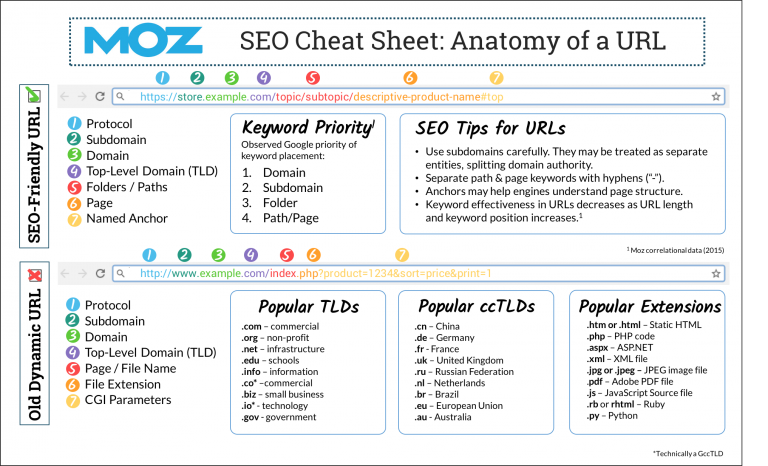
This cheat sheet gives an overview of what makes a good URL. Briefly, a good URL should be clear and easy to understand. It should be sprinkled with focus keywords that your website is about, and could be used as its own anchor text. An Old Dynamic URL tend to be long and hard to read due to unsafe characters. There are also extra words in an Old Dynamic URL that will dilute the SEO value, and sometimes create other problems such as security issues and duplicate content issues. Different characters that cause problems are the Pound Symbol #, Underscores _ , and Uppercase Letters.

SEO Cheat Sheet

Providing All The Services You Will Ever Need

Marketing Services

We Are Your All-In-One Service Provider in All Things Digital

Full-service, graphic identity and marketing collateral shop!

Spectrum Net Designs is your one-stop website development and creative firm that can start with your website design and development, then move
 on to provide all your printed graphics, from business cards, large yard signs, letterhead, brochures, and anything else you might need. Spectrum
can help you take the stress and time constraints out of website design with WordPress development and hundreds of plug-ins that can be customized for your business needs.

Responding to Negative Reviews: Do I Have To?

Responding to negative customer reviews

Why do I have to respond to negative reviews?

Oh, no! Another negative review!

What do I do?

Maybe it’s best if I just ignore it. After all, “Sticks and stones may break my bones, but words will never hurt me.” So…I’ll just pretend I never saw this negative review and move on. After all, how much can it really hurt me?

Why We Fear Them

 We see a negative review. Usually, our first response is one of anger or fear.  Why?

  • Some (most?) of us have difficulty with how to handle or react to criticism.
  • The negative review contains dubious information that you know isn’t true.
  • The claims are exaggerated.
  • Our entire livelihood could be at stake depending on how far the review reaches in both the online world and by “word of mouth”.

Once we’ve acknowledged why we’re angry and/or afraid, we are not only able to move on, we also have to respond.

Why You Have To Respond

Whether the negative review appears on Google, Facebook, Yelp, etc., you must respond – and do so as soon as possible – once you’re no longer angry or “afraid”, that is. Whether positive or negative, reviews generate interest in your company and influence visibility in Google’s as well as Yelp’s local search results and internal rankings, according to Miriam Ellis. If you’re still not convinced, Adrienne Weissman cites the following statistics:

  • “A total of 70% of Americans look at reviews before they make a purchase according to an American Lifestyles report…even the negative ones.”
  • “In fact, buyers who seek out negative reviews are 67% more likely to convert to a purchase than an average customer, according to a Revoo study.”
  • “You might not think that’s the kind of attention you want to share. However, 68% of people trust a company’s reviews more when they see bad ones mixed in with the good. That expresses the reality of most products – not every product is good for everyone.”

In addition to your rankings, responding to negative reviews gives you the opportunity to improve your reputation by demonstrating your ability to resolve complaints successfully. In turn, this can increase your revenue by influencing those 70% potential customers who make their purchases contingent on what they read in the reviews. Finally, if you don’t respond at all, you give the perception that you just don’t care.

How To Respond

Of course, how you respond is going to be based on the mistakes, problems, and/or issues that the customer is referring to. Whether the customer is right or wrong (remember the old adage that “The customer is always right”), make the offer as to how you can best rectify their particular complaint. Usually, most rational people understand and recognize that “no one’s perfect”. Once a problem has been solved, follow up as to whether they are now satisfied. If their response is positive, ask them if they would consider either editing what they had written previously or removing it altogether. The following are just some of the ways to respond.

  • Respond immediately (once you’ve calmed down) with a polite apology.
  • Listen, and then ask how you can correct the problem.
  • Acknowledge genuine mistakes, and then explain how you’re going to resolve the issues.
  • When appropriate, have supporting content ready to verify your response.
  • Always respond professionally, calmly, and courteously.
  • Make your answers “short and sweet”.
  • Even if they get personal, don’t respond the same way.
  • Be consistent in how you respond.
  • Sometimes…there’s just not a good response, so just thank the customer for their input.
  • Always keep in mind that your response will be read by your current and future customers.
  • Have someone review your response before posting it.
  • Follow up once the issue has been resolved, and then ask them to change or remove the negative review.
  • It’s simply the polite thing to do.
  • But…always respond.

How NOT to Respond

On the other hand, there are several ways in which you shouldn’t respond.

  • Don’t be defensive.
  • Don’t answer while you’re still angry or upset.
  • Don’t try to make a joke out of the situation.
  • Don’t use sarcasm.
  • Don’t debate the issue online or in public.
  • Don’t post or make argumentative comments.
  • Don’t ignore or not respond.

How Negative Reviews Can Be GOOD

As paradoxical as it sounds, negative reviews can be good. As we noted above, these reviews can increase the authenticity of your business as well as your trustworthiness. Additionally, they give you more insight about your customers as well as an opportunity to learn more about your business. This can be valuable input that you can turn into an advantage.

  • Increases the authenticity of your company.
  • Maintain your trustworthiness.
  • Gives additional insight about your customers.
  • Offers you an opportunity to access your weaknesses and address them.
  • Provides valuable information about your company.

We know you hate it, but you’ve got to do it.

Because….

Negative reviews will hurt you if you don’t.

Why You Should Utilize Directories for Your SEO Campaigns

Online directories

SEO & Search Engine Benefits of Directories for Business'

By: Shannan K. DuShane | May 2017 | www.SpectrumNetDesigns.com

Your business deserves all the attention that you can give it to support a healthy lifespan. This includes hands-on management of your online accounts, such as social media and business directories.  Social media, business directories, online profiles, and other means of expanding the reach to your prospective clients are growing.  Online business directories have been around for years, but all the buzz is just lately in the past 3-4 years, with more focus on search engine optimization.

Business directories have a specific focus on local businesses in the area you are searching.  For the most part, the consumer will search locally 90% of the online directoriestime, with exceptions of planning for travel or looking for someone else.  Google has a very strong stance on local search results and tends to favor them extensively; that is why directory listings are so beneficial, as they promote local business results.

When you search for instance “plumbers near me”, this will utilize you location via your ip address or phone location turned on in your phone and tell the search engine exactly where you are so it can provide you a list of local plumbers in your area.  But you can also utilize the search to include your location manually by typing it in.

What do you see when you search for “plumbers in Grand Rapids MI” – Directory Sites! You will see Home Advisor, Angie’s List, Yelp, Yellow Pages, Better Business Bureau, and more.

Why? Because Google favors local business search, directories will always show up at the top first.  This is the advantage of utilizing directory sites – Google gives you a boost just for being local!

Why Would I Use Directories?

  1. Free marketing – The cost of keeping up directory listings is minimal, and most are completely free.
  2. They amplify your online presence – giving you enhanced rank with better chances to be seen on the first page of the search engines.
  3. Increases local visibility – huge benefit without spending hundreds of dollars on PPC and marketing
  4. Put the buzz in your prospect’s ear by increasing brand awareness – your customers can see your business before even clicking on it. In a directory, that is a huge benefit!
  5. Make yourself discoverable – most customers won’t know your name unless you come up under a search. And that is a great thing to help your local visibility. Make sure you enter all the business information so that no matter what the consumer searches for, your business name will come up on that directory.
  6. Reputation Management – all directory sites will have a specific ranking system to rate and review local businesses that services have rendered. This spotlight can have both positive and negative experiences.  Working similarly to word-of-mouth, clients leaving accurate reviews and ratings about a company can help future clients to see what your business is all about and what it represents.

If you are looking for increased engagement with your prospective clients – you should put the time and effort into multiple avenues of increasing your visibility through several platforms. You might have identified your most popular platforms but that doesn’t mean you have another audience out there looking for your services.  The best way to accomplish this is to take the jump and expand your reach to online directories, in addition to social media, the website, and other marketing initiatives that you launch.

The end thought is that online business directories have an insane amount of daily online traffic and if you are not taking advantage of the free benefits that they offer, then someone else will utilize them and benefit.  Online listings for your business, support your current marketing efforts and website to gain additional validation for the trustworthiness of your domain and website.

Want to learn more? Let’s Chat!

Google Now Lets You Submit URL’s for Indexing Direct from the Search Page

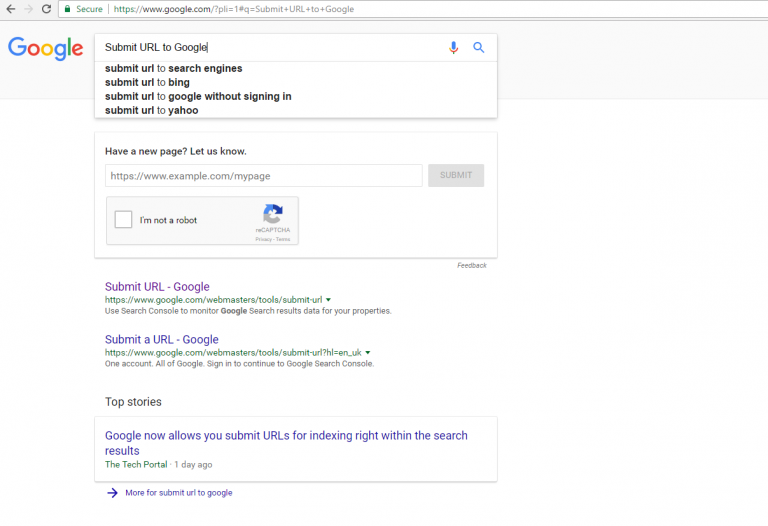
Google is always pushing out little features and functions when you least expect it.  It was noticed late last week and now it’s becoming more prominent on the web as it is discovered.Google submit url in page 1

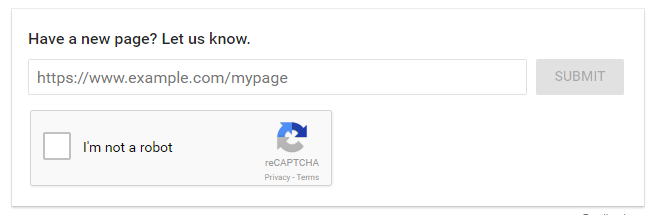
Now you can submit your URLs for your site directly on the search page when you type in “Submit URL to Google”.  The one drawback is that you have to be logged into your account for it to show up and to utilize this new feature. Which isn’t all bad, but just another hump to get to the summit.

There is no telling how long this has been released as there is nothing official on any of Google’s blogs or wikis as of right now. But we are happy that this has made an appearance, how convenient that it just sits there and we don’t have to go track it down.

Google submit url in page

But as always, just because you submit your URLs, that doesn’t mean that Google will always pick up your website.  You will still need to utilize best SEO practices follow the rules and wait to see if the Big G index’s the site.

Not familiar with Google or how indexing works, contact us and we would be happy to explain.

Top 16 SEO Website Design Tips That You Shouldn’t Ignore

Website Design Tips

Website Design Tips: How to Protect SEO During a Redesign

Shannan K. DuShane | March 2017 | Spectrum Net Designs, Inc

Why Does SEO Matter in a Website Redesign?

When you decide to take on the task of a website redesign, normally, SEO is the last thing you think of during that process.  This is the biggest mistake you will ever make when it comes to your online marketing strategy.  Because when you are ready to launch and push that site out live, you just lose all of your hard work ranking your website.  If you had great search results, you can probably kiss that goodbye and start over with your marketing and SEO tactics.

SEO is the art of ranking higher than other websites on search engines such as Google or Bing.  Google and Bing have algorithms or programs that search for and identify specific factors while probing through billions of web pages to provide the most relevant results again via their algorithm, for your search based on the architecture, metadata, and ranking of the webpage.

Search engine optimization has been a growing trend among business owners over the past 5 years. And there is an ever-growing need to understand how to rank at the top, knowledge is the key to optimizing your site.

The one question I always get is Why can you just put me at the top – Well, easier said than done, there are industry best practices that need to be followed. These results aren’t instant, and different search engines have different update policies and software algorithms. The first step is to research the best possible search phrase for each page, or what phrase you want to come up under the search for, then continue to optimize the page. You will need to analyze your site, see what the problem is, and correct it, including re-writing all of your content, new images, optimizing video, and more.

Don't Forget About SEO

This is an ongoing process.  Search engine optimization is never a one-and-done task that you can let go.  The largest piece is the research in the beginning, and the monitoring throughout.

What you don’t want to forget is that your current search engine optimization on your new site won’t transfer automatically from your old site.  And most of the time, when that time comes, it’s too late because you didn’t save anything.

"Great Design Doesn’t Assume Great SEO"

Here are my Top 16 SEO Tips to Watch During A Website Re-Design

1. Know Your Site

Know your URL, and if you have any subdomains that need to be directed to the new site. Set up your subdomains and make sure they are pointed properly with testing before launch. The worst thing you can do is to have someone contact you about broken pages. 

2. Replace & Optimize Your Images

You don’t want to launch your site with dummy images with no optimization. Ensure you have placed all alt tags and SEO titles for each image, to ensure the search engines will have the ability to identify those images. Also, make sure your images are compressed for fast loading for a good user experience. 

3. Install & Configure Plugin

This is primarily if you have a WordPress website. This is extremely important. While WordPress is well configured for SEO, the power plugins available, like Yoast or All in One SEO Pack, can take your site to the next level of SEO and marketing. 

4. Setup SEO Meta Data Before Launch

If this isn’t your first website, you probably have this all set up. Don’t throw it away – use it! Especially if you have excellent rankings on the search engines.  If you don’t, you will lose those precious rankings. 

5. Create Your Sitemap

As your re-design progresses, you will see pages move and new ones develop. Creating a new sitemap will help the search engines crawl your new site and index it properly. This will need to be done just before the launch, after the site is finalized. You can create your new sitemap here. 

6. Setup Permalinks & URL’s

Make sure the permalink/URL structure is set to your liking.  Each page URL contains its main keyword or keyphrase. This will support your SEO strategy and assist the search engines in finding appropriate searchable pages.  If you have specific pages that rank well or are important, make sure you set up redirects to promote a good user experience on your site. The worst thing you can do is ignore this task. 

7. URL Structure

Continuing from above, your URL structure is super important when it comes to directing your audience around your website. With a new design, it is a given that your URLs will change unless you transfer this information and let your developers know you need these to transfer to the new website. The other option is pre-setting up 301 redirects to the appropriate pages. Once you launch, it is harder to identify your old URLs until Google Search Console or a plug-in picks them up. Then it might be too late to get that audience back. If they know the pages don’t exist, they probably won’t return. 

8. Titles & Tags

If you are utilizing WordPress – your SEO plugin should take care of this. Just make sure you don’t launch with the dummy information – “This is a WordPress Site” 

9. Optional Tags

Check the meta and social RSS feeds and whether they are set up correctly.  Don’t forget to implement optional tags such as rel=”nofollow” for admin and login pages. There is no need for search engines to crawl these; it will just slow down the process.

10. Proofread & Proofread

No I didn’t accidentally duplicate that text.  But that is something you want to check in your content. Search engines do not like duplicate content, whether it is metadata, on-page, or blog posts. 

11. Link Strategy

How are you connected to the world? Your links play an important part in your SEO strategy. Check each link on your new site to guarantee that all work is directed to the appropriate location. This goes for all internal links, external links, and image links.   Broken links lead users around your site or to another site and then bring them to non-existent web pages. Multiple broken links negatively affect user experience and may worsen your search engine rankings because crawlers may think that your website is poorly maintained or coded. 

12. Robot.txt

If you don’t have a robot.txt file on your site or if it is poorly configured, it can lead to disastrous results. One mistake can damage your search rankings, ruining all your hard search engine efforts. Read more here…. 

13. Non-Secure Pages

This can trigger many errors throughout search engines and the general security of your website. If you have a login screen on your homepage or anywhere on your site, you will need to purchase an SSL certificate and implement HTTPS on your website. This is to protect users’ sensitive information as well as yourself from liability on your server.  Google Chrome will start informing users about the dangers of submitting their passwords on HTTP pages by labeling such pages as “non-secure” starting January 2017. This could hurt your bounce rate, as users will most likely feel uncomfortable and leave your page as quickly as possible.

14. Google Favors Secure Sites

Yes, you heard this correctly! Google is giving brownie points to those sites that use secure encryption to help stop the spread of hacked websites. You can read more about it here. Google considers a website’s security as a ranking factor. Websites that do not support HTTPS connections may be less prominent in Google’s search results, while HTTPS-protected sites will rank higher with its search algorithms. 

15. WWW Resolve Issue

Normally a webpage can be accessed with or without adding www to its domain name. If you haven’t specified which version should be prioritized, search engines will crawl both versions and the link juice will be split between them.  You can correct this by making sure you have a canonical link in your website and setting the site in your Google Search Console account. 

16. Mobile Friendly/ Responsive Design

Everyone is on the move these days, and your website needs to be as well.  Mobile-friendly is fairly new within the past year or so, and the emphasis is on the importance of having a mobile-friendly website.  Don’t forget to include the viewport meta tag. It is an HTML tag that allows you to control a page’s viewport size and scale on mobile devices. This tag is indispensable if you want to make your website accessible and optimized for mobile devices. Check out the Complete Mobile SEO Guide.

Your Top 9 Website & SEO Tips Before You Start A New Website with Data Migration

SEO Tips Before You Start A New Website Redesign

Shannan K. DuShane | March 2017 | Spectrum Net Designs, Inc

SEO is an important factor that needs to be part of the preliminary planning process of a website. It takes time to use the best proven practices to get to the front pages of your most popular search engines, such as Google, Yahoo, Bing/MSN, and a few others. Traffic does not just find your site, it takes work. Look at seo like this, imagine a piece of paper suspended by a single string blowing in the wind, same concept in that, you need a plan to find it and secure a solid position in the search engines.

Most companies that I work with think that search engine optimization is just another way for a company to take their hard-earned money from them.  What they don’t know or understand is how the search engines’ inner workings and algorithms work.  Merely having a domain, website, and content doesn’t guarantee your website will get to the top or even appear on the search engines.

9 Website SEO Tips

The first question you should ask yourself or your team: Why are you considering a new website?

Well, there are many factors that can come out of this.  First, you have a lot to lose if you are ranking high, but there is more to gain, too.  Due to this, there are specific procedures that you want to make sure you execute.

Here are my Top 9 SEO Tips Before You Start a Redesign

1. Audit

First things first, audit your current website. What’s missing, what would you like to change? Discuss this with your team and make a list to discuss with the development company. Take a min and check out SEM Rush audit report of your website now. Check your site’s health, and prioritize seo issues and warnings.

2. Data Migration

Back up your current website, data, images, and especially your metadata and URL structure currently in place. Once it’s gone, there is no retrieving it. Having your current URL structure will assist the development company in ensuring that your old URLs will point to your new URLs to keep a user-friendly environment and experience for your audience. While 404 errors are fatal to user experience, they are easily corrected. Take the time to do this in the beginning, and your audience will thank you.

3. Navigation

What does your current navigation look like? Is it text-based or images? Does your audience have to click more than 3 times to get to the content they are looking for? These are items that should be considered and have a lot to do with your search engine rankings. Crawl depth is very important and Googlebot looks at this as one of its ranking factors.  The rule is 3 clicks or less, your users should be able to find information. Your navigation should be all text-based and not images. Search engines can’t read images unless they are text-based or have alt tags on them, so this is very important and can help with keywords in your website.

4. Design

Well above the fold design to be specific. Now days everyone scrolls so this isn’t always the best practice. If you have a website that sells a service then this could work for you, but if you have a product, e-commerce, or other type of website, there isn’t a standard other than my next point of user experience (ux). Analyze other sites in your industry across the map and see what the upward trends are to see what is gaining popularity.

5. User Experience

What does your audience have to say about your website? Do you get any feedback, or do you have a high bounce rate that never seems to drop? Items that can help your search engine optimization are friendly buttons, size-appropriate text, and common use of fonts in your navigation, buttons, and content. These factors can be the reason for a drop in visitors to your site and a drop in the search engines.  Google can measure the text size and mobile-friendly attributes and more, and rank you based on user experience. Keep an eye on these and correct what you can to help you rank better. You can check to see if your website is mobile-friendly with Google’s mobile-friendly test!

6. Readability

The content of your website tells a story about your company. It also helps Google read your site properly and rank it accordingly. How well that content is understood, verbiage, context, grammar, and punctuation, is how the audience will perceive the readability. This doesn’t mean that you need to dumb down the content for a kindergartner, it means don’t use words no one has heard of or can’t pronounce – use your natural language. The content within your site will promote itself to get your message across to your audience if your readability is in order.

7. Responsive Design

Mobile friendly design is probably the biggest feature for a business website. Make sure you talk to your development company about ensuring your new site is mobile friendly and responsive design. This not the same as having a mobile website, that is a separate website that is strictly for mobile users. Having a responsive design is built into your website without the distraction of having multiple sites to manage. Another large benefit is Google Mobile First Indexing. You can read more about it on the Google Webmaster Central Blog.

8. Security

Over the past few years Google has been taking into account whether sites use secure, encrypted connections as a signal in search ranking algorithms. They have started to use HTTPS as a ranking signal in your search engine optimization. This doesn’t mean you have to run out and purchase the best of the best SSL (security certificate) for your website, there are minimal certificates that will do the job without spending hundreds of dollars.  Check with your development company about your options.

9. Speed

Does your site take forever to load right now? Did you know that it can affect how the search engine perceives your website? Check your site. Heavy loading sites rank lower due to the poor user experience. You are looking for your website to load under 3-4 seconds, no matter how large it is. Make sure you have Java and CSS compressed, watch your HTTP requests, and browser caching. These factors and more can greatly affect your site’s ranking on search engines. HubSpot offers a free website grader free of charge. Check it out.

SEO Tips Wrap Up

SEO is an ongoing monthly process from analysis, changes, monitoring, testing, strategy, and fresh monthly content. SEO also includes technical changes in the back end from the architecture to crawl depth and page speed. Making sure best practices are being used with optimized images, and updated meta data is present.  I always tell our clients, the average time to see changes is normally 4-6 months of active and ongoing changes to the site. In the past customers have come to me after 3 months and tell me they can’t justify the cost with no results to show, that tells me they were never in it for the long haul and had no realistic expectations of the plan we outlined in the beginning, if you can’t budget your seo campaign for a 12-month time frame you shouldn’t invest at all, search engine optimization is a long term marketing tactic that needs time and patience to build not a month to month marketing plan.

Rise of 2017 Search Engine Optimization Trends

2017 Search Engine Optimization Trends (SEO)

Shannan DuShane | February 2017 | Spectrum Net Designs, Inc

Search engine optimization is a revolving door that changes on a regular basis.  Dating back to end of 2000 when Google rolled out their first toolbar that had thousands wondering how the internet will change from this point on.   This was the beginning and now in 2017, 17 years later, over 70, changes, search updates, tools, enhancements and algorithm changes/updates. It’s a game changer to everyone with a website.


 Click here to see a full list of the Google Algorithm Change History.

Here is a fun and detailed infographic!


In the past, you could do a lot more with search engine optimization, than today’s restrictions and rules, such as keyword stuffing.  A tactic that was quickly shut down by Google search engines.  The user would stuff keywords, as many as they could into a single webpage, as many times as they could and get the results they were seeking.  Conversions however are another story. Inbound links were another tactic that site optimizer would try and utilize.  They would stuff links, hundreds of them in a single site if they could.

Currently, Google has made the search engines a much friendlier place to achieve results.  Now mind you that it’s not easy to get to the top, but you can ensure that it’s all in fair play with black hat seo techniques being penalized and spammed.


You have a fair chance to get to the top, if you practice safe seo.


With Google now releasing more updates and changes yearly, we can have hopes that the search engines we’ve come to rely on will become more efficient.  We now have a real-time update that was recently released or re-released, the Google Penguin 4.0 update in September of 2016. It was viewed what seemed like a multi-phase roll-out that took about 3 months to complete.  Penguin 4.0 Real Time Update was released as a part of Google’s core algorithm and you can expect big things from Penguin in the future.  This update allows quicker recovery time for items you were previously penalized for, that until now took months to correct.  Penguin 4.0 update will not penalize an entire website that was found to conflict with certain criteria banned from search engines, because of the real-time update, you can correct and rank more effectively.  The old Penguin was found to take upwards of 12+ months to fix.


Now on to 2017, what can you expect for seo trends? Everything!


Constant Artificial Intelligence Learning. RankBrain by Google, is an algorithm learning artificial intelligence system, the use of which by Google. It helps Google to process search results and provide more relevant search results for users. In a 2015 interview, Google commented that RankBrain was the third most important factor in the ranking algorithm along with links and content. If RankBrain sees a word or phrase it isn’t familiar with, the machine can make a guess as to what words or phrases might have a similar meaning and filter the result accordingly, making it more effective at handling never-before-seen search queries or keywords.  Search queries are sorted into word vectors, also known as “distributed representations,” which are close to each other in terms of linguistic similarity. RankBrain attempts to map this query into words (entities) or clusters of words that have the best chance of matching it. Therefore, RankBrain attempts to guess what people mean and records the results, which adapts the results to provide better user satisfaction. Mobile First Indexing

Mobile First Indexing.  Back in November 2016, Google announced they are going to be rolling out Mobile First Indexing.  While it isn’t a surprise that more people use their mobile phones to search everything these days, Google wants to help those that have taken steps to become more mobile friendly with responsive design of their websites.  This is different that a business having a separate mobile website from your desktop. Where you must make changes to two (2) difference sites.  This refers to the same website as your desktop version, just mobile optimized for friendlier viewing on all mobile devices.

Here are a few recommendations from Google to help webmasters prepare as Google move towards a more mobile-focused index.

  • If you have a responsive site or a dynamic serving site where the primary content and markup is equivalent across mobile and desktop, you shouldn’t have to change anything.
  • If you have a site configuration where the primary content and markup is different across mobile and desktop, you should consider making some changes to your site.
  • Make sure to serve structured markup for both the desktop and mobile version.
  • Sites can verify the equivalence of their structured markup across desktop and mobile by typing the URLs of both versions into the Structured Data Testing Tool and comparing the output.
  • When adding structured data to a mobile site, avoid adding large amounts of markup that isn’t relevant to the specific information content of each document.
  • Use the txt testing tool to verify that your mobile version is accessible to Googlebot.
  • Sites do not have to make changes to their canonical links; we’ll continue to use these links as guides to serve the appropriate results to a user searching on desktop or mobile.
  • If you are a site owner who has only verified their desktop site in Search Console, please add and verify your mobile version.
  • If you only have a desktop site, we’ll continue to index your desktop site just fine, even if we’re using a mobile user agent to view your site.
  • If you are building a mobile version of your site, keep in mind that a functional desktop-oriented site can be better than a broken or incomplete mobile version of the site. It’s better for you to build up your mobile site and launch it when ready. Learn more about mobile-first indexing.

Accelerated Mobile Pages (AMP). AMP pages utilize asynchronous JavaScript which allows the scripts in the site to be loaded simultaneously instead of one after another starting with the head tag.  “In early tests, we found that AMP pages load four times faster and use eight times less data than traditional mobile-optimized pages,” says Pinterest’s product engineer, Jon Parise. “A better, faster mobile web is better for everyone, including users, platforms like Pinterest, and publishers.” You can see that Google hasn’t announced it yet, but is starting to favor sites that have utilized this tool. You identify the page by the “lightning bolt” which pages are AMP’ed. Now to see what happens when a larger crowd starts using this tool for their websites, there will need to be another change to ensure the pages are properly ranked if everyone uses this, that’s a game changer.Voice search

Voice Search. This is a growing trend when it comes to smart phones, tablets, and other devices.  Now in 2017, when it comes to searching and
results, search engines are growing smarter and voice search is gaining momentum.  We should admit that it is easier to talk to our phone than typing, especially when we are on the move most of the time.  The one drawback that can come out of this is the technology behind recognizing the words when it comes to the actual search.  The best results come when you use short queries and questions versus sentences and specific data.

Video & Animation. Video and animation have been around for ages. But, can you explain the rise in seo capabilities when it comes to video optimization? Videos are powerful, they can express your content with an ability to keep your audience’s attention, versus the monotonous task of reading, or in my case scanning a long article.  If your audience had an option of clicking on a video or article, who wouldn’t want to watch a video, they are intriguing. While text articles aren’t going anywhere, there are added benefits to utilizing and embedding a video platform within your website, such as YouTube, Vimeo, Vine, and utilizing Facebook Live, and Instagram. You will get a different audience and reaction of your content, with a rise in conversions from your website. Plus, you can see that Google is indexing videos at a higher rate which adds value to your website. 

The key is to stay on top, and watch for trends that are rising in popularity.  Search engine optimization trends can range from large algorithm releases to small updates that change the way your site shows up. This will help you stay up-to-date with your seo efforts for you and your client’s needs.   I also suggest subscribing to those larger companies that post regularly about Google updates, search engines, and other tech based companies newsletters and feeds, this will save you time and keep your strategies up and moving forward.

Happy Marketing!