Search Engine Optimization Archives | Spectrum Net Designs

2024 SEO Trends

2024 SEO Trends

As SEO keeps updating and changing we need to make sure that you don’t keep using the same old and outdated tactics that once worked. With the advancement of AI and technology that just means that seo marketing is changing faster than ever.

So, we are going to teach you 4 SEO trends that you should be up to date on to make sure that you won’t be left behind.

A person looking at a press release on an ipad

Ai Overview

Whether you like it or not ai is going to be a large part of the future of the world, not just SEO.

Google has even updated its policies to change from looking for high quality content made by people for people to content made for people. Now this might not seem like a large switch but what they are saying is they no longer care who/what (ai) makes the content as long as it is high quality.

They did this because they realized that they wanted to start taking advantage of the benefits of AI. But they very well can’t say well we can use AI content because it’s great, but you can’t because it isn’t high quality content. That’s like saying this food is so good and healthy but you can have any because it’s poisonous.

What to do

Now just because Google is giving people the answers without having to go onto websites doesn’t mean this is a bad thing.

An AI is only as smart as the info it has so focusing on creating high quality content is key because if Google is drawing information from different sources you want to make sure they see you as one of the leading authorities.

As you can see google is also showing down below where they got their data from, so people could click on you to get more info on their search.

So, our best recommendation is to keep putting out high quality content and make sure that it is data/information rich, so the Google AI bot will draw from you.

Answer Engine Optimization (AEO)

AEO also has to do with ai bots, and it is the prosses of optimizing your content and website to be usable by Ai’s like Chat GPT, Google SGE, and Grok.

Ai search engines are changing the way that people are looking for information. Because now people are just typing their questions into an ai to get their answers because it will look at multiple different sources and gives you an unbiased answer.

What we need to start learning how to do is make sure that these ai bots are pulling info from your website.

We know some people might say why would I want to ai to pull data from my site. The first reason is if I ask what are the best shoes for running?  You want the ai to say you should shop for shoes at nike.com if you are looking for running shoes. Another reason is when Googles and Bings bots use your site that means the search engines view you as authority on the topic and that is the main purpose of seo; to make search engines view you as an authority on a topic.

What To Do

There are a couple of different things that you need to start doing for answer engine optimization.

First, you need to start making your content easy to digest and understand. We know this is already something that you should already be doing, but it is now more important than ever. Your content needs to be super easy to understand so the AI can easily pull information from it.

Another great way to optimize is to include an FAQ section on your pages. You might say why I would need an FAQ page for AI. Well, it makes a ton of sense because what you are trying to do is mimic questions people might ask their AI. So, when the AI sees you answer the exact question that the user asked it will draw the info from your site.

Looking at a press release on a laptop

Focus on Topical Authority

Back in the day topical authority wasn’t that big of a deal, it was more based on your domain authority. If you had super high domain authority, you were able to rank well even if you don’t normally publish related content.

But now search engines are focusing more on your topical authority and what you are an expert on.

This is fantastic for us because most of us are smaller sites compared to Amazon and Apple. So, Google is filtering out some of the larger sites from the SERPs because they are only kind of related.

What To Do

The best way to keep building your topic authority is to keep pushing content that shows you are an authority on that topic.

You should be publishing everything you can think of about your category from super broad articles for the average person, and highly detailed articles for experts in the field. All of this will show that you are well versed in what you are talking about, and you can be trusted.

You should also only be posting related content on each site. For example, if you are an affiliate marketer and you want to try and market pet food and car parts you should have a different website. If you tried to put all of this on the same website Google would see this and get confused and wouldn’t see you as a professional because you are trying to be an expert on two completely different categories.

If you do want to promote both of these different things that’s not a problem, you just need two different websites. It is most definitely more work, but now since you are only focusing on one thing google will see each of your sites as an authority rather than just having one that’s not viewed as an authority on anything.

Evolving Search Engine Ranking Factors

Search engines are starting to prioritize your trustworthiness and expertise in the content you are providing. They are starting to give more precise answers from smaller websites showing you are larger website, but it doesn’t answer your questions.

Now this doesn’t mean that you can be super small either. You can’t have a super small website with a DR score of 0 even if you are answering the exact question.  Google won’t show your site because they don’t know if they can trust what you are writing about because you are super small.

The three leading factors according to some surveys are

  1. Machine Learning
  2. Core Web Vitals
  3. EEAT & Trustworthiness

What To Do

Before you freak out because you’re not sure what to do, don’t worry because we are going to teach you how you are going to need to adapt.

To start with you need to just start putting out a ton of content to increase your authority on what your topic is. You must make sure it is different content though you can’t write an article about why cookies taste good, and another one about why people like to eat cookies. Those two technically different articles are probably going to be about 90% the same. You must make sure you are putting out new high-quality content.

Another thing you can do to is to improve your website experience. You do this by getting rid of seo errors that google is dinging you for. These are things like duplicate h1 tags title tags that are too long, pages that don’t have enough content, and tons of other errors. You can view these errors with tools ahrefs, sem rush, and even Google search console will show you some.

By fixing those errors Google will see your site as more professional and will be more likely to send traffic your way.

Final Thoughts on SEO Trends

There are definitely some new and emerging trends to keep up on, but they are worth keeping up with because there will just be more and more and more if you keep putting in off.  If this is a bit much for you though we can always help with that. We always offer our marketing teams service to anyone who is interested in having us do their SEO and or ads. So please contact our marketing team if you would be interested hiring us.


2024 SEO Digital Marketing Terminology

2024 SEO Digital Marketing Terms

With the ever-evolving tech world that also means that your business and marketing strategies also need to change with the times. With new ways of digital marketing also means that there are new digital marketing terms and definitions that you need to learn so you aren’t left in the dust.

We’re going to make sure that you stay ahead of the curve, and make sure you know what you’re learning about or what your marketing agency is talking about. We will teach you terms like domain authority, PPC, content marketing, backlinks, and many more.

The word marketing being highlighted in a book

Digital Marketing Terms to help understand marketing "lingo"...

  1. SEO (Search Engine Optimization)
    • SEO is using specific terms and site content to rank your page for specific keywords in the SERPS (Search Engine Results Pages). This can also mean using videos, photos, tables, and graphs to help with user experience and understanding.
  2. PPC (Pay Per Click)
    • PPC is a form of a paid marketing strategy where pay per click that you add gets rather than pay a fixed amount for placement on a page.
  3. Content Marketing
    • Content Marketing is marketing where you are making and giving away digital materials like photos, blogs, or videos. This is meant to create brand awareness and get people interested in your product/service.
  4. SSM (Social Media Marketing)
    • SSM is when you market your brand or service on social media sites like Instagram, Facebook, or even Linked In.
  5. Email Marketing
    • Email Marketing is when you send an outreach email to one of your clients/subscriber lists. This could be anything from updates to sales or even just a newsletter.
  6. Conversion Rate Optimization
    • Conversion Rate Optimization just means that you are optimizing your webpage or ad you increase the percentage of people who see your page/ad and take the desired action.
  7. Affiliate Marketing
    • Affiliate Marketing is when people get a commission for delivering a desired result that could be a sale or even just bringing them to your website.
  8. White Hat SEO
    • This is when you are implementing SEO strategies that follow the guidelines of the browser you are using.
  9. Black Hat SEO
    • Black Hat SEO is when you are using strategies that have very beneficial upsides but don’t follow the browser’s guidelines. If caught large penalty usually follows making it very hard to rank your website even if you no longer use black hat tactics. (WE NEVER RECOMMEND BLACK HAT TACTICS)
  10. Organic Traffic
    • This is the traffic that comes to your site without the use of paid ads. This could be from SERPS rankings or links from other sites (Free Traffic).
  11. Link Building
    • Link Building is when you are actively trying to get links from other sites Ponting to yours.
  12. Anchor Text
    • Anchor Text is the clickable text portion of a hyperlink. This could be a brand name, product name, or any other text that links to another page or website.
  13. Meta Description
    • This is the paragraph-style text below the URL on the SERPs page that gives a small blurb about the page. This is written by the website but sometimes the browser will override it and rewrite it for different searches.
  14. Meta Title
    • This is the name of the page in the SERPs that that is the hyperlink. This is also used to try to help determine keyword relevancy.
  15. Keyword Density
    • This is the percentage of the text on the page that is a keyword compared to the non-keyword text.
  16. Indexing
    • Indexing is the prosses of getting pages on a browser. If your page isn’t indexed it won’t show in the search results.
  17. Crawling
    • Crawling is how search engines look at your site to stay up to date on your page updates like new content or links.
  18. robots.txt
    • In a robots.txt file you provide a browser to tell them what pages to crawl and what ones to skip.
  19. DA (Domain Authority)
    • A score from 1-100 by Moz predicts how well the website is likely to rank in the SERPs. (Very Similar To DR).
  20. DR (Domain Rank)
    • A score that tells a website’s strength on a scale from 0-100. The higher the score the higher the authority and easier it will be to rank. (Very Similar To DA)
  21. Alt Text
    • Alt text is linked text to an image to describe what it is, and this helps the browser determine what the image is.
  22. Conversion Rate
    • Conversion Rate is the percentage of people that perform an action on a page vs the people it was shown to. For example, the percentage of people who place an order on a site compared to the total number of visitors.
  23. 301 Redirect
    • A 301 redirect is when a URL is redirected to a different URL.
  24. 404 Error
    • A 404 error is when the web page can’t find the webpage you are looking for.
  25. Mobile Optimization
    • Mobile Optimization is when you make our site easy to use on phones and other mobile devices.
  26. Local SEO
    • Local SEO implemented strategies will help sites rank better that serve customers face to face (Brick and mortar store or service).
  27. Featured Snippet
    • A Featured Snippet is the text that sometimes appears at the top of the SERPs giving a quick answer or explanation. (Excerpt from a site)
  28. Longtail Keyword
    • Longtail keywords are just longer more specific keywords. The longtail might be “pink 18th birthday party cake” rather than “pink cake”.
  29. CTR (Click Through Rate)
    • It’s the ratio of people who see your ads to the people who click on them.
  30. Breadcrumb
    • A text path is usually on the top of the page that shows how you got there. An example could be Home>Team>Marketing>John Smith.
  31. Canonical URL
    • A Canonical URL is a URL that is picked by you or Google to be indexed in a set duplicate page.
  32. Keyword
    • A Keyword is a word or phrase that helps describe a page or site.
  33. On-Page SEO
    • On-Page SEO is changing or adding elements to your website to improve your rankings.
  34. Off-Page SEO
    • Off Page SEO are things you do off your site to improve your rankings like getting backlinks and posting on social media.
  35. Sitemap
    • A Site Map tells the browser what pages and/or files you think are important for it to index.

Final Thoughts

2 People Learning About SEO Terminology

Now that you have some of the basic digital marketing terms down you need to get optimizing. We understand that learning all the ins and outs of search engine optimization is a big task. With constant updates and changes to the rules of SEO and Search Engines, it can be a lot to take on with all other responsibilities. 

That is why we recommend that you work with an agency like us here at Spectrum Net Designs. Our SEO marketing team would be more than happy to meet with you to get your site fully optimized.

Google is always changing its policies so there are always tons of new terms that you will need to learn about. So just keep that in mind when working; always look up terms that you see and don’t know what they mean. Now let’s get to it and happy optimizing.

We get all of this might be a little tricky and there are always new words to learn. Our marketing team can help!  

If you want to ensure your SEO & Ads are done perfectly give us a call today!

Do Press Releases for SEO Help?

Do Press Releases for SEO Help?

A press release can be super beneficial to a company, but what effect does it have on your SEO?

Back in the day, SEO engineers would stuff links and keywords into press releases to gain relevancy and power through backlinks. Google put an end to this by introducing no follow links that don’t transfer link power.

 So, do press releases for SEO still help your rankings or are they just another strategy that doesn’t work anymore?

A person looking at a press release on an ipad

What Is A Press Release

Let’s quickly go over what a press release is before we get started.

A press release is an official statement from your company that you give to a news organization or a journalist with the goal of it being widely seen and distributed.

A press release gives a quick overview of the article in the heading then gives a little more info in a subheading under it. It’s almost like an inverted pyramid. You want to give the most important information in the heading/title and get more specific and detailed as you keep reading the article.

There are a few different reasons why a company or person would want to put out a press release.

  • Get noticed – If you are trying to make a name for yourself because you are just getting started a press release could be a good way to get some media attention.
  • New products – If you are now offering a new product or service a press release is a good way to let people know that you are now offering a new product/service.
  • Damage control – If there is a negative story about you this is a great way for you to try and respond to and control the story so you can minimize the damage it does to your brand.

These are just a few of the different reasons why you might issue a press release.

Are there SEO Benefits from Press Releases

Press releases are still very helpful in 2024 as part of your SEO strategy. Even if a press release gives you a no follow link it can still help you with SEO. In 2019, Google made an adjustment to its algorithm so it hints at no follow links. So, no follow links are definitely not as good as do follow links but that also doesn’t mean they have value.

A well placed and timed press release on the correct media outlet can get you referring traffic. As people read your press release, they become more likely to click on one of your hyperlinks to your site/products. Even if there isn’t a huge power transfer going on this is still traffic to your site showing Google that you are relevant to whatever your press release is talking about.

These are a few of the other ways that press releases can help your SEO.

  • Increased brand recognition – press releases will help your brand get in front of new people and audiences that might like your brand, but wouldn’t normally find you.
  • Faster backlink indexing – media outlets are indexed more often than regular websites because they are constantly being updated, so they will see the backlinks faster.
  • Increased topical authority – Just having your brand name appear on a high authority website will help your brand gain topical authority when Google sees that.
  • Brand Protection – If there was a negative article that was released about your brand you can publish a press release that Google will see to direct the story and protect your brand.

Backlinks

A good strategy for generating backlinks is very important and press releases can be a part of yours. Even though no follow backlinks aren’t going to pass much authority the press release can still be a great way to get backlinks from many other high DR rated sites that will pass on power.

There are a few different ways that a press release can generate backlinks, one of which is with journalists. If a press release is picked up by a journalist in the company that is a great way to get backlinks because when a journalist writes an article about you usually that backlinks are do follow. Thus, passing tons of authority through those links to your site.

Press releases can also get you backlinks by just exposure. You can get backlinks from people who discover you from the press release and decide to post about and share your site around the internet. Now these most likely won’t be do follow links but as we are learning those aren’t bad links, they still deliver traffic to your site.

How To Write a Press Release

Writing a press release is a little bit different than writing a blog post. This should be more formatted to reflect a journalist’s writing style. A journalist will always answer who, what, where, when, why, and sometimes how in their writings, so you should try and reflect that in your writing because you are posting on the same medium.

You also don’t want to publish a book. What I mean by that is you need to keep it short, around 300-500 characters (one page). If you get any longer than this your reader will start to lose interest and not make it your call to action at the end.

It is super important to make sure that you don’t misspeak, or have spelling, or formatting errors because this is a super simple way to lose trust and credibility in your article. When you make these simple mistakes, you appear uneducated and potentially not worthy of taking advice from them. Most people are hyper-critical of these mistakes, which is why you need to be 100% sure that you aren’t making them.

Looking at a press release on a laptop

Grab Your Readers Right Away

When you are writing you want to grab your readers in the first few sentences to keep them interested, but because of the nature of press releases, you actually need to grab them with your heading.

People come across press releases more rather than look for them, so with your first heading, you need to make sure that it is attractive enough to make people want to click and read your article.

When you are trying to grab attention keep in mind that your title tag is what people will see in the SERPs. So not only will you need a heading that will grab attention, but you will also need a title tag that’s under 60 characters to grab attention for your article.

When you are writing your headlines you also need to remember that a good sounding headline isn’t everything. If it is too long people aren’t going to read it, and that doesn’t do you any favors.

For example, if you write “Why The New Age Of Emerging Power Of AI Places A Great Threat On Not Only The Importance Of Data Driven Jobs, But Also On The Implementation Of AI Into Cars And Trucks”

Now that heading tells you everything about that article but if we are being honest not one of us is going to read that, so a better example would be “How Is AI Changing The Job Market For Everyone.”

Now that last iteration is nowhere near as descriptive as the one we first wrote, but more people will read it because it quickly tells you what the article is about rather than reading a whole dissertation.

Make It Easy To Comprehend

No matter what you are writing about, you need to make sure your press release is easy to understand. It doesn’t matter if you understand everything you wrote if you use language that is too advanced for most people your press release won’t perform well.

This changes based on what you are writing about because if you are an engineer writing to other engineers about your new software for volumetric surveying (find the volume of something that is usually quite large). The language that you would use is way different than if you are doing a press release about why a gravel company should know the volume of their gravel piles.

If you still need some more proof that your language changes based on the audience, I just showed you the above. I briefly mentioned volumetric surveys and then put a short description after it because I would bet most marketing and SEO specialists aren’t up to date on the new land surveying trends/terms. But I wouldn’t put that description as a blog aimed at engineers, so there is proof that you need to make your press release easy for your specific audience to understand.

Keep Your Readers Interested

You want to write this like a news story to keep people interested in what you are talking about, so it’s always a good idea to use quotes from key people in your company (it can be you). It’s also a good idea to use pictures and videos to keep the readers interested.

There is also the added benefit of the fact that then if a journalist picks this up to write about you have already started to point them in the direction you want with the info you provided.

Final Thoughts on Press Releases for SEO...

So, as it turns out, press releases for SEO do still help with SEO even if there are no follow links. Just keep in mind that you need to make sure that you aren’t making simple mistakes because the more you do the less likely this press release is to get shared or picked up by a journalist to be turned into a new article.

Writing a press releases can be intimidating or hard for a lot of people. Our marketing team can help!  

If you want to make sure your press release is written correctly, give us a call today!

Why Is No One Reading My Blog? 10 Tips to Get Your Blog Views

Why is No One Reading my Blog? 10 Tips on How to Get People to View your Blog!

As we have heard many times over the past few years, “Content is King”, meaning that content is key in growing your audience and helps you play the long game in marketing. A good way to create content for your website is to create a blog.  A blog is a fantastic addition to your site, as it lets you continually add content, with each blog bringing the chance of new eyes on your work or business. 

However, a blog without views doesn’t do very much for a website. So, you’ve got your blog up and running, but there are no views! Are you wondering why that is? Read on to hear our top ten tips on how to get people to view your blog!

A woman seated at a desk working on a laptop with a mug of coffee beside it.

Tip #1: Have a Consistent Focus

Narrowing down the focus of your blog helps you target an audience directly.  The goal of your blog should be to establish yourself as a thought leader in your focus area.  While it may seem appealing to write about a variety of topics, readers may end up confused about your blog when you are writing about flowers one week and birds the next.  Targeting a specific topic, and in turn a specific audience, makes it easier for people to know that you’re the one to come to about your chosen topic. 

Not only does this help readers, but keeping your blog about one topic helps you rank on Google as well. Google combs through your site, following links and checking keywords that you may be using to learn what your blog is about.  Sticking to one topic helps Google show your site on the results page when people are searching for the topic you are writing about.  

Tip #2: Research SEO Before You Write

Research some relevant SEO keywords to include in your blog before you start writing, in order to build your content around those keywords.  You could even go a step further and use SEO to create a content strategy based on SEO and topical relevancy. To read more about this, check out our blog here

Tip #3: Use Hierarchal Formatting Correctly

Using hierarchical formatting, like H2s and H3s (in correct descending order). Not only helps your readers follow and possibly skim your content, but it also helps Google “read” your content, allowing your blogs to be indexed properly by Google.  

Tip #4: Utilize Backlinks and Internal Links

Backlinks:

Backlinks are links to your content from other sources.  Having backlinks increases your authority and gets more eyes on your content.  You can get these by reaching out to other bloggers and websites and getting them to link to your content!

Internal Links:

Linking to your own content within your own posts allows your readers to discover more of your content, and it also helps Google to crawl your content and learn about what your content is focusing on in order to show your site on Google.  

Tip #5: Add a Call to Action

Adding a call-to-action, such as a call to subscribe via email or check out another section of your site, can be a very effective way to encourage your readers to continue their descent into your content without sounding too salesy.  This is most likely done at the end of your blog post.  

Tip #6: Craft Good Headlines

A good, attention-grabbing headline is sure to get your audience to click on your blogs.  Keep them simple, but explanatory, and you’ll be set.  To learn more about how to craft a solid headline, check out this WordPress article.

Tip #7: Make Your Content User Focused

It can be said that readers are more likely to continue reading content that is more focused on them, and less about the author.  While it may be tempting to talk about yourself, it may be best to make sure your content is at the most useful as it can be to your readers, to keep them on your blog, and to keep them coming back.  If you keep it genuine, and not just about sales or yourself, it will draw readers in.  

Tip #8: Post Consistently

Being consistent keeps you at the forefront of your readers’ minds, as it is easy to forget about a blogger if they are inactive for some time.  Post regular content, and batch write your blogs to schedule ahead of time when you are feeling super inspired to avoid burnout.  

Tip #9 Promote on Social Media

Do you post your blogs to your social media? Do you have buttons for each social media site on your blog that make your content more sharable? Do you have an easily pinable image that readers can use to share this content on Pinterest?  Having all of these things in place helps you and your readers utilize social media to spread your content. 

Posting a blog is half the battle, the other half is promoting it on social media.  Doing things like making a cool graphic and posting links to your social media will greatly increase your chances of fresh eyes on your blog.  

Tip #10 Prioritize Helpful User Design

If your website is hard to navigate, readers may not want to stay on your site very long.  Make sure you have a good design and a good user interface to appeal to new and old readers.   

Another element to consider is that you will want to make sure your blog and site have a quick loading time; usually, about three seconds or less is ideal. If your site takes 9 seconds to load, it may deter your readers from staying on your blog.

Build a Content Strategy with SEO: How to Plan for Content That will Bring Conversions

Build a Content Strategy with SEO: How to Plan for Content That Will Bring Conversions

If Google’s updates this year have told us anything, it’s that content is key to a good SEO strategy, and SEO is needed for good content.  But not just any content will pass the test of Google rankings.  Google is telling us that generating quality, helpful content can help you gain the organic traffic you need and can also help you rank on Google. Ranking on Google opens the doors for many new eyes to be seeing your site, which will hopefully lead them to interacting with your site, or even completing a sale.   

Search Engine Journal writes that the market for content marketing is going to grow over 500 billion dollars between now and 2027.  This huge amount of growth prediction shows that business owners are putting their eggs into the content marketing basket.  Now more than ever is the time for content strategy.  

Some worry that AI is going to quickly replace content marketers, and the need for producing content, but I can assure you that is not the case.   AI is still in development and is prone to mistakes.  Human first content will always be the best avenue.  Google has said themselves that they are already in the process of learning how to spot and keep AI generated content from ranking on Google.  As internet users prefer spam free, useful content, so does Google.   

A hand is connecting ideas together on a board.

What Content is Google Looking For?

Google has shown us time and time again that they want us to produce human-first content.  They don’t want us producing spammy, repetitive content, rather, they want us to put our time and energy into producing content that will be useful to users of the internet. 

When someone is browsing the internet, they will most likely be inclined to stay on the pages that serve them and will be quick to leave the pages with useless and unreadable content.  Google improves with each update and gets better and better at weeding out spammy content, making it best to keep on the side of content production that best meets the user’s needs.   

Why Google?

Whether liked or not, Google is the most used search engine and they have become synonymous with the action of researching, or looking something up.  The name itself has become a verb, as the saying goes, we all know how to “Google it”.    

Google has been the top search engine and search authority for years now, and its algorithm changes are what the experts look to for guidance when it comes to updating SEO strategy.  It is important to pay attention to Google, as they predict and control the trends of SEO, content marketing, and beyond.  

How to Write High Quality Content

·         Proper Keyword Density: We know by now that Google penalizes keywords stuffing, yet the alternative of having too little keyword representation can keep you from ranking as well.  Try to find the happy medium of putting the keyword throughout your content where it could naturally fall. 

·         Natural Language: Google may not be physically reading your content, but humans will be.  If it sounds clunky, boring, or even too pretentious, then you run the risk of losing those valuable eyes on your content.  Conversational language is key to a happy audience. 

·         Minimal Repetition: Content should be to the point.  Don’t try to repeat yourself just to make your content longer.  Use as many words as you need to in order to completely explain your topic and stay away from fluff.  

Another great way to produce thoughtful and quality content is to follow the E-E-A-T method.  

What Is E-E-A-T?

“E-E-A-T” is a phrase coined by Google that means Experience, Expertise, Authoritativeness, and Trustworthiness. 

·         Experience: Do you have an experience with your topic? Be sure to talk about it!

·         Expertise: Are you an expert on the topic? Can you interview an expert in the field to elevate the expertise of your content?  Be sure to also be linking to quality sources, as gives weight to your words. 

·         Authoritativeness: Present your content with authority.  Your content from beginning to end should get right to the point and stick to that point throughout. 


·         Trustworthiness: Are your sources quality? Are you being honest? People can tell when content isn’t trustworthy or are being dishonest with them.  

What is Topical Relevancy?

Topical Relevancy is the practice of building out content based on the topics of the service or blank that your business provides.  The more quality content you build out, the more your site will be seen as an authority in that field of your choosing. 

The types of links you have both linking out of your site, within your site, as well as too your site can greatly advance your topical relevancy and authority. 

The process of achieving topical relevancy is essentially the act of building content, and then making sure that content has inbound and outbound links that are relevant to the content. 

For example, if you are a construction company, you could produce content about building homes.  In order to further build out this content, you can then begin writing content about the more specific aspect of building a home, such as wiring, plumbing, bath trends ETC, and then begin linking to your own content within your content. 

Google determines authority and relevancy based on the number of links that connects your content.  Building out your content and interlinking it, as well as adding links out to other trustworthy sources, signals to Google that you are also an authority.  

How to Find Topics to Write About

Using a good keyword research tool is the best way to find topics regarding your content that you can write about. There are many free tools out there for you to utilize.  Sites like Google Trends and Google Keywords are very good for initial research.  They allow you to find questions that people are asking based on the keywords and topics you are researching. 

You can also utilize autocomplete, to see what other people are asking Google, and base your topics off of that. 

Once you’ve found a few good topics, then you can start finding keywords.  

How to Find Keywords

Look at your topics, can you use a keyword research tool to find keywords that have a high volume, that may be synonymous with your topic?  Using a keyword research tool is a great way to learn how strong the keywords you want to work out will be. 

Look at your competitor’s keywords.  Can you draw inspiration from them? Are there some they are using that could also work for you?

If you’re looking for a dedicated, hard working team to find quality keywords, narrow down some effective topics, or even create your content for your site with authority and expertise, contact our marketing team to see how we can help you today!

As Google is constantly updating and evolving their algorithm, so must we.  Content should be up to their standards.  Search engines also want us to produce high quality content, with Google specifically wanting us to focus on the person who is visiting our site, our audience, and our users.  Keeping all of this in mind, as well as your SEO keywords, will help you get well on your way as you formulate a content strategy.  Happy Content Making! 

5 Components of SEO You Must Do

components of SEO

5 Components of SEO That Will Never Change

There are about five components of SEO that will always stay the same despite Google algorithm trends and updates. Knowing and understanding these elements will provide you with successful best practices for your online presence.

But first, let’s understand exactly what SEO is.

What is SEO?

SEO, also known as search engine optimization, simply enhances your online presence through search engines like Google, Bing, or Yahoo! These are avenues where your audience searches keywords that are related to your business, hoping to find someone to fix their problem.

Selecting the right keywords will guide your online marketing strategy and, ultimately, lead to higher search engine rankings and conversions.

Below, we have outlined five components of SEO in detail. When you understand and practice these components, you will steadily see an increase in quality website traffic and leads.

The 5 Components of SEO You Should Start Doing Today

Helpful and Informative Content

Creating a website is the first step in establishing an online presence. However, it doesn’t begin ranking just because it is live. Your business website must be optimized and crawlable by search engines to see any real results.

In the late 2000’s when SEO first took off, it was a common practice to “keyword stuff” pages. Keyword stuffing is when a website overloads a page with keywords or numbers to try to manipulate its site rankings in a SERP (search engine results page).

In today’s SEO world, search engines have gotten much smarter and evolved. Practicing keyword stuffing now will get your site flagged as a spammer, and search engine spiders are programmed to ignore these sites that are guilty of bad SEO tactics. Check out Good SEO vs. Bad SEO for more information on these practices to avoid.

Therefore, keyword research is so important to implement correctly. Additionally, this is why creating helpful and informative content will always prevail in SEO. Readability contributes to your SEO score, which rates your content on how clear it is to your target audience.

This element is important for all owned content, such as blogs, videos, podcasts, downloadable one-sheets, and more.

Meta Description and SEO Title

A meta description is the information about the webpage that appears in the SERP below the title/URL of your page. An SEO title is the title of your page that also appears in the search results.

components of seo

When you create a meta description that is compelling and concise with a clear CTA at the end, it will improve the CTR of your organic search results. This means more of the people who see your page in the SERP will click through and land on your webpage. Even if your ranking doesn’t change, you can expect more traffic to your website.

The same goes for SEO titles, too. Your SEO title should include your target keyword at the beginning and be no more than 60 characters. They should also be catchy and easy to read, and therefore, you must find the sweet spot between SEO and readability.

Check out How to Write SEO Headlines for some more information.

Connect With Us

Facebook
Twitter
YouTube
Pinterest
LinkedIn
Instagram

Categories

Recent Posts

Archives

Internal Links, Integration, External Link Building and Backlinks

Have you ever noticed that when you read a blog or webpage, some hyperlinks lead to other relevant information on the same website? More than likely, you have,e and you’ve even clicked on a few to expand your reading.

Internal Links

Internal links are those hyperlinks that point to other pages on the same website. The internal links help search engines understand the most important pages on your website.

The search engines consider pages with relevant internal links to be more valuable than those with fewer links. Integrating internal links is a simple way to improve traffic and time spent on your website.

External Links

In contrast, external links are hyperlinks that point to web pages that are outside of your domain. These provide your readers with outside references that enhance your website’s authority and credibility, which is also a factor that contributes to quality content.

Backlinks

Backlinks are when another website links back to your website. The quality of a backlink is dependent on the online reputation and authority score of the original website. Backlinks are crucial to have because they signal to Google that other websites find your content valuable. To be successful with this, you will need to develop a backlink portfolio.

This tactic is time-consuming with continuous outreach, but it is an extremely important factor in your link strategy for SEO.

To learn more, check out Why Having a Strong Backlink Strategy is Critical for Optimal SEO.

Google My Business/Reviews

Local SEO is the process of optimizing your website to appear for your target location. Search engines, especially Google, are getting better at displaying location-based search results on more generic search inquiries.

When you think about local SEO, think about how many times you’ve searched “car wash near me” or “oil change near me”. Google provided you with the closest businesses near you based on your location for your convenience.

This type of search does have limitations, for example, when you search for “marketing agency”, it will return mostly national results.

Incorporating location-specific keywords is extremely powerful for this reason. Include the following in your keyword selections:

  • City
  • State
  • General Area

Additionally, Google My Business (GMB) is a free, easy tool for businesses to manage their Google presence, including on Search and Maps. To optimize your GMB profile, make sure the following information is correct:

  • Business Hours
  • Contact Information
  • Location(s)
  • Area(s) your business serves
  • Your service and/or product offerings

This is a simple and powerful way to optimize your local online presence while avoiding falling into the “keyword stuffing” trap.

Check out What is Local SEO for more information.

User Experience

Recently, user experience (UX) has become more and more important for SEO. When a website is slow, laggy, and has excessing pop-ups, Google will consider it to be spammy and therefore, a lower authority score. If your website provides its users with a bad user experience than most likely it won’t rank in the top 10 of the search results.

UX will always remain important for SEO because it helps searchers find (and remain) on your website, converts traffic into hot leads, and keeps your customers coming back to you.

Components of SEO that Will Never Go Out of Style

When you implement your SEO strategy with these 5 basic elements in mind, you will certainly see a steady increase in both conversions and traffic over time. Reminder that SEO does NOT happen overnight, this is a long-term investment that when done correctly will provide you with some amazing results.

We all know and see the benefits of Paid Advertising, when done correctly. But laying the foundation of solid organic SEO will likely to remain important for business for years to come. An even more strategic avenue is to incorporate not just one or the other BUT implement both Organic SEO and Paid Advertising to see REAL results.

Ready To Stay Driving Better Results with Your SEO Strategy? Contact Us Today to Speak With Us!

Breaking Down Google Analytics Data and What It Means

Google Analytics Data and What It Means

Breaking Down Google Analytics Data and What It Means

Google Analytics provides powerful insights about your website’s users. But understanding isn’t all that straightforward for beginners, and that’s why we’re here! Let’s talk about what Google Analytics is, what it does, and what all wonderful reports it can tell you about your website visitors. 

What is Google Analytics

Google Analytics is a free tracking tool offered by Google, and it provides insight into the visitors who come to your website. You are capable of seeing the number of visitors on your site in real time, where they are coming from, and even which device they are accessing your site on, and so much more.

What Does Google Analytics Do?

Google Analytics offers its users information about the online behavior of their audience, which can be critical for your business. There are many reasons why you should be utilizing this free tool. It has many benefits, including:

Measures your website’s performance

Check if your marketing efforts are working

Which type of content should you create, or products should you list on your website

Divide your audience into segments based on age, gender, country, device, etc.

Optimize your web pages to boost conversions

Using the Reports

Once you have set up your account and added your tracking code, it’s time for the fun and to see exactly what Google Analytics can do for you.

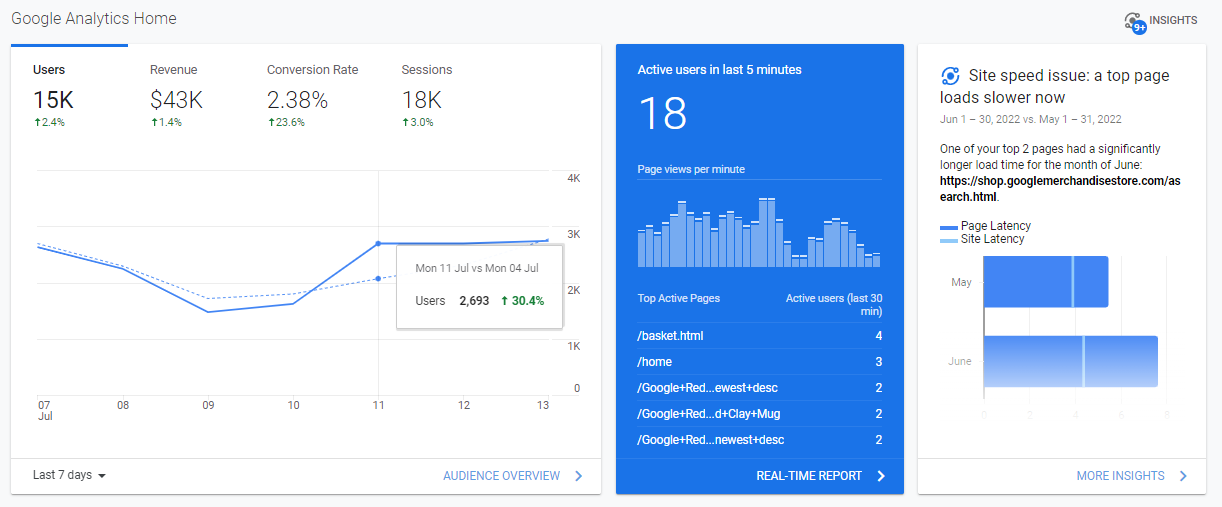
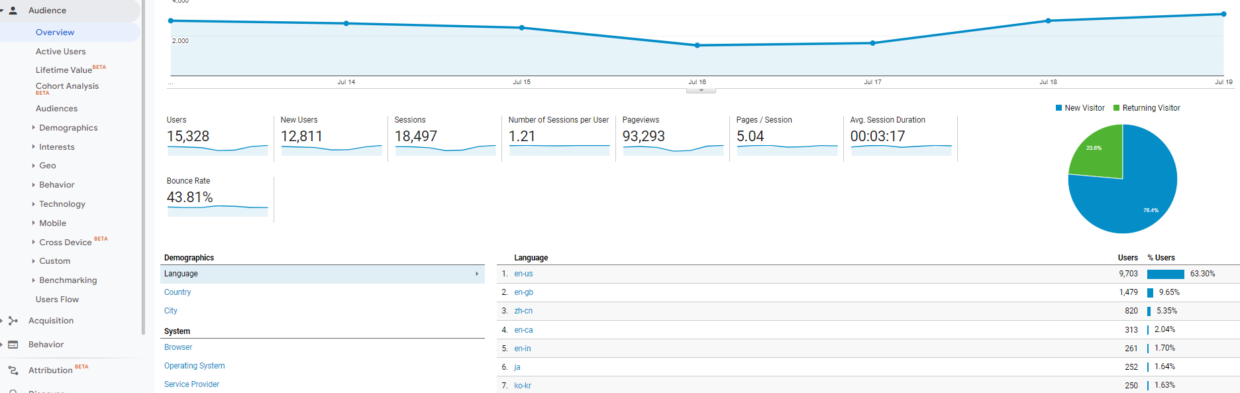
The first thing you’ll see is the Google Analytics home screen. This will give you a quick overview of how your website is performing.

Google Analytics Data and What It Means

In the above screen grab of the home screen, you’ll notice:

Users: how many visitors came to your website (in the past 7 days, in this example)

Sessions: how many interactions a visitor makes within your website within a period. Ex: viewing a page, clicking a link, or purchasing a product.

Bounce Rate: how many visitors hit the back button or close your website without performing an interaction.

Session Duration: the average amount of time a visitor spends on the website

Active Users Right Now: How many active users do you currently have on your website

Connect With Us

Facebook
Twitter
YouTube
Pinterest
LinkedIn
Instagram

Categories

Recent Posts

Archives

Left Column Google Analytics Reports

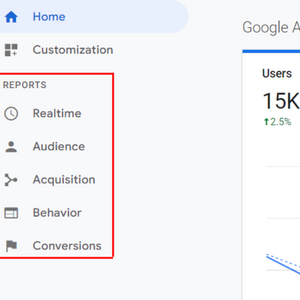
On the left side of the dashboard, you’ll find various reports. Each of these reports will provide insight into how a user interacts and behaves with your website.

Google Analytics Data and What It Means

The Realtime Report

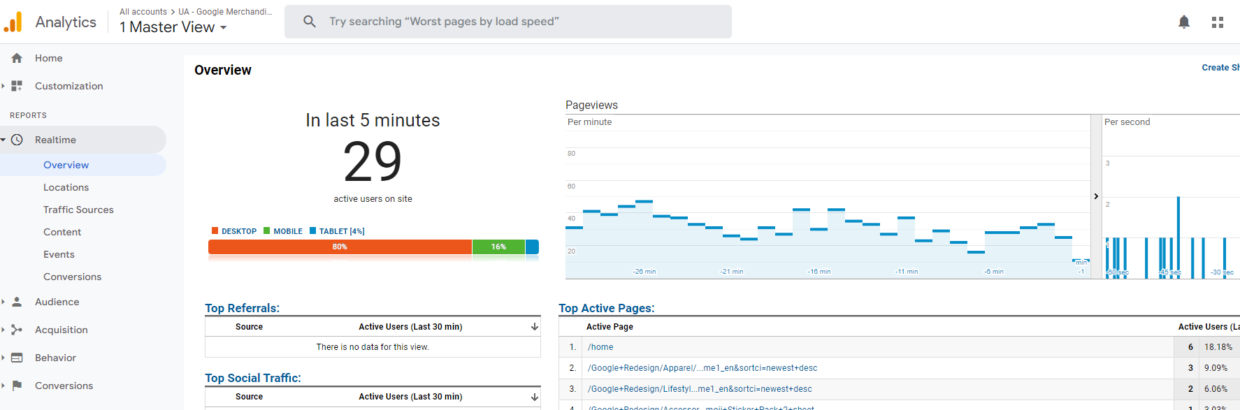
This report will show you the number of users currently on your site. This is the tab you go to when you want to see real-time activity on your website.

By clicking Overview, you can see the top active pages on your website, how many visitors are on each page, and the country they are from. The overview will show all the important information in one place. But you can also use the more options like traffic source, content, event, and location to get more insight about your real-time performance.

These reports are great for measuring the performance of recent campaigns that you are running.

The Audience Report

This report in Google Analytics breaks down your website traffic. If you are interested in knowing the age of your visitors or the device they are using, this is where you would go. As you can see under Audience, more reports are easy to understand. You can gain better insight into demographics, geography, interests, etc. The mobile section will show you which device your visitors are using to view your website. This can be helpful information when deciding which pages to optimize. 

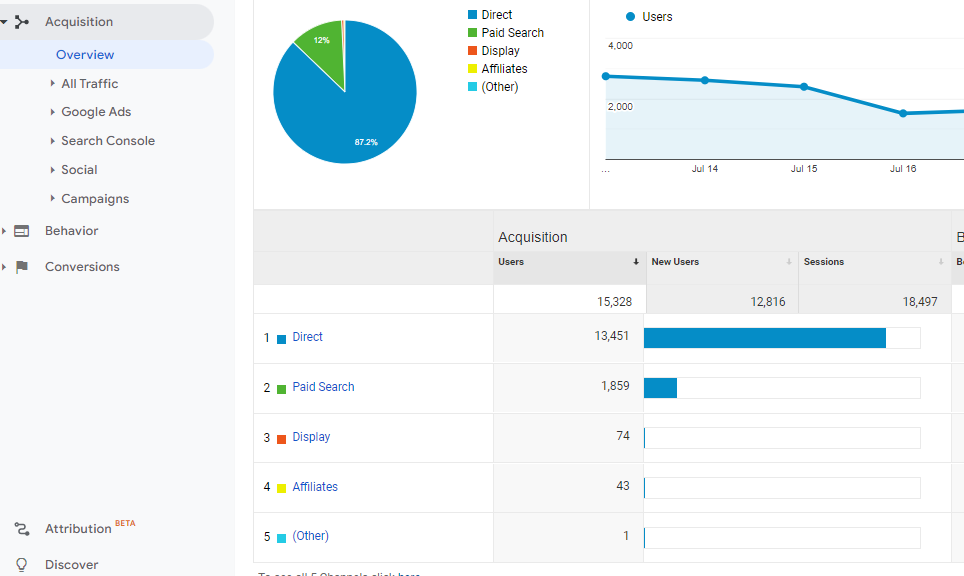
The Acquisition Report

First, starting with Google Analytics, the acquisition report will be very helpful. It will show you how the traffic reaches your website. Google Analytics divides these traffic sources into four categories:

Organic Search: users who come from search engines like Google or Bing

Direct: users who directly type your website into the browser, open your website through a bookmark, or when Google can’t recognize the traffic source.

Referral: users that come from any source other than search engines, like a link on another website or a YouTube video.

Social: users that arrive on your website from a social media platform like Facebook or Instagram.

The Behavior Report

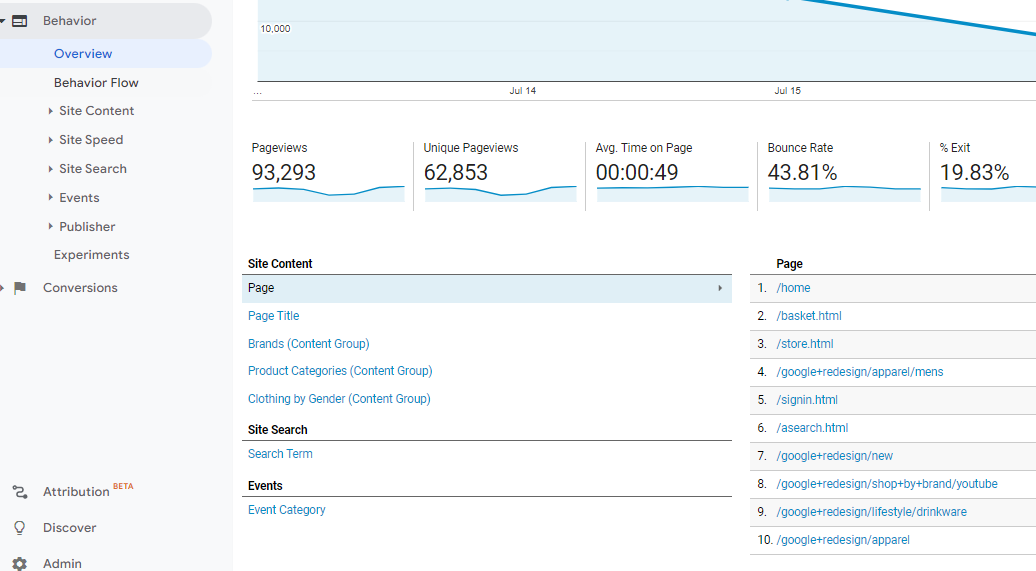
If you are interested in finding out what your users are doing on your website, this is the report you would go to. In its Overview, it will show you a snapshot of your user’s behavior:

Pageviews: the total number of pages viewed by your visitors

Unique Pageviews: This is when an individual has viewed a certain page at least once

Average Time on a Page: It’s the average amount of time a visitor spends on your website

Bounce Rate: the percentage of visitors who only view one page and then leave without interacting with it

Percentage Exit: How often visitors exit your website’s pages

The Conversion Report

Lastly, the conversion report tells you how your website’s conversion rate is performing.

What is a conversion rate? It is simply any activity completed by a visitor.

This report can get a little confusing for beginners. It requires advanced setups like creating a goal in Google Analytics or setting up eCommerce tracking. To understand how this works, here’s an overview of two reports that might be useful to you: Goals and Ecommerce.

Under Goals, you can go to Overview and see the total goal completions on your website, like visitors placing a bid. It will also show you the location where your goals are completed the most.

If you are running an online store, then the eCommerce section is important for you. It will provide you with individual product performance, sales performance, order size, and time of purchase. All of these metrics should be important to you to help improve your online sales and boost conversions.

Since there is additional setup for the conversion report, there’s an easier way to collect this data. You can simply install a WordPress plugin called MonsterInsights that will allow you to track your store’s performance without the manual setup.

MonsterInsights Reports- a Quick Overview

The MonsterInsights plugin is one of the most user-friendly Google Analytics plugins for WordPress. It enables anyone to install and use Google Analytics in WordPress easily, without any daunting code. MonterInsights offers a variety of reports that make reading Google Analytics very easy.

All of these metrics are useful to learn more about your users and to help improve your marketing strategies, SEO, and boost your conversions. Now you are ready to make a Google Analytics account, if you don’t already have one, and start leveraging the information to improve your own marketing strategy! 

If you are looking for some help with your current marketing needs, feel free to reach out to the Spectrum Net Designs Team! We’d be happy to see if there’s an opportunity to get more out of your current strategy! 

What are the Best Practices for Writing an SEO Headline?

website hosting

How to Write an SEO Headline

Headlines are lifelines to your readers. They grab attention, build trust, and help time-pressed consumers focus on the stories they care most about.

Implementing SEO best practices is essential to growing your audience, driving traffic from search engines, and promoting your business or content. One of the key components to practicing good on-page optimization tactics is writing strong headlines for your pages.

Your headlines should be short, sweet, and to the point. This can be tough to format in the most effective way possible and cater to your wide audience. That’s where we can help you!

What’s the Difference Between a Title Tag and an H1?

Before we dive into crafting strategic headlines, let’s go over the different elements that affect SEO headlines:

  • H1 (Header 1) tags: These are the top-level header HTML tags. On most websites, the headline is coded in an H1 tag.
  • Title Tags: These are the blue links that appear in the search engine results page.
Headlines for SEO

* Title Tag

Headlines for SEO

*Headline (H1)

Sites typically use the same text for the H1 and the Title Tag on an article or blog post. However, it is important to keep in mind that these are two different things that are controlled in two different places on a page. In this blog, we are aiming to help you write headlines that can easily work as the H1 and the title tag for your articles.

While it is often okay to reuse your H1 as your title tag, sometimes you might face some challenges.

  • Your headline that appears on your content (H1) might be too long for a title tag.
  • Typically, it makes sense to add a keyword in the title tag somewhere different than the H1. For example, if your target keyword appears at the end of your headline, you might want to rewrite the headline for your title tag to start with the keyword. This is mainly done because search engines consider words furthest to the left in the title tag to be most important.
  • You must keep both humans and search engines in mind when writing your title tag and H1.

The H1 of your content may contain keywords or formatting that could help you rank higher; title tags are what get potential readers from their results page to your site. If you keyword stuff your SEO headline to boost your rankings, you’re more than likely to chase away your audience by obvious stuffing or being too aggressive about the topic. That being said, it’s important when writing your SEO headlines that you write them for both your audience and search engines.

5 Easy Steps to Optimize Your SEO Headlines

Now that you understand the power behind a strong SEO headline, let’s go over some easy steps to use when writing your SEO headline.

  • Keep Character Count in Mind
  • Avoid Keyword Stuffing
  • Be Concise & Clear
  • Use Attention-Grabbing Vocabulary
  • Ensure Consistency Between Your Title Tag & Content

Keep Character Count in Mind

The visibility of your title tag on search engines is limited to 50-60 characters, so keep that in mind when creating your SEO headline. You are not only ensuring that the search engine users can see the whole topic from their result pages, but you’re also demonstrating to readers that you’re aware and taking action toward their ease of access.

Check out the Moz Title Tag Preview Tool to see how your title tag will appear on Google.

Avoid Keyword Stuffing

Even though it might seem like a good idea to include your keyword or keyword phrase in your SEO headline multiple times, and it would help your rankings, you’re more likely to irritate or turn your audience away by doing so. With limited visibility of characters for your title tag, do your best to please both your audience and search engines with your keyword quantity.

Be Concise & Clear

This is another important step when creating your SEO headline. Use these questions to help determine whether your title tag is clear and “user-friendly” enough for your audience.

  • Can my headline be skimmed easily?
  • Is my keyword somewhere within the first or last three words of my headline?
  • Would a 10-year-old be able to understand what my headline is saying?
    Is my headline longer than 90 characters?
  • Are there grammar errors in my headline?
  • Am I using unnecessarily big words?

Use Attention-Grabbing Vocabulary

There is no need to use big fancy words for your SEO headline to impress or capture your audience’s attention- you just have to use words that will resonate with them. Words like: Boost, Easy, Free, Important, Limited

Ensure Consistency Between Your Title Tag & Content

Lastly, make sure that your SEO headline matches what you cover in your content. If your title tag does not match what they are about to read, you risk losing the trust of potential customers.

We hope this insight helps you when you are crafting your next SEO headline. Remember to write for both your audience and Google, keep character count in mind, avoid repetitive use of your keyword or keyphrase, and keep it concise and clear. 

If You’d Like Some Help with Your Current SEO Strategy- Contact Our Marketing Department Today!

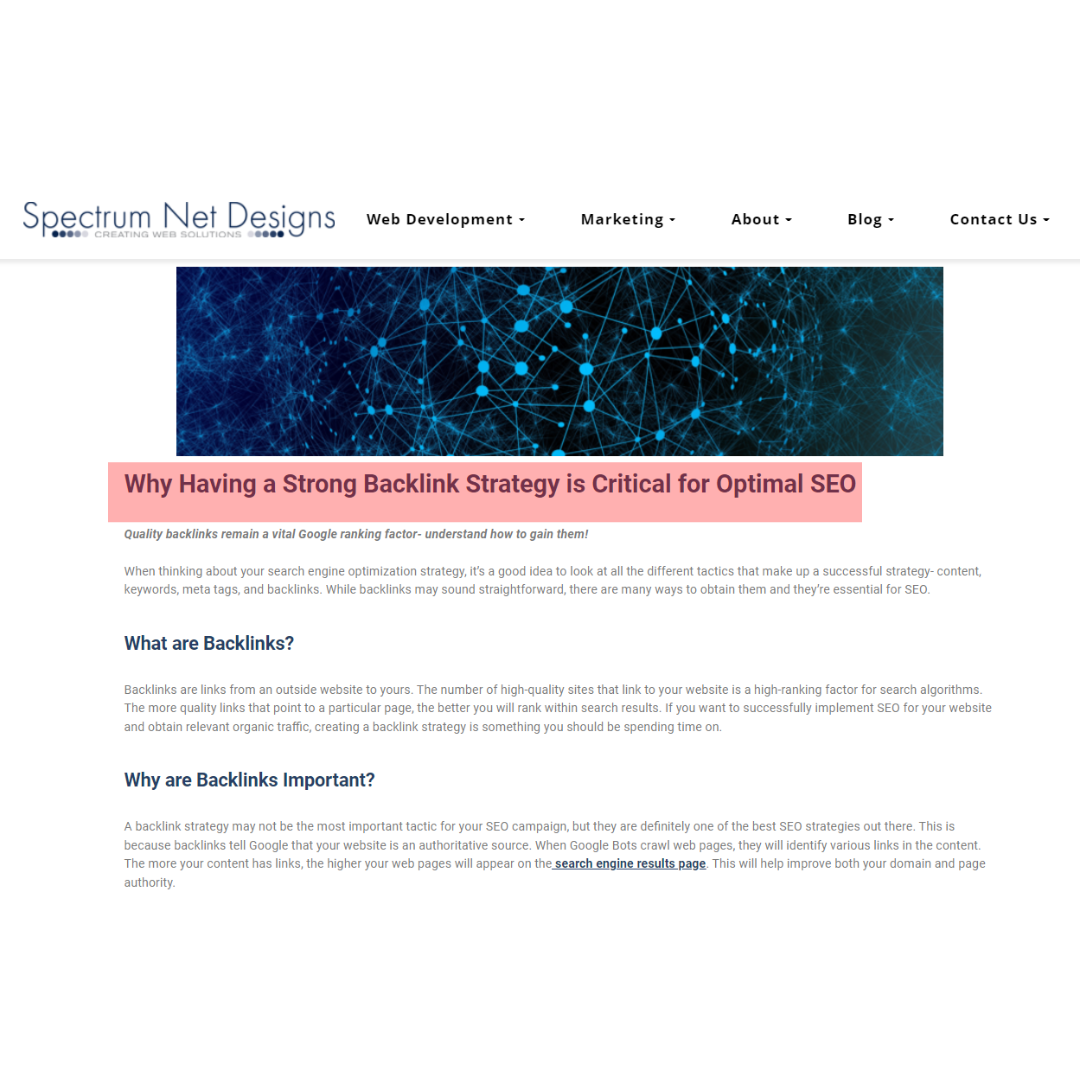
Why Having a Strong Backlink Strategy is Critical for Optimal SEO

Why Having a Strong Backlink Strategy is Critical for Optimal SEO

Quality backlinks remain a vital Google ranking factor- understand how to gain them!

When thinking about your search engine optimization strategy, it’s a good idea to look at all the different tactics that make up a successful strategy- content, keywords, meta tags, and backlinks. While backlinks may sound straightforward, there are many ways to obtain them, and they’re essential for SEO.

What are Backlinks?

Backlinks are links from an outside website to yours. The number of high-quality sites that link to your website is a high-ranking factor for search algorithms. The more quality links that point to a particular page, the better you will rank within search results. If you want to successfully implement SEO for your website and obtain relevant organic traffic, creating a backlink strategy is something you should be spending time on.

Why are Backlinks Important?

A backlink strategy may not be the most important tactic for your SEO campaign, but they are definitely one of the best SEO strategies out there. This is because backlinks tell Google that your website is an authoritative source. When Google Bots crawl web pages, they will identify various links in the content. The more your content has links, the higher your web pages will appear on the search engine results page. This will help improve both your domain and page authority.

The domain authority is your website’s relevance for the search engines, specifically in certain topics or niches. Page authority is how well a specific web page ranks on the SERPs. Backlinks not only improve the linked page’s authority but can also increase your overall domain authority.

Backlinks can also help increase website traffic. If someone is reading a blog on your page and is linked with an interesting article, the reader might click on your website’s link and browse through your website, giving you more exposure.

Backlink Strategies and SEO Tools

You can build strong backlinks by using smart techniques without spamming others. Let’s dive into some of those strategies and SEO tools that will make this easier for you.

Resource Link Building

One of the most effective ways to build links is with resource link building. You will want to identify where your business can add value to your audience. After that, you will need to create a great resource page so you can earn quality backlinks from relevant authorities.

Common examples of where resource pages exist online include the following:

– Your Local Chamber of Commerce
– Local Library’s
– Travel and tourism boards
– Universities
– Local governments

By using the SEMrush Backlink Analytics Tool, you will be able to easily identify resources that link to your competitor’s site. This way, you can work on a content strategy that may generate their attention, and they will want to link to your site instead.

Broken Link Building

Broken link building is when you find informative web pages with external links that lead to a dead page. If you can identify broken links that direct you to a 404 page and present the owner of that website with an alternative piece of content that is as good, or even better, than the original link, you can quickly build some excellent links.

You will want to make sure that you have a piece of similar content to what was initially linked. This tactic can drive a reasonable level of success since neither users nor the website you want a link from will benefit from linking to a page that 404s. You will be helping the owner of that webpage reduce broken links on their site while suggesting an alternative replacement, so they don’t have to go looking for one themselves.

backlink strategy

Supplier Links

If your business sells products, you could be sitting on an excellent opportunity to earn a bunch of quality links to your site. Many manufacturers and suppliers include a ‘where to buy’ page on their website to incorporate this tactic. A manufacturer simply points users to the places where they can buy their products. And if you are a seller of a manufacturer’s products, you should be listed and linked.

First, you will want to put together a list of all your suppliers and their websites and work through them one by one to look for a page that lists their stockists. If you find a page and notice you are not listed, you can reach out to whomever your contact is at the company, share the page, and ask what the process is to get your website listed and linked.

Business Association Links

Is your business a member of any type of business association? Chamber of Commerce or a specialist industry body? If so, these are great opportunities to earn quality links to your site. In many ways, this is similar to supplier links. You will want to compile a list of all the associations that you are a member of and their website. Then look for a ‘members’ page or a similar page on their site. If you are a member of an association but do not see yourself listed, reach out to your content and ask how to be added.

You can take this tactic one step further and proactively go out and look for organizations in your local community or industry that offer links to their members as part of their membership. If you are not a member, reach out and chase that link!

Link Gap Analysis

Another quick way to find link-building opportunities is to conduct a link gap analysis and find sites that link to your competitors but do not link to your site. If a website has linked to multiple of your competitors, there is a great chance that they will also link to your site, as long as you can justify why they should do so.

You can use the Backlink Gap tool in SEMrush to streamline this process. You can enter up to five domains and see the domains (and pages) that are linking out to multiple competitors. Then it is time to understand why they are linked and how you can grab these yourself.

Here we’ve highlighted just five tactics to obtain quality backlinks. There are so many others out there, depending on how you have approached link building in the past, which industry you operate in, and what your competitors are doing. Putting together a solid link-building strategy, you can identify the tactics that are best suited to your website and resources and plan out exactly how you are going to earn your competitive advantage.

Spectrum Net Designs Can Help with Your Backlink Strategy!

If you are looking to incorporate a backlink strategy into your SEO plan we can help! We offer monthly SEO services that include a variety of important SEO strategies to help increase your website traffic, rank higher on the SERPs, and continue to write content to keep your website fresh and relevant. Contact our marketing department today for a free SEO analysis!

What is a SERP? All About Search Engine Results Pages

what is a serp

What is a SERP? All About The Search Engine Result Pages

It is more important than ever for digital marketers to know how search works and what can be done to maximize their online visibility.

Search engine optimization specialists and PPC advertisers compete for the same precious real estate in the most prominent parts of the SERPs, but competition is fierce and ever-growing. Technological developments in search have made it more important than ever to understand how search works and what can be done to maximize your online visibility.

What Are SERPS and How Do They Work?

Search engine results pages are web pages that are served to users when they search for something online using a search engine, like Google or Bing. The user will type in their search query (often using specific terms and phrases known as keywords), and based upon their search query, they are then presented with a SERP. (Check out our blog on, How to Find New SEO Keywords for more information) 

Every SERP will be unique to the user, even for search queries performed on the same search engine using the same keywords or queries. This is due to all search engines customizing the experience for their users by presenting results based on a variety of factors beyond just the typed-in query, such as location, browsing history, and social settings.

The search engine results page is constantly changing due to experimental changes conducted by Google, Bing, and other search engines to provide their users with a more intuitive and responsive experience. Combining this with emerging and rapidly developing technologies in the search space, mean that today’s SERP will differ greatly in appearance from their old predecessors.

Organic Results

SERPs usually present you with two types of content- “organic” results and paid results. Organic results are the listings of web pages that appear as a result of the search engine’s algorithm. SEO professionals, commonly known as SEOs, specialize in optimizing web content and websites to better rank for the organic search results

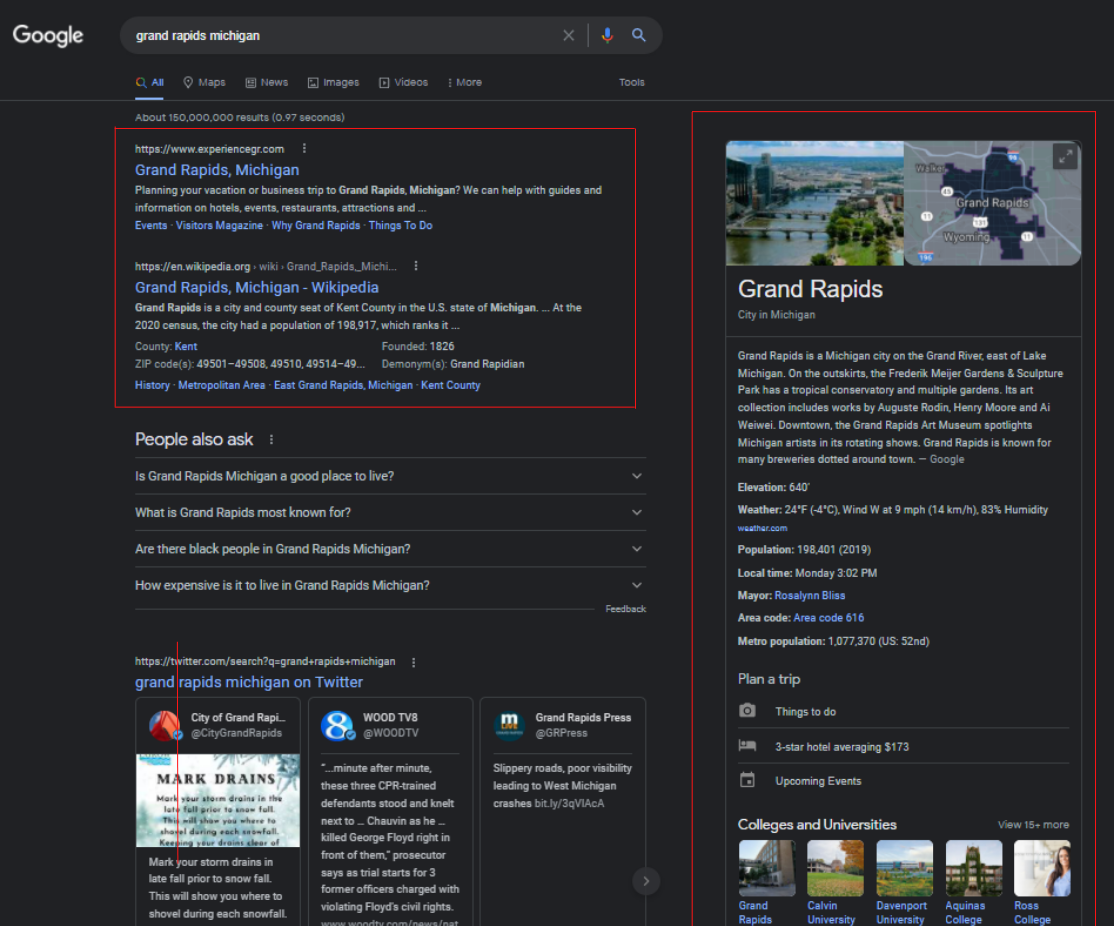
The box on the right column of this SERP is known as the Knowledge Graph. This feature was introduced by Google in 2012 that pulls data for commonly asked questions from various sources across the web to provide a concise answer to a question in on a central location on the SERP. Shown in this screen grab is a wide range of information about Grand Rapids Michigan such as elevation, weather, population, local time, the current mayor- many of the listed facts also have their own links to relevant pages.

Some SERPs will provide more organic results than others, such as the example above. This is because of the differing intent of various searches.

3 primary types of Internet searches:

Informational– Informational searches are those that the user hopes to find information on a given topic, such as Grand Rapids. It doesn’t make too much sense to place ads or other paid results on this type of internet search since this search query has very low commercial intent- the vast majority of searches are not looking to purchase something.

What is a serp

Organic Results on the SERP

Navigational– Navigational searches are those in which the user is looking to locate a specific website. Usually, this is for individuals searching for a specific website, trying to locate a website that they can no longer remember the URL or another type of navigational search.

Transactional – Transactional searches are those in which paid results are most likely to be displayed on the SERP. These searches have high commercial intent and search queries leading to transactional SERPs maybe including keywords like “buy” and other terms that suggest wanting to make a purchase.

Paid Results

In contrast to organic results, paid results are those that have been paid to be displayed by an advertiser. Before, paid results were typically limited to small, text-based ads that were displayed above and to the right of the organic results. Now, paid results take on a wide range of forms, and there are dozens of advertising formats that cater to advertisers.

what is a serp

Paid Results on the SERP

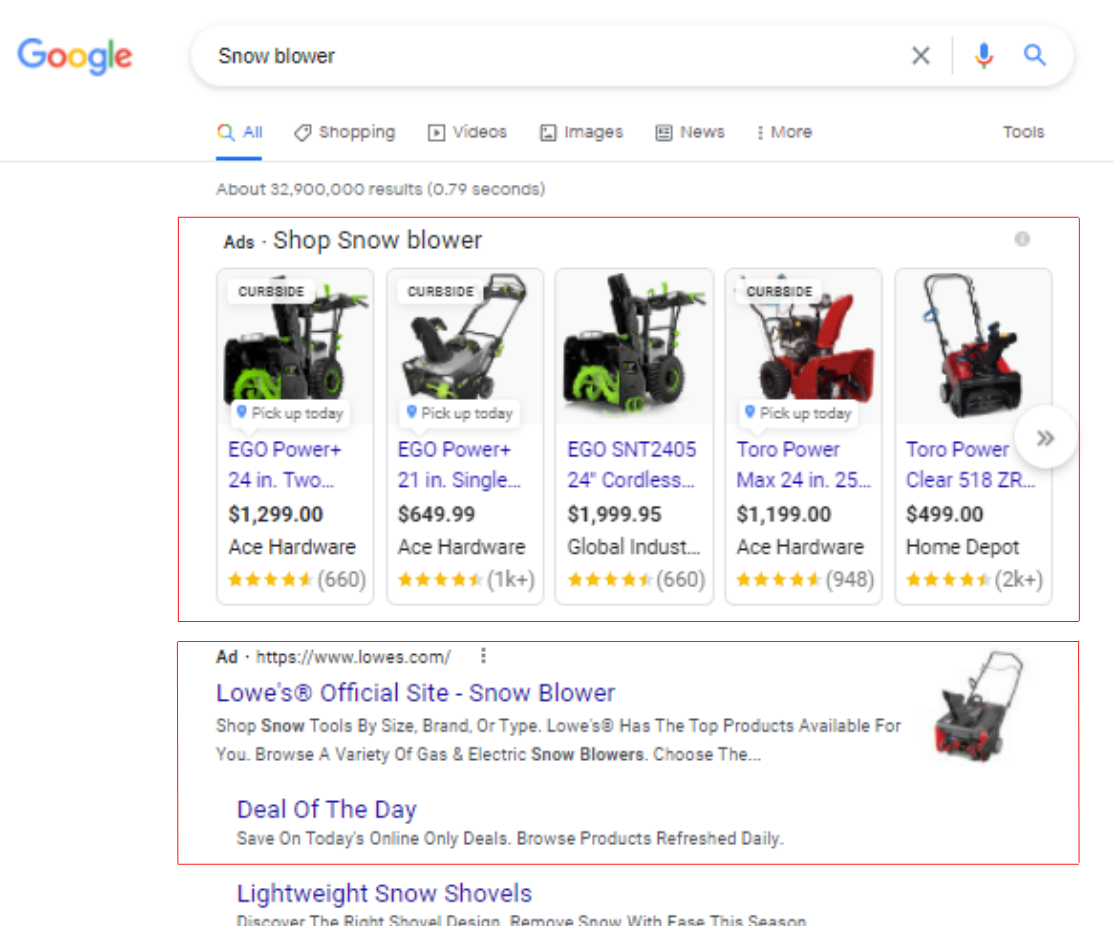
In the example to the left (a SERP feature for the search query “snowblower”), the image-based ads shown on the very top are Shopping Ads, a feature offered on the Google Ads platform that allows eCommerce retailers’ product information to be shown alongside other results. Shopping ads typically contain a wide range of information, such as product availability, reviews, promotions, and more.

The Lowes.com listing is a paid result. This section, which is beneath the Shopping Ads, is prime real estate for advertisers and is usually PPC ads. Typically, the PPC ads will incorporate ad extensions that allow prospective customers to navigate to specific pages on their website directly from the ad.

Generally, there will be a map and business listings shown on the SERP that are NOT paid results. The map is shown based on a user’s location, and feature listings for local businesses that have set up their free Google My Business Listing. Google My Business is a free directory of companies that helps smaller local businesses increase their visibility to searches based on location, particularly important for mobile searches.

Spectrum Net Designs Can Help!

Are you interested in moving your web pages to the first page of Google? What about sharing your opportunity with those who are actively searching for your product or service? We offer a multitude of marketing services to help attract more business for you. Everything from SEO optimization, Social Media Advertising, Paid Google Search & Display Ads, to logo design and development.

What is Local SEO and How Do I Dominate Local SEO

how to dominate local seo

What is Local SEO?

If you are looking to dominate local SEO and drive more local business to your website, follow these quick tips!

Local SEO is the process of optimizing a business, product, or service for search queries that are location-specific. Search engines use the user’s location based on IP address and geolocation to determine which search result to show the user based on their query. When someone performs a local search for a bakery, fast food, or car wash, the search engine will provide local business results based on their location.

A local search is combined with two main parts for local businesses:

  1. Organic Search Results- The website
  2. Local Pack- Google My Business (GMB)

The process of optimizing and dominating local SEO and search includes adding localized keywords throughout your website as well as optimizing the business’s Google My Business.

Difference Between SEO and Local SEO

Your traditional SEO is focused on high rankings on the results page for global or national searches. Local SEO focuses on improving your rankings related to specific location searches. There are many of the same SEO tactics used in local SEO, such as creating high-quality content and website optimization. But to dominate local SEO you will include additional methods such as obtaining your business on local listings such as Google My Business.

Benefits of Optimizing for Local SEO

With an increasing percentage of consumers searching online before converting into a customer- it should be a no brainer to make sure you are optimizing your website for local SEO. Local SEO allows you to not be a little fish in a big pond but rather submerges you in a more realistically sized pool. If you are a local business and rely heavily on your local consumers, the benefits of local SEO are undeniable. Some key benefits are:

  1. Improves Online Visibility
  2. Builds a Community
  3. More Relevant Traffic
  4. Local Return Customers
  5. Builds Trust and Authority
  6. Reduces Ad Costs
  7. Increases Sales
dominate local seo

Let's dive into Local SEO tips that help dominate local search

Tip 1: Update Your Google My Business Profile

The first step, well, requirement, to successfully start your local SEO process is to claim your listing on Google My Business. Here is what you need to do first:

  • Make sure your business name, address, and phone number are correct and correct on other local listings. Consistency amongst platforms allows the search engines to identify that your business is the same across websites.
  • Fill out all the details that Google My Business allows. The more the merrier here!
  • Link to your most popular web page plus your homepage.
  • Add pictures to your profile. People are very visual and will decide whether they want to engage with your business or not based on those images. Having no pictures provides little confidence for users.
  • Strategically think about what tags represent your business the best and apply them all.

Tip 2: Claim Local Listings

There are many places online to list your business you just have to find them! Here are some big players:

  • Your local Chamber of Commerce. If you belong to your local chamber of commerce, you are typically viewed as more trustworthy to your local customers. You are also presented with networking opportunities that can enhance your visibility.
  • Yelp for Business. Yelp is not just for restaurants anymore. Consumers love to search on Yelp as it provides easy access to all business information in one place- with pictures!
  • Citysearch allows consumers to search for specific industry businesses by city.
  • Yellowpages is not just a huge book with yellow-colored pages anymore. They went online to be known as YP- The Real Yellow Pages and they’ve added a reviews feature.

If you have multiple locations you must set up local listings for each. There are also industry-specific local listings such as Zillow for realtors and Angie’s List for contractors.

Tip 3: Acquire New Customer Reviews

Obtaining customer reviews is critical for many aspects of your business. The best way to get reviews is to ask happy customers to leave you a review on a specific website. You can provide incentives like receiving a discount the next time they come in if they leave a review as well. Customer reviews provide confidence for future customers of yours. Displaying these on your website and addressing both good and bad reviews on other platforms are great practices to help drive traffic. 

We wrote a whole blog on what Good Customer Reviews can do for your business, check it out for a quick read! 

Tip 4: Incorporate Local and Long-Tail Keywords throughout Your Website

Another big step for successful local SEO is to incorporate local and long-tail keywords throughout your site. Some ideas on how to do this are:

  • Name the title and description of your home page with attention-getting copy. This heading is what viewers will see in their search engine results page (SERP), so it is important to make it descriptive, keyword-rich, and concise.
  • Include town names and neighborhood names throughout your site pages.
  • Use long-tail keywords, which are longer phrases that describe your products or services in a way a searcher might search for them. “The best steakhouse to buy a Filet” or “The most comfortable running shoes”.
  • Incorporate Shema.org to include the “language of search engines” on your website. If this is not something you are capable of doing, you might need to ask your marketing team or hire someone.
dominate local seo

Check out our recent blog on Long Tail vs Short Tail Keywords.

Tip 5: Increase Your Backlinks

Backlinks are links from an outside website to yours. The number of high-quality sites that link to your website is a high-ranking factor for search algorithms. The more quality links to a particular page, the better your ranking within search results. There are several ways to increase your backlinks:

  • Get local news coverage within your industry
  • Do backlink swaps with other local businesses that may have a connection to your products or services.
  • Provide guest articles to other blogs related to your business.

The goal here is to get backlinks to your business, or links that are directed to your site, on popular online pages with high domain authority scores.

For more information on backlinks, check out the How to Obtain Quality Backlinks newsletter. 

Tip 6: Produce Quality Content

This step goes along with Google’s EAT philosophy, which stands for Expertise, Authoritativeness, and Trustworthiness. These are a set of website quality standards to be considered when evaluating websites. By creating content that follows these guidelines, you will compel users to spend more time on your site: the higher your numbers, the higher your ranking.

  • Write high-quality articles based on your business’s expertise to engage your readers.
  • Blog about local events that are related to your brand.

Check out our recent ebook on SEO Best Practices for more information! 

Local SEO is a powerful way to increase your brand awareness and ultimately, sales. You should incorporate it into your marketing strategy to capitalize on your target audience. If you are looking for help to dominate local SEO, reach out to the Spectrum Net Designs team!

Connect With Us

Facebook
Twitter
YouTube
Pinterest
LinkedIn
Instagram

Categories

Recent Posts

Archives

Good SEO vs Bad SEO

Good SEO Practices

Good SEO vs Bad SEO: How To Not Get Penalized

The world of SEO is constantly changing and keeping everyone on their toes. It is crucial to stay up to date with best the SEO practices- and avoid bad SEO mistakes- to help your business thrive online. Even avoiding the obvious pitfalls, there is still room for missteps that you would not even realize as bad practices. The answer to that is Google. Google is known to make several major updates to its algorithms every year while tweaking things here and there. Again, keeping us on our toes!

What Is Good SEO?

Good SEO practices are also called ‘white hat’, and these tactics comply with industry standards that follow the SEO rules. These practices are followed by those who care about long-term ranking strategies, which you should keep in mind can take up to six months to materialize but will generate more solid results down the road. This is great for building your business’s online presence and sticking to it for the long term

What Is Bad SEO?

Bad SEO on the other hand, is called ‘black hat’, and typically violates Google’s terms of service. These not so good tactics include hidden text, keyword stuffing, and spamming amongst other ‘black hat’ tactics. This practice is taking shortcuts to rank higher in search engine results but is met with stiff that significantly reduces a website’s rankings on Google and other search engines.

Let’s dive into some characteristics of Good SEO vs Bad SEO

Bad SEO Mistakes to Avoid

When talking about SEO, Google ultimately cares about one thing: that you are presenting quality content on topics in which you have demonstrated expertise.

Bad SEO

Poor Quality Citations

It is smart to cite your sources in your content but be careful who you are citing. Google considers linking to other pages as a vote of confidence and credibility. When linking a source, you are indirectly telling Google that you believe this content is valid and credible.

When researching for content, be on the lookout for:

  • Sites that have been flagged for misinformation or disinformation
  • Citations for YMYL content where the author or their credentials are not clear on the page.
  • Sites with Alexa Rank that is over 100k (indicates little to no traffic for that site).

Articles That Are Way Too Long​

Quality is key here! It is great to create the most complete, comprehensive content that you can but do not make it long to just be longer than your competitors. You should not write a word more than you have to.

Overly long content can have an equally detrimental effect just as much as thin content dealing with the user experience. Make sure to strive to make effective content, not endless.

Connect With Us

Facebook
Twitter
YouTube
Pinterest
LinkedIn
Instagram

Categories

Recent Posts

Archives

A Lack of Headings

If you are trying to land the spot for one of the featured snippet spots it is important to use headings, especially if you are writing a lit. The H2 and H3 headings help guide readers and keep them intrigued. Using them every 300 words or so gives your readers a break and keeps their eyes from wandering.

Your headings are taken in account with your SEO as well. This is a great avenue to use your keyword. Lastly, they provide structure for the page and give Google and your users an indication of what your page is about.

Duplicate Content

This is when content on your website is similar (or identical) to other content found within your site. It has always been a big no-no in the SEO world. You will not notice a penalty for duplicate content, but it does signal to Google that the content on the page is not unique. Therefore, it ends up being omitted from the search results altogether.

Keyword Abuse

When you go above and beyond to repeat your keywords over and over. Well, it is very noticeable to your readers and Google. There are other ways to go about keyword abuse other than keyword stuffing and those are:

Optimizing for too many keywords. You should solely focus on one keyword per page but a handful of secondary keywords. No more.

Using keywords incorrectly relative to the searcher’s intent. Google has been getting better at understanding what the users mean when they type that string of words into the search bar.

Good SEO Practices

Now that you understand bad SEO mistakes to avoid let us talk about the handful of perennial SEO best practices. Understand and apply these, and your content will look good to both Google and your audience!

Do Keyword Research

Take time to understand what your audience is searching for when looking for your product or service. It is crucial to get this right and not use too many keywords or too few keywords- it needs to be just right. Some tips for this are:

  • Use synonyms for your keywords in your content, answer questions, and group your content around topics rather than individual terms.
  • Look for the diamond in the rough, long-tail keywords your competitors haven’t discovered yet.
  • Do a quick search of your potential keywords in Google to see what comes up and whether your content is similar to others listed.

Optimize For Local Content

If you are a brick-and-mortar store or local business, optimizing for local is very important. To get this right, use geographical keywords throughout your site to help get you identified as a local business.

Create Content for Featured Snippets

Featured snippets are the helpful boxes that pop up at the very top of the search results page. It is very popular to have featured snippets for “how to” questions- which I’m sure you have seen a time or two.

It is a great way to get your content boosted to a much wider audience when creating content for featured snippets. Tips for this:

  • Use headings to highlight steps or points
  • Provide straight answers that are highlighted on your page
  • Avoid creating content that falls into one of these prohibited categories
Good SEO vs Bad SEO

Use Topic Clusters

SEO is heading in the direction of becoming less about the individual keywords or articles and more about your topic expertise. You need to demonstrate to Google, in your content, that you are an expert in specific topics.

Topic clusters involve the creation of something called ‘pillar content’. These are long, authoritative, credible pieces to which smaller and more specific articles can link back. These structures will help Google crawl through your site and get a sense of your expertise.

Update Your Old Content

Your old content is not a set-it-and-forget-it type of thing. Older content can become outdated, irrelevant, or factually untrue. When you let this happen, Google refers to it as “stale”.

You can tell when a piece of content has gone stale when its organic traffic associated with it has slowed down. This is an indicator that the information is no longer valuable to readers, or the searcher’s intent of the keywords with which it was originally optimized has changed.

It is a best practice to review your content at least once a year to check for stale pieces.

Good SEO vs Bad SEO

Put Your Users First

Last but certainly not least, when you are practicing good SEO, make sure that you are putting your users first. Good SEO tactics tend to create a better browsing experience for their readers. They also develop more useful content that will bring users to their site without any ‘tricks’.

If the strategy you are implementing does not help you do either of those two things from above, then side-eye it. Google’s guiding star is user experience, and that must be your priority too!

Wrapping Up Good SEO vs Bad SEO

SEO continues to evolve. What once was a good SEO practice can become a bad SEO mistake easily, as Google refines its expectations frequently for content creators. By producing great content with a consistently exceptional user experience, you will continue to help Google fulfill its mission to provide useful, relevant, and quality content while also ranking your website pages higher and higher!

Check out our Search Engine Optimization services we offer to see if we can help you rank higher on Google!

How To Find New SEO Keywords

How To Find New SEO Keywords

Keep your targeted keyword phrases up-to-date, relevant & generating traffic

Keyword research & finding new SEO keywords is a fundamental part of various search marketing strategies. Whether you are primarily running pay-per-click (PPC) or paid search campaigns, or your goal is to improve your organic search optimization results- you will be using keyword research.

Keyword research is the process of identifying and optimizing your site for specific words that people are typing into search engines. Since what people are searching for, and when they are searching directly relates to your product or service- keyword research is a crucial element of a successful search marketing campaign.

Now with all of that being said, I am sure you have been there when you run out of keyword ideas or are in a slump trying to find the perfect keyword that hasn’t been completely saturated yet. Well, we are here to help with the best SEO keyword tools to get you out of that keyword bubble!

Google’s Related Searches & Autocomplete

While this tactic is fairly well-known, it is also very underrated. When you enter a search query into the search engine, it will populate recommendations at the bottom of the SERP. These are topics that are directly related to your query and also what other people are searching for. Another suggestion is to type your keyword phrase into Google plus any letter of the alphabet. This will generate more ideas or topics to help pop that bubble! Of course, these keywords can also be fed back into the other keyword tools to help find more keyword possibilities. Do not forget to keep a list handy of all these potential keyword phrases.

Find New SEO Keywords

Google Search Console

Google stopped showing meaningful keyword data in Google Analytics a long time ago, but many do not know that the Search Console has a great deal of keyword data. The Search Console provides many filters you can use to sort by clicks, impressions, click-through-rate, and positions to also help with your keyword research. These results will tell you what keywords are bringing traffic to your site, even the ones you have not explicitly targeted.
What you can do here is try sorting by positions 10-30, for a start. This will show you the keywords you have not gone out of your way to target, but you are already ranking for. Thus, building your new SEO keyword list.

Google Trends

Google Trends is a very useful tool for industry-specific content. You can search by specific industries and narrow down the results for specific regions as well. It will provide you with a list of topics that people have been searching for over the past 24 hours. While this tactic takes a certain content producer to take these trends and capitalize on the keywords before anyone else has- it is a great way to shake things up and broaden out your interests to discover new relevant topics.

SEMrush- Keyword Gap Analysis

Another great tool to use to help find new SEO keywords is to use the Keyword Gap Analysis tool in SEMrush. This strategy allows you to input your URL plus one or more of your competitors to find terms you have common ground with or where one or more of your competitors rank and you do not. It gives you awesome insight into what keywords are doing well compared to your competitors and others that can use some improvement.

An alternative way to competitor keyword research is to visit your competitor’s website to look for terms where they rank reasonably well and where you do not, or even if you both rank well on the same term, this can definitely help you build out a targeted keyword list.

How to find new seo keywords

SEMrush- Domain Overview

Lastly, using the Domain Overview in SEMrush will provide all the terms your site is currently organically ranking for. It lists the top organic words for that specific URL including your position, volume, CPC, and Traffic %. This tool will give you great insight into what searched keywords are driving traffic to that page.

On the other hand, this tool is also great for top-level insight into your competitor’s domain in no time at all. With this info, you can quickly assess your competitor’s strengths and weaknesses- while also providing you with insight on areas you have not thought about.

Your keyword research should influence your website navigation, URL naming, and content for each page. Keywords determine what your company is known for and are essentially the blueprint for your online marketing efforts, driving every decision you make.

If you find yourself struggling to find new SEO keywords that are relevant & your rankings are suffering from it- give us a call for a quick consultation or contact us to see if we can help your strategy!

Or Check Out Our SEO Marketing Services to Learn More

Connect With Us

Facebook
Twitter
YouTube
Pinterest
LinkedIn
Instagram

Categories

Recent Posts

Archives

How Google Search Indexes Your Website

How Google Search Indexes Your Website

Understand the benefits of Google Search Index

Google is where millions across the globe turn first for their questions, big or small. If they are lucky, they typically find them within the first few results shown. That is why websites that are on the top of Google’s search engine results pages (SERP) grab around 40% of the traffic missed by lower-ranked websites.

According to Statista, in February 2021, the online search engine, Bing, accounted for 6.7% of the global search market, while the market leader, Google, had a market share of 86.6%, and the Chinese search engine, Baidu’s, market share was 0.54%.

These numbers show that throughout the world, 9 out of 10 people go to Google when conducting any type of search on the internet. This means that you should indeed be aiming your SEO strategy towards hitting that first page of Google Rankings! A way to start this process is to make sure your website pages are submitted through the Google Search Index. 

If your website is not in the database of the Google Search Index,  then you are pretty much invisible to the online world and more importantly, your target audience. You will not show up for any search queries and you will not receive any organic traffic whatsoever.

Given that you are reading this blog, we are assuming this is not news to you. So, let us break it down and learn how Google indexes your website.

First, What is Crawling and Indexing for Google?

Google continuously discovers new web pages by crawling the web, and they add those pages to their index. And all of this is done by using a web spider or Googlebot.

Crawling: This is the process of following hyperlinks on the web to discover new content and web pages.

Indexing: Once a bot or spider has crawled the web page it will then store that page in a very vast database.

Web Spider: A piece of software designed to carry out the crawling process.

Googlebot: Google’s web spider.

When anyone Googles something, they are looking for Google to then return all relevant pages from their index. Because there are millions and millions of pages that fit their search query, Google’s ranking algorithm does its best to sort the pages so that you will be presented with the best and most relevant web pages first.

There are several quick ways to check whether Google has indexed your website, or whether they are still stuck in the preceding phases of discovery and crawling. Use the Google Search Console’s Index Coverage Report to get a quick overview of your website’s indexing status. This detailed report provides feedback on the more technical details of your site’s crawling and indexing process.

Now that you understand how Google Search Index works with crawling, indexing, and spiders, we must talk about your sitemap.

How a Sitemap helps Google Search Index your Website

A site map is a list of all the pages (URLs) on a website. The file is used by search engines as an overview of all available content as well as a way to better understand the structure of the website.

Having a sitemap submitted that is constructed with a clear goal in mind could be the driving factor to a website’s success. It will provide a vital link between a website and a search engine that nurtures the relationship that is vital to the website’s success. A well-structured sitemap will make a website searchable by all search engines and provide your users with more accurate search results when they are looking for keywords that are related to your website. The site crawlers used by the search engines depend on sitemaps to help point them in the direction of the correct website that the user is searching for.

Google Search Index

“A well-structured sitemap will make a website searchable by all search engines and provides your users with more accurate search results when they are looking for keywords that are related to your website.”

Benefits of Submitting a Sitemap

There are many benefits of using a sitemap. Not only does it make it easier to navigate, but it gives it better visibility to search engine crawlers. Sitemaps can offer the opportunity to link search engines with any changes made to the site immediately after they happen. Additionally, when there is a sitemap link to a website, and it is submitted to search engines, you will not have to rely on external links as much when search engines are bringing visitors to your website.

To learn more about sitemaps, read our blog- What is an XML Sitemap and Why Should You Have One?

As a Website Design Company, Spectrum Net Designs, understands that a SEO Strategy can be a full-time job! If you are looking for more insight about SEO Marketing, we would love to see how we can help! Contact Us today and one of our marketing professionals will assist you.

Connect With Us

Facebook
Twitter
YouTube
Pinterest
LinkedIn
Instagram

Categories

Recent Posts

Archives

Long Tail vs Short Tail Keywords

long tail vs short tail keywords

Long Tail vs Short Tail Keywords

If you have spent any time in the SEO world, you have heard both of these terms before. We’re talking long tail vs short tail keywords for your on-page SEO. Many different components build a successful SEO strategy, but we believe it starts with your keyword research. Your chosen keywords represent your brand, company, product offerings, etc., and fuel your SEO.

Let’s dive into the difference between long tail and short tail keywords.

Short Tail Keywords

A short tail keyword is a phrase that contains up to 3 words that describe your company or what you offer. An example of this is “marketing company” or “auction software”. These terms are also called “head terms”- they may be the first thoughts that come to your head when thinking about what you’re looking for or focus keywords. The short tail keywords will be shorter and broader. This inherently makes them popular, high-volume search terms. But for most websites, however, short tail keywords are simply not enough to stand against the top companies of the world, which monopolize the top-ranking SERP spots.

Long Tail Keywords

The long tail keywords are different compared to the short tail. Being longer than 3 words, they are more targeted and less broad. If you use long tail keywords, you will notice a lower search traffic, but the traffic you do get will be of better quality.

Examples of long tail keywords are “website design marketing company” or “real estate auction house in Texas”. Obviously, long tail keywords are more specific and less broad compared to short tail keywords.

long tail keywords

We all understand that digital marketing trends are forever evolving, and this stands true with “long tail” keywords skyrocketing in popularity. We mentioned that long tail keywords are more specific, producing a more targeted search, meaning you will get a more targeted audience when you rank for them. Also, long tail keywords are easier to rank for since they’re not as competitive as short tail keywords or “head terms”.

While long tail keywords are more targeted, they tend to deliver less traffic overall and can be difficult to come up with if you are new to keyword research. In contrast, short tail keywords are broader terms- typically the first thing a searcher thinks of when looking for your product or service and have higher traffic but more competition.

Depending on your objectives, if you are searching for a lot of traffic, then short tail keywords give you the broad reach you will need. However, you should keep in mind that they come with more competition and risk of “generic” traffic.

Are long tail keywords better?

When taking volume, competition, focus, cost, and conversion rate into account, then yes, long tail keywords are the way to go. But of course, you want to save money, and you want to have as large a web presence as you possibly can. At the same time, you should keep in mind that the point of having a web presence isn’t to get people to click to your site and bounce off, but rather to convert them into paying customers.

In today’s world of online searches, short tail keywords are very difficult to tap into the rankings of. And as we mentioned earlier, it’s almost impossible for small or even medium-sized businesses to rank amongst the top dog companies.

A smart strategy for higher conversion, lower cost, lower competition, and volume that is focused on specifically what you are selling, the long tail keyword game is one that you should be spending time in!

Are you overwhelmed with your current keyword research strategy? We can help you!
Contact us today or click here to see what SEO services we offer! Our marketing team is ready to help!

Need help with your SEO Strategy? Contact Us Today! 

Connect With Us

Facebook
Twitter
YouTube
Pinterest
LinkedIn
Instagram

Categories

Recent Posts

Archives

What are Conversion Rates and What Do They Mean?

How You Can Properly Use Conversion Rates In Marketing

In the world of marketing, many professionals throw around loads of technical terms that might not mean a whole lot to the rest of the world. Click-through rate, impressions, organic distribution, conversion rates, and more…Maybe we will have time another day to write down some information for you on the rest of those terms, but for today, let’s focus on conversion rates, what are conversion rates? How do they affect your sales? What makes a high conversion rate good? Where do they connect to your marketing?

These might be a few questions that you are asking as you assess your business’s marketing efforts as well as try to find ways to improve your “conversion rates”. Conversion rates can be broken down into various types of conversion rates including page-level conversion rate, campaign conversion rate, keyword conversion rate, and more. But on a very general overall side of it, the conversion rate is the percentage of visitors that take a specific action (that you choose). For example, if your goal is that your visitors fill out a contact form to receive more information, then, the percentage of visitors to your website that fill out your contact form is your contact form conversion rate. You can have unlimited amounts of conversion rates, all based on the goals that you have set for your website! Any action that a visitor can take on your site, can be converted into a conversion rate. Examples include, clicking on a certain button, filling out a contact form, reaching a certain website page, and engaging with an interactive portion of your site, the possibilities are truly endless. Likely, you will not want to track ALL of your conversion rates, because that would just be too much data to keep track of. As a business, you will want to set specific goals as far as conversions go. Determine what conversions you want to track, and which ones you would like to see increase (most likely all of them!). Start by tracking and calculating the few conversion rates that you want to see increase.

conversion rate

How Do You Calculate Conversion Rate?

Calculating your conversion rate is fairly simple, you will have to establish the time frame that you are calculating, this could be anywhere from a few days up to a few years or more. We suggest calculating your conversion rate at least for 2 weeks to ensure that you are getting a wide variety of data. You will take the number of conversions from your time frame and divide that number by the total number of website visitors that you had for that time frame. Once you have that number, you will multiply it by 100%. This will be your new conversion rate for said action on your website. Yay! You just calculated your very first conversion rate! Now you can go ahead and calculate all of the various conversions that you’ve been tracking, and then start figuring out how you can increase each conversion rate!

How Are Conversion Rate, Marketing, & Sales Related?

Now you know what a conversion rate is, you know how to calculate it, and you know what conversion rates you want to track for your specific company and goals. But how does your conversion rate relate to your marketing efforts, that relate to your sales? Although bringing it to completion might be more challenging, the idea is quite simple really…better marketing = higher conversions = more sales. When you go through and begin to start tracking some of your conversions, you can start implementing different, better marketing tactics. This will likely take some time, and trial and error to find what works for your audience, what they respond to, and what encourages them in the best way to take that specific action that you want them to. This in turn will tend to lead to more sales, more connections, and more opportunities to reach out and connect with your audience.
Higher conversion rates are often a sign of a successful business, but what is normal? According to research done by our friends over at Wordstream, When considering landing pages, the goal is to achieve a conversion rate of 11.45% or higher. This would put your landing page in the top 10%

How To Increase Your Conversion Rate Today!

If you’re wondering how to increase conversion rate on your e-commerce website, social media campaign, or newsletter sign-up you’re not alone. So many businesses wonder where to first begin! You can go about increasing your conversion rate in many different ways. Try to set specific goals as far as raising your rates according to where you are currently, setting realistic goals as well as brainstorming various ways to get there is a good place to start. Some of the ways that you can increase your conversion rates are through paid advertising such as Google Ads, Facebook ads, or other various paid social media advertising. Another way that you can work on increasing your conversion rate is through organic marketing such as Search Engine Optimization. When your site is optimized for Google properly, more visitors will find your site as well as take action on your pages.

how to increase conversion rate

We hope that this little bit of information is helpful for you to understand conversion rates and what they tell you about your website. If you have questions regarding conversion rates or what marketing approaches you can take in order to increase yours, please contact us today! Our team of marketing professionals is happy to help you!

Need help starting up your social media marketing?

Digital Marketing Made Simple

Digital Marketing Made Simple

Your Guide To Types of Digital Marketing Today

Digital marketing is so much more than “marketing digitally” because what does that even mean anyway? Most marketing professionals don’t even truly understand how wide and deep digital marketing is because it encompasses so much more than what we can imagine! So, what IS digital marketing? How can one explain something that is so much more than advertising and search engine optimization? There is a lot to cover, but it isn’t as hard to navigate as you might think. In this article, we’ll show you the types of digital marketing and how to make online marketing simple. 

What Is Digital Marketing Made Of

Digital Marketing can be broken into two main groups, one being ONLINE marketing, and the other being OFFLINE marketing. But how can you market digitally if you’re offline is a question that you might be asking, but here is where we need to go back to the basics of what digital marketing is. The word digital does not exclusively mean online or with the internet. Over the past few years, many people have gotten so used to life with the internet, that we have forgotten what the word “digital” actually means. Digital as defined by the Merriam-Webster Dictionary is “electronic” or “characterized by electronic and especially computerized technology” This is what “digital” truly means! Digital goes back to when radios and televisions were invented, it goes back to the first computers BEFORE the internet existed. “digital marketing” goes back so much further than just “online” marketing. Digital marketing goes back to the first transmitted radio ad, or tv feature. 

Then once we began utilizing the amazing thing called the Internet, digital marketing began to grow and grow quickly. All of a sudden search engines were born, ads began to gain popularity, and social media followed not too long after. The amount of people who use the internet daily is continually growing. According to Statista, there are currently 2.41 billion Facebook users as of the second quarter of 2019. This statistic easily proves where digital marketing has drastically shifted over the last 5 years. So let’s dive into both online and offline digital marketing so that we have a better understanding of what digital marketing is.

Offline Digital Marketing

Let’s start with offline digital marketing. Offline digital marketing as we stated previously includes any sort of marketing that includes a piece of electronic, but not the internet. This includes all radio and TV ads, electronic ordering machines at restaurants, telemarketing, electronic billboards, and other various non internet driven ideas. Offline digital marketing is often thought of as irrelevant in today’s day and age, but that is far from true. Although efforts and effectiveness have lessened, it does not mean that they have stopped being productive. Not to mention that new ideas and ways to digitally market offline are still being developed. Only within the last few years have electronic ordering machines become popular, and they are widely used throughout restaurants everywhere! This just goes to show that offline digital marketing is still changing and being developed!

digital marketing made simple

Online Digital Marketing

Although offline digital marketing still exists and even is successful in many aspects, online digital marketing has been the one to steal the spotlight over the past 3-5 years. Online digital marketing has opened up hundreds of doors over the years. Encompassing everything from blogs, to search engine optimization, to email marketing, to paid advertising, to social media marketing, to paid social media advertising and so. much. more. Online marketing has of course gained popularity based on the direct correlation to users online. Businesses are smart to focus more time, energy, and money on online marketing, that is where most of the world is! Online digital marketing efforts if done well can take any business to the next level. Things such as search engine optimization can increase a business’s traffic exponentially increasing visibility, as well as likely reaping a higher conversion rate. Paid advertising has developed over the years into an incredible tool that people can use to target and retarget specific audiences such as people who have already been on their website or even someone who has already purchased an item from them! If you have questions about what online marketing services we offer, please refer to our marketing tab at the top of our website!

Simply Put

Simply put and defined by industry influence and leader, Hubspot, “Digital marketing encompasses all marketing efforts that use an electronic device or the internet. Businesses leverage digital channels such as search engines, social media, email, and other websites to connect with current and prospective customers.”  The idea and concept of digital marketing is quite simple. It’s bringing it to completion that is challenging. Within the two ideas of online and offline digital marketing, there are many various avenues that you can take that all fall within those categories. There isn’t a way to nail down digital marketing and the types of digital marketing more specifically because it’s continually changing, and although it covers a wide range of ideas, it is quite simple. Feel free to contact us if you have any other questions about online marketing!

Need help starting up your social media marketing?

We Like Big Data – How Your Website, Big Data, & SEO Work Together

big data

Do A Site Analysis & Find Your Big Data

Google Stats, Analytics, and Search Console Oh My...

We like big data and we cannot lie. Big data has become an invaluable resource to search engine marketers in the industry today. Big data by definition in the dictionary is, “extremely large data sets that may be analyzed computationally to reveal patterns, trends, and associations, especially relating to human behavior and interactions.” Big data did not make its large entrance into the marketing world until about 2 or 3 years ago, changing search engine optimization forever! Big data and SEO now go hand in hand!

Website Content Is More Than You Think

Many people think of websites as solely content, which is true, but over the past 2-3 years, Google has adjusted the way they look at web content, rather than looking at it as a large entity of information, Google now takes the information from your website and breaks it our into little sections of data. With these pieces of data, it becomes easier to create those large data sets that we can in turn analyze to better business search engine optimization. So, our website content turns into data, but how do those jumbled numbers and information pieces benefit marketing efforts? Big data, as stated above, reveals patterns, trends, and more valuable information about human behavior and interactions, captured from the web. This is one of the most valuable tools when it comes to your marketing strategy – why you might ask?

data

The ability to analyze a set of extremely specific stats and accurately predict what your users want to know, what questions they will ask, as well as what time they will search for those answers is a priceless skill when it comes to getting your business across to the right person at the right time. With data, you can answer those questions from actions that users have taken on your website. Great, but how does that affect SEO? SEO for most businesses, is all about conversions. There are many types of conversions and depending on your business goals, there could be several that you want to track. Businesses want the right people to see their products at the right time, buying time. Conversion is everything to a business, it’s how they make a profit as well as stay in business long term! Utilizing big data makes it easier to predict who, what, when, and where your website needs to be, say, advertise, and when to do all of the above!

Google is the largest supplier of big data for companies today, with many free tools that businesses can utilize to help make their websites better, more relevant, and have a better user experience. Specifically, Google Analytics and Search Console are two tools that work seamlessly together providing both historical information as well as current, making it simpler to predict trends moving forward.

Google Analytics

Google Analytics is a great tool to help you gain insight into your website and a necessary tool to help you get a hold of some important big data that can help your search engine optimization efforts greatly. Analytics, once set up properly offers you valuable insight into your website, website visitors, where your visitors came from, and where they are going. This Google tool can also keep specific track of eCommerce insights as well as conversions, and behavior paths of website visitors. If you are not utilizing Google Analytics on your website, today is the day to get it set up and start analyzing the data, STAT. You can find a detailed step by step instructional on how to get analytics up and running here.

Google Search Console

Google Search Console (formerly Webmaster Tools) is another great resource that can exponentially give you great input into your website and what improvements need to be made. While this is a free resource you will have to go through the installation process for your website here. The search console provides great information in regard to backlinks, user search queries, landing pages, mobile usability, and more! These insights will help you improve your user experience, keyword focuses, and backlinks if analyzed and looked at properly. If you need help getting search console set up and running for your website, take a look at the following guide here.

social media marketing grand rapids

Social Media, Big Data, and SEO

Don’t forget the importance of social media when it comes to big data and your SEO! Over the last few years, Google has observed, tracked, and tested the enormous impact that search engine optimization and social media can have on business and website traffic. We see today how much of an impact social media plays on business ranks in search engines. Don’t be satisfied with only the information of sessions, engagements, and page views to see how well you are performing, but rather you should analyze all information and data trends throughout all of your big data to make the most specific plan for your company. In turn, you will see positive numbers and trends in various metrics, not just sessions, engagements, and page views as a result of intentional and proper digital marketing. This will allow you to tailor your marketing strategy all the more for your customers encouraging more conversions and helping you get your content to the top of the search engines!

Although big data makes it easier and more accessible to access the stats that truly can change your search engine marketing game, not all marketing professionals have the skill and ability to read those stats in a way that benefits their business – and if we are honest, all marketing professionals have constant room for growth.

We here at Spectrum Net Designs love big data and SEO and are committed to continual learning and pushing ourselves to be better and understand more about each of our clients and who they are. We regularly use Google Analytics, Search Console (formerly Webmaster Tools), and other informative statistics to do our best to predict what next month will bring for our clients. If you need more information on our Search Engine Optimization services or have questions about how big data can help your business; contact us today!

If you need more information on our Search Engine Optimization services or have questions about how big data can help your business

Smart Writing or Writing Smart – How To Overcome Exaggerated Posts

Smart Writing Or Writing Smart?

Smart Writing or Writing Smart - How To Overcome Exaggerated Posts

Blogging is more popular than ever, freelance bloggers, hobby bloggers, company bloggers, and more all make up the intense blogging community. Various stats have proven blogs’ success and positive impacts on companies, including increased visibility. It is recommended that every company puts out 3-4 blog posts per WEEK to have maximum efficiency for traffic & leads. Here are some more blogging statistics for you from our friends over at Codeless.

  • Companies that publish 16+ blogs per month get nearly 3.5x more traffic than those that publish 0-4 month
  • Marketers who prioritize blogging efforts are 13x more likely to see positive ROI
  • Longer in-depth blogs generate 9x more leads than short ones
  • 60% of consumers feel engaged/positive with a brand or company after reading custom content on their blog

But, we can obviously gather from these few statistics the importance of blogging & the positive effect it can have on your business. But how many times have you clicked into a blog trying to learn something or get some information, only to read a few sentences into the article and have no clue what just happened…okay, maybe that truly hasn’t ever happened to you…But I’ll tell you from personal experience…IT HAPPENS!! As a fellow blogger, it can be easy to be carried away by your true passion for the subject and desire to bestow your knowledge onto anyone who will possibly stumble upon your writings, but we are here to tell you that isn’t always the best approach to have when writing your blogs and resources for your audience. So, how do you overcome overly technical & exaggerated posts?

#1 Write Like You’re Talking to a Novice…

Chances are, you will be! Writing to a novice of your shared interest will help you get back on track & only talk about the things that are important to know while starting. Try to remember back when your interest was sparked in this specific topic & make sure you are providing the information that a novice would want to know, not only that but in a way that a novice will understand, ditch the long words & explain theories…stick to the basics that make up the topic – remember you can always do a more in-depth blog as needed or as requested. Going beyond that, as you get into topics that a more intermediate-level person might be interested in, it’s still smart to write in a way that conveys your knowledge without stumping your readers. This is not a skill that will most likely come easily; it will have to be practiced & put into effect over time.

Smart writing

#2 Break Down Topics Into Series...

Breaking topics down into various parts is a great way to get more content out of one topic – especially if the topic is generally just more lengthy in the way it needs to be explained & understood. After all, you cannot stick to writing novice-level blogs forever, so when you do get the chance to write about a more intermediate-type topic & you need to go more in-depth, do your best to break it up into multiple blogs & postings. This will help keep your blog easier to comprehend without overwhelming your readers, as well as give them something to look forward to reading as you write & publish your next post. A great way to go about this is while finishing one blog, promoting your next one with a release date, as well as a tagline to help your readers want to come back to catch the next bit of information you will release!

smart writing

#3 Go In-depth Without Going Overboard or Losing Your Readers…

This is a hard rule for anyone who is interested in a specific topic – especially a topic that might just be generally harder to understand. Our advice for this is to go into detail and go in-depth, all the while being cautious of how you are doing so. A great way to expand on a subject is by using simple analogies, imagery, & other resources to help your readers get the most out of what information you are providing them.
It’s important to put content out that sparks your reader’s interest & keeps it! These tips are just a few guidelines to help you work on overcoming lengthy, wordy, & over the top posts that have the tendency to lose your readers’ interest and focus on smart writing to get the traffic and visibility you deserve.

If You Need Help With Blog Management or Blog Topic Generation

Contact us today to learn more about our BLOG MANAGEMENT and CONTENT WRITING services!

Share this post

Why Choose WordPress For Your New Website

10 REASONS TO CHOOSE WORDPRESS FOR YOUR NEW WEBSITE

So you’ve decided you need a new website, your old one is on its way out…or possibly already been out for months now, it doesn’t have the functionality you want & your current site just isn’t keeping up with your competitors…but where to begin? Most people generally do not get excited about the time, expense & research that goes into a website redesign. So, where do you begin? Generally, the first and foremost order of business is deciding with what platform are going to use for your new website, with so many “easy to use” website builders, such as WordPress, Wix, Gator, BigCommerce, Shopify, Webbly, Squarespace & more, we have laid out 10 reasons why we believe WordPress is the platform you should use for your new website, or website redesign.
Many people think of WordPress as a blogging platform only, this is how WordPress started out and got its reputation, but really, WordPress has drastically evolved throughout many years to be so much more than just a blogging platform, now you can host websites, build custom themes, and upload personal plugins to make sure your website is the best that it can be for your users. We decided it would be helpful for you to see why we support WordPress and why we suggest it for your new website, so here are 10 reasons why you should choose the WordPress platform for your new site…

content marketing ideas

1. Many people who are using WordPress for their website are not necessarily web developers or website designers. WordPress is a great option for these people, they have various already built “themes” and “plugins” that will help you build a professional website without needing prior web development or design knowledge. There are easy-to-use options for all of our non “tech savvy” folk out there.

2. WordPress is completely versatile. You can create anything from a blog to an e-commerce site, a product-based site, a membership website, and pretty much anything else you can think of. It’s customizable for your desires and wishes

3. WordPress is SEO friendly – SEO is an important part of marketing today. Making sure that your website is being found & indexed by search engines is important, and according to Google, WordPress is 99% SEO friendly. So, if you are looking to bring your SEO to the next level, WordPress is a great tool to use for your website.

4. WordPress is a FREE & Open Source- there’s got to be a catch, right? Well, in the spirit of all things out in the open, you will need to buy your domain and pay for hosting and various other costs, but the actual software, WordPress, is free.

5. Themes & Plugins give you complete customizable options – if you can dream it, you can bring it to completion. Not only does WordPress provide you with various pre-built themes & plugins, but you also have options to build your customized theme & plugins for whatever you could think of. To read about 24 WordPress plugins for your business website, check out this article: https://www.wpbeginner.com/showcase/24-must-have-wordpress-plugins-for-business-websites/

6. Safe & Secure – WordPress is supreme in the level of security measures that they take for their customers. They have staff that is updating CMS consistently, along with all the plugins that go hand in hand. Of course, to protect yourself, it’s best to only download plugins from WordPress itself or trusted sources. Read more about WordPress security here.


7. Mobile Friendly – This is a HUGE advantage today. In a world where most people have cell phones & surf the web constantly, your mobile online presence is crucial! You have to make sure that your website is not only available to your mobile users but also that they have a good mobile experience, that they can see the important pieces & parts, that images aren’t cut off or covering important text & so on & so forth. Being mobile-friendly is more important than ever. Read about it here: https://www.augustash.com/our-blog/mobile-friendly-websites-2019

8. Easy Social Media Integration – WordPress offers a simple way for your users & website visitors to interact with & be a part of your social media. This is especially great if you have a previously established online presence or a previously established social media presence. Feeding one off the other is a great way to build your company & business.

9. Scheduling makes blogging easy – not everyone has time to sit down 3 times a week to bust out a blog…we get it. So sit down for one day, bust out 3 blogs & schedule them for 3 different days! WordPress makes it easy to do that. You can schedule posts as far out in advance as you want to make sure you don’t fall behind in keeping your readers updated. Take a look at how to create the perfect blog schedule for your company here.

10. One of the BEST parts about WordPress is that it just keeps improving. With the community of users that are currently a part of WordPress, the site just keeps improving. It’s a great platform that only keeps getting better.

So you know why WordPress is great, but still don’t have the time, energy, or resources to make it happen? Spectrum Net Designs offers great custom WordPress development for your website. Contact us today to learn how you can update your website to make sure you are keeping up with your competitors.

Still Don't Want To Face A New Website - Much Less WordPress Alone? We Understand...

we also handle hosting & domain registration

Like this article?

Share on Facebook
Share on Twitter
Share on Linkdin
Share on Pinterest